Want to watch someone’s Instagram Story without your name showing up in their “Seen by” list?
You’re in the right place.
Today I’m going to show you exactly how to view Instagram Stories anonymously in 2026.
In fact, I recently tried the most popular anonymous story viewers side by side.
Some worked great.
The good news? Not one of them asked for my Instagram password.
The surprise? One “free” viewer wanted me to create an account before it would show me a full profile.
I’ll also show you which old tricks Instagram has quietly shut down, so you don’t waste time on them.
Let’s get started.
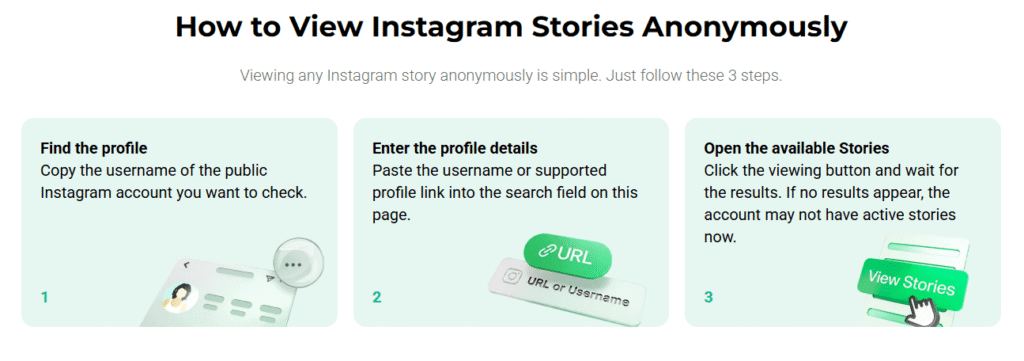
How to View Instagram Stories Anonymously (3 Steps)
Here’s the fastest way to do it:
- Open an anonymous Instagram story viewer, like Inflact
- Type in the public account’s username
- Tap a Story to watch it, or download it
That’s it.
The account owner won’t see your name in their viewer list. And you don’t need an Instagram account to do it.
Why does this work?
When you watch a Story in the Instagram app, your account asks Instagram for it. So Instagram logs you as a viewer.
A story viewer asks for the Story from its own servers instead. Your account never touches it.
No account, no log.
One big catch: this only works on public accounts. Private accounts and Close Friends Stories stay locked. (More on that later.)
The 8 Best Anonymous Instagram Story Viewers (Tested)
Here’s the thing about story viewers:
There are hundreds of them. And most look identical.
But under the hood? Huge differences.
Some load Stories in two seconds. Some hide the real download button behind three fake ones. And some broke months ago and never got fixed.
So I tried each one on the same public accounts, on my phone and on desktop.
Here’s how the 8 worth using stack up:
| Viewer | Price | Downloads | Also Shows | Best for |
|---|---|---|---|---|
| Inflact | Free (7 views/day); $7.80/mo Premium | Yes | Full profile viewer, highlights, posts, Reels, tracking | Weekly research |
| DolphinRadar | Free with sign-up; tracking $6.99/mo per profile | Yes | Highlights | Free, frequent checks |
| StoryNavigation | Free | Yes | Posts, likes, comments | A 10-second peek |
| StoriesIG | Free | Yes | — | One story, nothing else |
| InstaNavigation | Free | Yes | — | Backup when others break |
| MollyGram | Free | Yes | Highlights, Reels, posts, profile photos | Whole-profile browsing |
| AnonyIG | Free | Yes | Reels, posts, Highlights | Reels |
| Imginn | Free | Yes | Posts, Reels | Older content |
Now let’s look at each one.
1. Inflact
Inflact puts everything about a public account in one place.
Most story viewers stop at Stories. So when you want their Highlights or latest Reel too, you end up hopping between sites and pasting the same username again and again.
Inflact skips all that. Type a public username once, and Stories, Highlights, posts and Reels each get their own tab in the same interface. You switch between them without leaving the page, and without logging into Instagram.
Want the whole profile at a glance? Inflact’s Profile Viewer shows a public account’s posts, Reels, Stories and Highlights in a single view.
Here’s how to use it:
- Go to Inflact’s Instagram Story Viewer
- Type in a public Instagram username
- Watch their Stories
- Click over to Highlights, posts or Reels, and save what you need
| 👍What I liked | 👎What I didn’t like |
|---|---|
| No Instagram login, and your name stays hidden | Public accounts only. Private ones stay private |
| Stories, Highlights, posts and Reels in separate sections | Overkill if you want one quick look |
| One tab for competitor and creator research | Takes a minute to find your way around the first time |
Stories disappear after 24 hours. If you miss a competitor’s launch Story on Tuesday, it’s gone by Wednesday.
With Premium, Inflact saves Stories from the accounts you track automatically. So you never miss one.
Pro Tip: Start on the free plan for a week. If you hit the 7-view limit by Wednesday, you’re a Premium user. If you don’t, stick with a free viewer from this list.
Bottom line: For a ten-second peek, any tool here will do. If you check accounts every week, start with Inflact.
2. DolphinRadar
If Inflact is the research tool, DolphinRadar is the best free one.
You don’t need an Instagram login. But here’s something most reviews leave out: when I tried it, DolphinRadar asked me to sign up for a free DolphinRadar account before it would show the full profile.
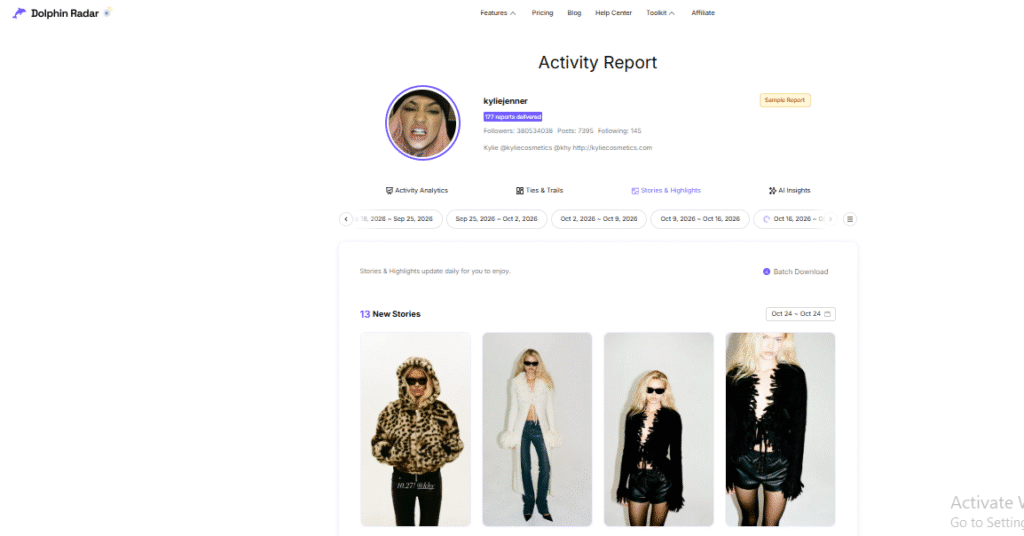
It’s a quick sign-up, and once you’re in, the free viewer is genuinely useful. Stories and Highlights load with a download button on each one, and it works the same in a phone browser as on a laptop.
The paid part only matters if you want DolphinRadar to watch an account for you. Automatic tracking costs $6.99 a month per profile, which adds up if you follow five competitors.
Best for: free checks a few times a week.
3. StoryNavigation
StoryNavigation is built for speed.
For creators and marketers, anonymous viewing can also be useful for studying what competitors post and which content gets the most attention. Once you know what resonates with an audience, you can buy shares on Instagram to give strong posts additional exposure, increase their reach and help more people discover the content.
No account, no setup, no tabs to explore. You enter a username and the Stories are right there, ready to watch or download. It works on iPhone, Android and desktop.

But it has one feature most free viewers skip: on posts, you can see who liked and commented.
Why does that matter?
Say you’re about to pitch an influencer. A quick look at who actually engages with their posts tells you more than their follower count ever will.
The trade-off is depth. There’s no tracking, no auto-save and no Reels focus.
Best for: a fast look, with a bonus peek at engagement.
4. StoriesIG
Sometimes you don’t want a dashboard.
You want one Story. Right now.
That’s where StoriesIG shines. The page is about as simple as a viewer gets: a search box, the Stories, and a download button. Nothing to learn, nothing to click past.

That simplicity is also why it’s one of the most popular viewers around. It loads quickly on mobile, which matters when you’re checking something on the go.
The downside is that it stops at Stories. If you want Highlights, Reels or a full profile, you’ll end up opening a second tool anyway.
Best for: grabbing one Story in under a minute.
5. InstaNavigation
Here’s something most “best viewer” lists won’t tell you:
These tools break. A lot.
Every time Instagram changes how it serves Stories, half the viewers out there go blank for a day, or a week.
InstaNavigation has a reputation for staying up when others don’t. The layout is clean, the Stories load without much fuss, and there’s very little clutter between you and the content.

It won’t win on features. There’s no tracking and not much beyond Stories.
But that’s not why you keep it around. You keep it as your backup, for the day your favorite viewer shows a blank screen.
Best for: a reliable plan B.
6. MollyGram
MollyGram shows you more of a profile than almost any free viewer.
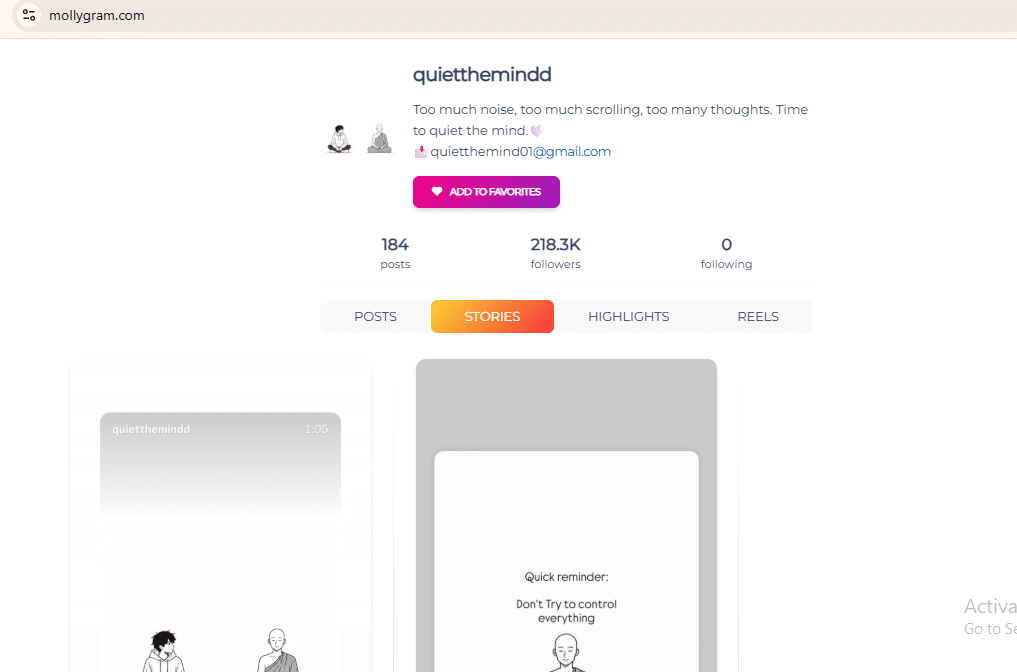
Stories, Highlights, Reels, posts and even full-size profile pictures all load without an Instagram login. If you want to get a feel for an account in one sitting, that range is hard to beat. And you can download almost anything you see.
So what’s the catch?
Ads. Lots of them.
Some reviewers report fake download buttons sitting right next to the real one, which is exactly the kind of thing that sends people somewhere they didn’t mean to go.
Note: Always use the download icon attached to the Story itself. Ignore anything big, green and flashing.
Best for: browsing a whole profile for free, if you can live with the ads.
7. AnonyIG
Most viewers treat Reels as an afterthought. You get the Stories, and Reels are buried somewhere, if they’re there at all.
AnonyIG doesn’t work that way.
Stories and Reels get equal billing. You can watch either without logging in, and download them in a click. It also pulls posts and Highlights, so you’re not stuck
switching tools halfway through.
That makes it the natural pick for creators who post more Reels than Stories, which is a lot of creators these days.
What it doesn’t do is help you keep up. There’s no tracking or alerts, so you’ll need to come back and check manually.
Best for: Reels-heavy accounts.
8. Imginn
Imginn is less a Story viewer and more a time machine.
Most viewers show you what’s live right now. Imginn lays out a public account’s posts, Reels and Stories so you can scroll back through them, all without logging in.
Why would you want that?
Context. If you’re studying how a brand’s content has changed, like what they posted before a launch or how often they switch formats, today’s Story only tells you a sliver of the story. Imginn shows you the pattern.
The downside is a heavy ad load, so expect to scroll past a few banners.
Best for: digging through older posts, not just today’s Story.
The Viewers I’d Skip
Two popular names didn’t make the list:
- Picuki has recurring outages.
- Pixwox has the same problem, plus copycat domains. It’s hard to tell if you’re even on the real site.
And IgAnony has had downtime this year, with the brand spread across several domains. [Editor: keep or cut based on your test]
How to Watch Instagram Stories Anonymously Without an App
Don’t want to use a third-party site?
Totally fair.
But heads up: most no-app tricks you’ll find online were written in 2023 or 2024. Instagram has changed a lot since then.
Here’s what still works (and what doesn’t).
Works: Use a Second Account
This is the most reliable method that doesn’t need a tool.
Here’s how to do it:
- In Instagram, tap your profile picture, then Add account
- Sign up with an email you don’t use anywhere else
- Skip contact syncing, so Instagram doesn’t suggest you to people you know
- View Stories from the new account
The person will see that an account watched their Story. They just won’t know it was you.
Unreliable: The Airplane Mode Trick
You’ve probably seen this one.
Let the Stories load, switch on airplane mode, watch offline, then force-close the app before you reconnect.
In theory, your view never reaches Instagram.
In practice? Instagram can hang on to that view and send it the moment you’re back online. Then your name lands on the list anyway.
It also only works for accounts you already follow. Instagram doesn’t preload Stories from accounts you don’t follow.
So it’s a coin flip. Use a viewer instead.
Dead: The Half-Swipe Trick
This one used to be clever. You’d open the Story next door, then slowly drag toward the one you wanted, and stop halfway.
Instagram patched it. Now any amount of loading counts as a view.
Skip it.
Can You View Private Instagram Stories Anonymously?
Short answer: no.
Not with a trick. Not with a tool. Not with an app.
I know that’s not what you wanted to hear. But it’s the truth, and it’ll save you from getting scammed.
Here’s why:
A private account’s Stories only go to followers the owner has approved. Instagram checks that on its own servers, every single time. No outside website can skip that check.
The same goes for Close Friends Stories.
So what about all those sites promising “private Instagram story viewer”?
They’re after one of three things:
- Your password. Type it in and your account is no longer yours.
- A “human verification” survey. That’s how they get paid. The Stories never load.
- An app install. Best case, ads. Worst case, malware.
Want to see a private account’s Stories? There’s exactly one way. Send a follow request.
Is It Safe to Use an Anonymous Story Viewer?
Yes, as long as you follow three simple rules.
Rule #1: Never type in your Instagram password.
A real viewer only needs a username. A password box means close the tab. Immediately.
Rule #2: Watch out for fake buttons.
Free viewers run on ads, and some ads are designed to look like download buttons. Use the button attached to the Story itself.
Rule #3: Know what “anonymous” actually means.
The account owner won’t see your name. That’s the promise, and it holds.
But the viewer site still sees your visit, like any website does. Even Inflact’s FAQ tells users not to treat an anonymity claim as a guarantee about all data processing.
One more thing: keep it decent. Watching a brand’s or creator’s public Stories is everyday research. Following someone who’s made it clear they don’t want contact isn’t.
Frequently Asked Questions
Will someone know if I watch their Story with an anonymous viewer?
No. The viewer fetches the Story through its own servers, so your name never appears in their viewer list. This only works for public accounts.
Can I view Instagram Stories without an account?
Yes. Every viewer in this guide works without an Instagram account. Just enter a public username.
Can I see Highlights anonymously too?
Yes. Inflact, DolphinRadar, MollyGram and AnonyIG all show Highlights from public accounts.
If I screenshot someone’s Story, will they know?
Instagram doesn’t currently notify people when you screenshot a regular Story.
How long can someone see who viewed their Story?
For 48 hours after posting. After that, the viewer list disappears, even if the Story is saved to Highlights.
Does the airplane mode trick still work in 2026?
Not reliably. Instagram can record the view when your phone reconnects.
What’s the best anonymous Instagram story viewer?
Inflact for regular research. DolphinRadar for free, frequent checks. StoryNavigation for a quick peek.
Now It’s Your Turn
There you have it: every way to view Instagram Stories anonymously that still works in 2026.
Now I’d like to hear from you:
Which method are you going to try first?
Or maybe you found a viewer that should be on this list.
People Also Reading…