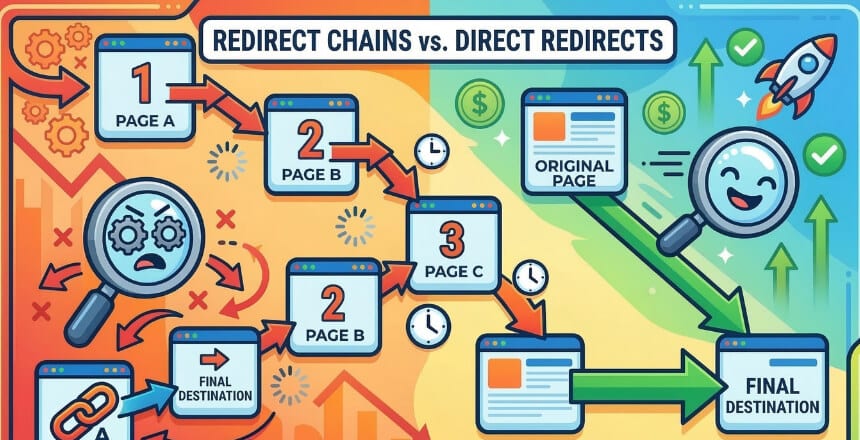
- A redirect chain is when URL A → B → C → D instead of going straight to the final page.
- Googlebot follows a chain up to ~10 hops, then stops anything beyond that won’t be indexed.
- They don’t directly kill your PageRank (Google fixed that in 2016), but they wreck LCP, TTFB, and crawl efficiency.
- Fix: Update every intermediate redirect so it points straight to the final destination URL.
- Your XML sitemaps, canonical tags, and internal links should all point to the final URL never a redirect.
Every time you change a URL, migrate a domain, or switch from HTTP to HTTPS, you’re creating a redirect. That’s fine. Redirects are a normal part of running a website. The problem is what happens when those redirects start stacking on top of each other without anyone noticing.
I’ve audited dozens of websites where a simple URL change from three years ago is now the first hop in a four-step redirect chain. It’s slowing down every single visitor, frustrating Googlebot, and dragging down Core Web Vitals scores. The site owner had no idea it was happening.
This guide walks you through exactly what redirect chains are, why they cause real SEO damage (and what most guides get completely wrong about that), and how to find and fix them whether you’re on WordPress, a custom CMS, or managing server configs directly.
What Is a Redirect Chain?
Here’s what the difference looks like in practice:
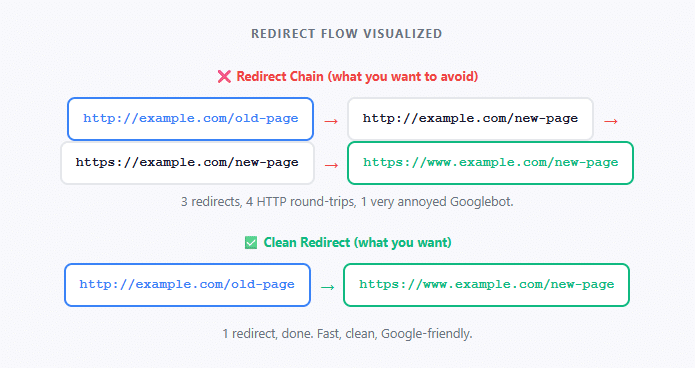
Notice the chain above? That’s a real-world scenario that happens to thousands of sites. You migrated from HTTP to HTTPS, added www later, and somewhere along the way had an old page that still redirects to the pre-www, pre-HTTPS version of the new URL. Three hops that should be one.
A Quick Note on Redirect Types (This Actually Matters)
Not all redirects are equal, and when you have a chain mixing different types, the SEO implications get messier. Here’s what you’re working with:
| Code | Type | SEO Signal Strength | Canonical? | Use When |
|---|---|---|---|---|
| 301 | Permanent redirect | Strong ✅ | Yes | Permanent URL changes, domain migrations |
| 308 | Permanent redirect (preserves method) | Strong ✅ | Yes | Same as 301, HTTP/2+ environments |
| 302 | Temporary redirect | Weaker ⚠️ | No | Seasonal pages, A/B tests, maintenance |
| 307 | Temporary redirect (preserves method) | Weaker ⚠️ | No | Only for POST requests; avoid for SEO |
| JS redirect | Client-side (JavaScript) | Weakest ❌ | No | Avoid entirely if you have server access |
| Meta refresh | HTML meta tag | Weakest ❌ | No | Avoid treated as soft signal by Google |
When a chain mixes a 301 with a 302, Google’s ability to determine the “canonical” destination (the URL it should index and consolidate signals to) gets muddier. A chain of all 301s is bad enough; a chain of mixed types is worse.
Why Redirect Chains Actually Hurt SEO (And What People Get Wrong)
Before getting into the real damage, let me clear up the biggest myth in this space: redirect chains do not directly cause PageRank loss.
Google’s John Mueller and Gary Illyes confirmed back in 2016 that PageRank passes fully through 301 redirects. The idea that each redirect hop drains your “link juice” is outdated SEO folklore from a decade ago. You’ll still find it repeated in guides written last year. Ignore it.
That said, redirect chains do cause serious indirect damage, and in some cases it’s worse than a bit of PageRank loss.
Crushed LCP and TTFB
Every hop adds a full HTTP round-trip. Each adds 100–300ms or more. This directly tanks your Largest Contentful Paint and Time to First Byte, both Core Web Vitals signals Google uses in ranking.
Googlebot Has a Hard Limit
Googlebot will follow a redirect chain up to approximately 10 hops, then stop. Pages at the end of a long chain may simply not get indexed. This is documented crawl behavior, not just a guideline.
Wasted Crawl Budget
On large sites, every crawl request counts. A chain of 4 redirects costs 4x the crawl budget of a clean URL. This can delay indexing of new content on sites with thousands of pages.
Confused Canonical Signals
Mixed redirect chains (301 + 302, or server-side + JavaScript) send conflicting canonicalization signals. Google may index the wrong URL, split ranking signals, or treat the final page as a new entity.
How Redirect Chains Form (Real Scenarios)
You don’t build a redirect chain on purpose. Here’s how they actually happen:
1. The HTTPS + WWW Combo That Nobody Cleaned Up
This is the most common source of chains on the entire web. You move from HTTP to HTTPS (redirect 1), then you decide to standardize on www (redirect 2), then the page slug changes during a redesign (redirect 3):
Three hops. Should be one. Clean configuration would handle all three conditions in a single server rule pointing directly to the final destination.
2. Domain Migrations That Layer on Top of Old Migrations
A site migrated from oldsite.com to newsite.com in 2021. Then in 2023 they rebranded to bestsite.com. Each migration added its own redirect layer without collapsing the previous ones:
oldsite.com/page → newsite.com/page → bestsite.com/page
3. CMS Redirect Plugins Stacking Rules
WordPress plugins like Redirection or Rank Math’s redirect manager let anyone on the team add redirect rules. Three people over two years have added overlapping rules for the same URL. Nobody checked whether the destination already redirected somewhere else.
4. Campaigns and Tracking URLs Left in Place
Marketing team created /campaign-spring-2022 → /spring-sale. The spring sale page later got renamed to /sale. The old campaign URL now goes through two hops instead of one.
How to Find Redirect Chains on Your Site
There are a few ways to do this, ranging from “quick check for one URL” to “full site audit.”
Method 1: Google Search Console (Free, First Place to Check)
Go to Coverage → Excluded → “Page with redirect.” Any URL Google has flagged here may be the start or middle of a chain. Cross-reference these with your known redirect rules.
Also check the URL Inspection tool paste in any URL and look at the “Page fetch” section. It’ll show you what Googlebot actually saw, including whether it followed a chain to get there.
Method 2: Screaming Frog (Best for Full Site Audits)
Screaming Frog is the industry standard for redirect chain detection. The free version crawls up to 500 URLs, which is more than enough for most blogs and small sites.
- Open Screaming Frog and enter your domain
- After the crawl finishes, go to Reports → Redirects → Redirect Chains
- Export the CSV, you’ll see every chain, its length, and every URL in each hop
Method 3: urllo (Best for Spot-Checking Individual URLs)
Screaming Frog is great when you want to audit the whole site, but sometimes you just need to check a handful of specific URLs quickly after a migration, during a content audit, or when a client flags a slow page. That’s where urllo redirect checker comes in handy.
You paste a URL, hit check, and it maps every single hop with the HTTP status code at each step. No setup, no crawl waiting time. I use it to verify individual pages after I’ve made a fix, since running a full Screaming Frog crawl just to confirm one URL is overkill.
Method 4: Ahrefs Site Audit
If you’re an Ahrefs subscriber, the Site Audit tool has a dedicated “Redirect chain” error in the Internal Pages report. It shows you the full chain path and, more usefully, how many internal links are pointing to that URL so you can prioritize which chains to fix first by actual impact.
Method 5: curl (For Developers and Quick Single-URL Checks)
If you want to see the full redirect path for a specific URL without spinning up a tool, curl with the -L flag will follow all redirects and show you every response code along the way:
curl -IL https://example.com/old-page 2>&1 | grep -E "HTTP|Location"
The output will show each HTTP response and the Location header that points to the next hop:
HTTP/1.1 301 Moved PermanentlyLocation: https://example.com/new-page HTTP/1.1 301 Moved Permanently Location: https://www.example.com/new-page HTTP/2 200
Two 301s before a 200 = a two-hop chain. Collapse it to one.
Method 5: Google PageSpeed Insights
Run any URL through PageSpeed Insights and look for the “Avoid multiple page redirects” diagnostic. If it appears, you have a chain affecting that page’s load time. This is useful for prioritizing run your highest-traffic pages first.
Redirect Loops: The Worse Cousin of Redirect Chains
While we’re here: redirect loops are what happen when a chain circles back to a URL it already visited. A → B → C → A. Every browser and crawler handles this by eventually giving up and throwing an error usually “ERR_TOO_MANY_REDIRECTS” in Chrome.
Loops are typically caused by misconfigured server rules, conflicting .htaccess entries, or a WordPress redirect plugin overriding a server-level rule in the opposite direction. They’re harder to find because they don’t resolve they just fail.
How to Fix Redirect Chains (Step-by-Step)
1. Map the Full Chain for Every Affected URL
Export your redirect chain report from Screaming Frog or Ahrefs. For each chain, document every hop: the starting URL, every intermediate URL, and the final destination. You can’t fix what you can’t see.
2. Identify Where Each Redirect Rule Lives
Redirect rules can exist in multiple places at the same time, and they all need to be checked. Common locations:
- .htaccess file (Apache servers)
- nginx.conf or site config block (Nginx servers)
- CDN settings (Cloudflare Page Rules, AWS CloudFront)
- WordPress redirect plugins (Redirection, Rank Math, Yoast)
- Application-level routing logic
- Host-level dashboard (some managed WordPress hosts have their own redirect UIs)
3. Update Each Rule to Point Directly to the Final URL
The fix is conceptually simple: instead of A → B → C → D, change every rule so A → D. Delete the intermediate rules (B and C) if they’re only there as stepping stones and aren’t the canonical destination for any content.
# Old HTTP → HTTPS
RewriteEngine On
RewriteCond %{HTTPS} off
RewriteRule ^(.*)$ http://www.example.com/$1 [R=301,L]

# www → no-www (conflicting!)
RewriteCond %{HTTP_HOST} ^www\.(.+)$ [NC]
RewriteRule ^ https://%1%{REQUEST_URI} [R=301,L]
RewriteEngine On

# Single rule: force HTTPS + non-www in one hop
RewriteCond %{HTTPS} off [OR]
RewriteCond %{HTTP_HOST} ^www\. [NC]
RewriteRule ^ https://example.com%{REQUEST_URI} [R=301,L]
This handles HTTP → HTTPS and www → non-www in a single redirect instead of two.
4. Update Your Internal Links, Canonicals, and Sitemap
Fixing the redirect rule isn’t enough. Every internal link in your content, your XML sitemap entries, and your canonical tags should point to the final destination URL, not the redirected one. If your sitemap lists a URL that redirects, Googlebot has to follow the redirect every time it checks that URL.
5. Verify the Fix With a Live Test
After updating your redirect rules, always test before moving on. I run the original URL through urllo as a quick sanity check. You paste the URL and it shows you every hop in real time. If it still shows more than one hop, there’s a rule somewhere you haven’t updated yet. You can also use curl -IL in the terminal or re-crawl the affected URLs in Screaming Frog. Either way, you want to see a direct 301 → 200 with nothing in between.
Fixing Redirect Chains in WordPress (Specific Guidance)
WordPress deserves its own section because it’s where most blogs and content sites actually live, and it’s where redirect chains accumulate fastest since non-developers can add redirect rules through plugins without realizing the consequences.
Using the Redirection Plugin
- Go to Tools → Redirection
- Check each redirect’s destination URL if the destination URL is itself redirecting somewhere else, you have a chain
- Update the source URL’s redirect to point directly to the final destination
- Delete any intermediate redirect rules that are now orphaned
Using Rank Math or Yoast
Both tools have redirect managers (Rank Math’s is under Rank Math → Redirections; Yoast’s is in the Premium version). The same logic applies: check each rule’s destination, and if that destination itself redirects, update the rule to skip the middle step.
Check Your Theme and functions.php
Some WordPress themes and custom functions.php code implement redirects using wp_redirect(). These won’t show up in your redirect plugin’s dashboard. Use Screaming Frog’s crawl to catch them it follows the actual HTTP responses regardless of where they originate.
Why This Hits Mobile Users Harder
Every redirect hop on mobile costs more than it does on a desktop connection. Mobile connections have higher latency by nature each HTTP round-trip on a 4G connection can add 150–400ms. A three-hop chain on mobile can easily add over a second to your load time before the first byte of actual content is even transferred.
Given that Google uses mobile-first indexing, meaning it crawls and evaluates your site using a mobile user agent by default, redirect chain problems that might feel minor on desktop are significantly amplified in how Google actually experiences your site.
Prevention: How to Stop Redirect Chains From Forming
🚀 Redirect Management Best Practices
- Always check the destination before adding a redirect. Before adding a rule for URL A → URL B, verify that URL B doesn’t already redirect to URL C. If it does, point A straight to C.
- Second point heading. Explanation sentence here.
- Handle HTTP/HTTPS and www/non-www in one server-level rule. Don’t layer these as separate rules. Consolidate them into a single condition block.
- Update internal links immediately when a slug changes. The fewer URLs pointing to redirected pages, the fewer hops Googlebot has to follow.
- Audit your redirects quarterly. Add redirect chain analysis to your technical SEO audit checklist. Chains are cheap to fix when caught early and compound when ignored.
- Document every redirect you create. A simple spreadsheet with Source URL, Destination URL, Date Created, and Reason is enough. Share it with anyone who manages the site.
- Keep old redirects in place, but collapse them. When you chain redirect A → B → C into A → C, keep both A → C and B → C. Someone might have bookmarked B. Just make sure B → C is now direct, not B → D → C.
What This Means for AI Overviews and Modern Search
Google’s AI Overviews tend to pull from pages that are fast, technically clean, and consistent in their signals. A page sitting at the end of a redirect chain isn’t just slower to load. It’s sending mixed messages about what URL should actually be treated as the canonical source.
When Google is deciding which page to surface in an AI Overview, a clean direct-access URL with consistent canonicals is a safer pick than one with a messy redirect history. Technical hygiene, including redirect hygiene, is part of what makes your content a trustworthy source worth citing.
Frequently Asked Questions
Do redirect chains cause a direct Google ranking penalty?
No. There’s no direct ranking penalty for having a redirect chain. Google confirmed in 2016 that PageRank passes through 301 redirects without leaking. However, chains cause indirect damage through slower page speeds (which affect Core Web Vitals), wasted crawl budget, and confused canonical signals, all of which do affect rankings indirectly.
How many redirect hops will Googlebot follow?
Googlebot will follow approximately 10 redirect hops before stopping. In practice, you should aim for a maximum of 1 hop for any URL. Ahrefs recommends a hard limit of no more than 3 hops, and ideally fewer than 5 in unavoidable cases. Anything beyond that is risking indexation failure.
Is a 302 redirect chain worse than a 301 redirect chain?
Yes. A 302 (temporary) redirect is not treated as a canonical signal by Google. In a chain that includes 302s, Google won’t consolidate ranking signals to the final destination the same way it would with a 301 chain. Mixed chains (e.g., 301 → 302 → 301) are the most problematic because they send genuinely conflicting canonicalization signals.
Should I keep old redirects in place after collapsing a chain?
Yes. When you collapse A → B → C into A → C, you should still maintain a redirect from B → C in case anyone has linked to or bookmarked B. Just make sure B now goes directly to C rather than back through A. Removing redirects entirely risks breaking links from external sites and bookmarks.
Does a redirect chain affect my robots.txt or XML sitemap?
Your sitemap and robots.txt don’t cause chains themselves, but they interact with them. If your sitemap lists a URL that redirects, Googlebot will follow the redirect every crawl cycle. Always list only final, 200-status URLs in your sitemap. Similarly, canonical tags should point to the final destination URL, not to any URL in the middle of a chain.
What’s the fastest way to check for redirect chains on my site?
For a full site audit, Screaming Frog’s free tier (up to 500 URLs) is the go-to. Crawl your site and check Reports → Redirects → Redirect Chains. For checking individual URLs quickly without any setup, urllo is the fastest option. Paste a URL and it shows you every hop instantly. For a site-wide paid audit with prioritization data, Ahrefs Site Audit is the most detailed since it shows chain length alongside internal link counts for each affected URL.
Your Redirect Chain Audit Checklist
Use this before and after any site migration, domain change, or major URL restructure:
- Run a full site crawl in Screaming Frog and export the Redirect Chains report
- Check Google Search Console Coverage for “Page with redirect” exclusions
- Run your top 10 traffic pages through PageSpeed Insights, look for “Avoid multiple page redirects”
- Verify your XML sitemap contains only 200-status final destination URLs
- Check that all canonical tags point to the final destination URL, not a redirected one
- Update all internal links that point to redirected URLs
- Review .htaccess / nginx config for overlapping or conflicting redirect rules
- Review CDN redirect rules (Cloudflare Page Rules, etc.) for conflicts with server-level rules
- Check WordPress redirect plugins for chains (destination URL also redirects)
- Test representative URLs with curl -IL to confirm single-hop resolution
- Document all redirect rules in a shared spreadsheet with dates and reasons
Bottom Line
Redirect chains are one of those technical SEO issues that feel minor until you actually audit for them and then you realize they’re everywhere. A site that’s been through two domain migrations, an HTTP-to-HTTPS switch, and three years of URL slug changes without a single redirect audit is almost certainly bleeding crawl budget and LCP performance through chains nobody intended to create.
The fix isn’t complicated. The tricky part is finding all of them. Run Screaming Frog, check GSC, audit your sitemap and canonicals, and collapse everything to a single hop pointing directly to the live, indexable URL. Do it once, document your redirect rules going forward, and schedule a quarterly check so chains don’t accumulate silently again.