Let me be honest upfront. I had my main Twitter account suspended. Not because I was spamming anyone, but because over a few years I had let the account drift. I was following hundreds of low-quality profiles, my follower-to-following ratio looked suspicious, and I had old tweets sitting there that gave X’s automated systems the wrong signals.
The suspension was a hard lesson. When I started a new X account, I set it up completely differently. Account hygiene from day one. And that is exactly where Circleboom comes in.
I have been tracking this tool since it first launched as a simple Twitter follower manager. Back then it did one thing: showed you who was not following you back. Today it has grown into a full social media management platform covering scheduling, AI content generation, native Canva integration, RSS automation, and deep Twitter analytics. I have tested both the Twitter Management tool and Circleboom Publish across multiple accounts and this review covers everything you need to make the right decision.
⚠ Why Twitter account hygiene matters more than most people realise
X doesn’t send you a warning before suspending an account. The system flags patterns, not single events. A bad follower ratio, a bunch of bot followers, a history of mass-following accounts that never followed back these things accumulate quietly. By the time you notice, the ban notice is already there.
That’s the situation I found myself in. Using Circleboom on my new account is me not making the same mistake twice.
I’ll show you everything you need to know about Circlboom: what works, what’s genuinely irritating, how it stacks up against Buffer and Hootsuite, and whether it’s worth paying for in 2026.
Try Circleboom Free for 14 Days
No credit card required. Publish plan. Cancel anytime.
What is Circleboom?
Circleboom is actually two separate tools that share a name. The first, the Twitter Management tool, is built entirely for X/Twitter: follower audits, fake follower detection, mass unfollow, bulk tweet deletion, Twitter archive cleanup, shadowban testing, and account analytics. The second, Circleboom Publish, is a multi-platform social media scheduler covering LinkedIn, Instagram, Facebook, Pinterest, Threads, YouTube Shorts, Bluesky, Google Business Profile, and X/Twitter, with AI post generation and Canva integration baked in.
The reason I bring this up immediately is that most people land on the Circleboom website and assume they are buying one product. They are not. More on the pricing confusion in a moment.
What separates Circleboom from generic schedulers like Buffer or Hootsuite is the Twitter-specific depth. No other tool under $25/month gives you a fake follower checker, a Twitter bot checker, a shadowban test, and bulk tweet delete in one place. That combination is genuinely hard to find anywhere else.
Circleboom is an Official X Enterprise Developer, which means X itself has vetted it for API compliance and safety. That matters if you plan on using mass unfollow or bulk delete features. Other tools that offer the same functions without that certification are working around the API in ways that put your account at risk.
Circleboom Pros and Cons
Pros
✓ Best-in-class Twitter account management at this price
✓ Official X Enterprise Partner safe for mass actions
✓ Native Canva integration inside the post composer
✓ Bulk tweet delete including full archive (no 3,200 limit)
✓ AI post generator powered by OpenAI
✓ RSS auto-posting for bloggers and content sites
✓ 14-day free trial on Publish plans
✓ Mobile app available for iOS
Cons
✗ Twitter tool and Publish are separate subscriptions
✗ Pro plan limits you to 300 queued posts
✗ No TikTok direct posting
✗ UI feels dated next to Buffer or Later
✗ Priority support only on Business and Enterprise tiers
✗ No social listening or brand mention tracking
✗ AI posts need editing before they sound natural
Circleboom Twitter Management: What it Actually Does
This is the part of Circleboom I care about most. If you have ever looked at your following list and thought “how did I end up following all these people” this is the tool that fixes that.
Follower insights and account audit
Connect your X account and Circleboom immediately gives you a breakdown of everyone you follow and everyone following you. Inactive accounts (no tweets in 30+ days), overactive accounts (20+ tweets per day), egghead profiles (no photo, never set up), fake and spam accounts, and people not following you back all separated into their own filters, all actionable.
For anyone who has been growing a Twitter account for a few years without paying attention to the list, this is a reality check. My non-follower count was way higher than I expected. Seeing it laid out like that made it obvious why my engagement rate was low. Clean follow list, better engagement. Simple as that.
Verdict: Excellent. Best in class at this price.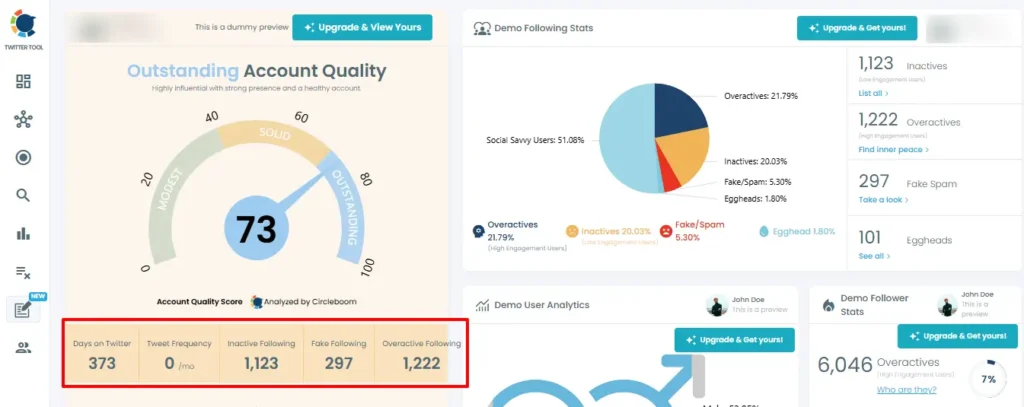
Fake follower checker and Twitter bot checker
Circleboom scans your followers for bot-like patterns: no bio, no photo, very high tweet frequency with zero engagement, suspiciously round follower numbers. It is not perfect some borderline accounts get flagged and some real bots slip through. But for a first pass it catches the obvious ones fast, and the combination with the inactive follower filter means you can do a proper account audit in an hour rather than a week.
The bigger reason this matters: fake followers tank your engagement rate. A 2% engagement rate on 1,000 real followers looks better to brands and collaborators than a 0.2% rate on 10,000 followers padded with bots. Cleaning up your list is not about vanity. It is about credibility.
Verdict: Good. Catches the obvious cases fast.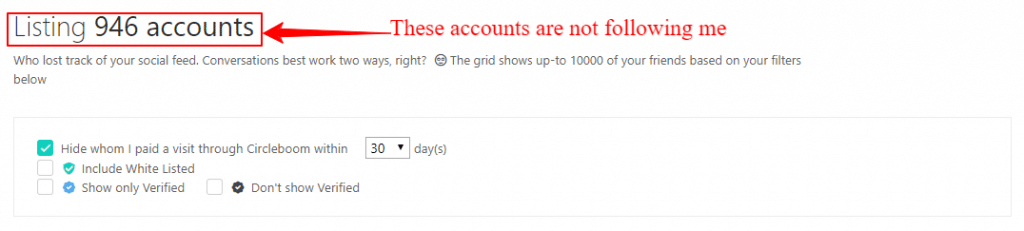
Bulk tweet delete and Twitter archive cleanup
Most tweet deletion tools hit a wall at 3,200 tweets that is the standard Twitter API limit. Circleboom gets around it by letting you upload your full Twitter archive. Once uploaded, you can filter everything: tweets older than a certain date, tweets with zero engagement, tweets containing a specific keyword, replies, retweets. Then delete in bulk.
If you have ever posted “follow for follow” content, old brand affiliations that no longer apply, or just years of low-quality stuff you would rather not have on a public profile, this is how you clean it up properly. I used it to remove a batch of old promotional tweets that were genuinely embarrassing in hindsight. Took about 20 minutes.
Verdict: Excellent. No other affordable tool does this better.
Twitter smart search and Find Friend Search
The Smart Search is more powerful than native X search in one specific way: you can filter by bio keyword, location, language, follower count, and join date simultaneously. Want to find SEO-focused bloggers in the UK with more than 1,000 followers who joined after 2020? You can build that filter in about 30 seconds.
The Find Friend Search is the feature I use most. Pick any public account and browse who they follow, filtered by quality. It is a practical way to find the right people to connect with in your niche without the manual scrolling.
Verdict: Good. Useful for finding targeted accounts to follow.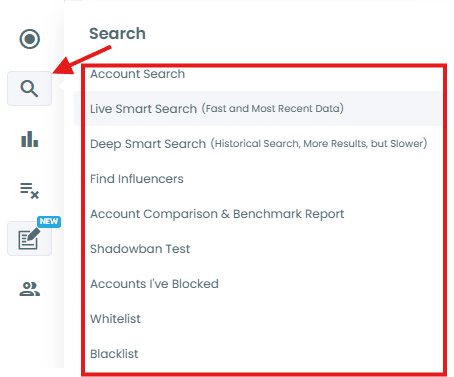
Twitter user analytics
Circleboom tracks follower growth daily, shows you who followed and unfollowed, and breaks down your audience: active vs inactive ratio, language distribution, gender breakdown, interest cloud. It also gives you an account quality score out of 100.
The practical value here has grown since X locked detailed analytics behind Premium. If you are not paying for X Premium, Circleboom gives you a reasonable alternative for monitoring your account health. It is not deep enough to replace a proper analytics tool, but for a blogger tracking what is happening with their audience it covers the basics well.
Verdict: Solid for basic analytics. Not a replacement for dedicated tools.Circleboom Publish: Scheduling, AI, and Canva in One Place
Publish is the second product under the Circleboom umbrella and it does something different entirely. Think of it as the multi-platform scheduling layer that sits on top of the Twitter-specific cleanup tools. LinkedIn, Instagram, Facebook, Pinterest, Threads, YouTube Shorts, Bluesky, Google Business Profile, X/Twitter schedule to all of them from one dashboard, with an AI writer and native Canva integration built into the post composer.
For a blogger managing their own social presence without a team, this is where the real daily time savings come from.
Native Canva integration the feature users talk about most
Go read Circleboom’s reviews on G2 and AppSumo. Canva comes up constantly. Not the AI writer, not the analytics Canva. The reason is simple: before this integration existed, the workflow was design something in Canva, download the file, switch to your scheduler, upload it, write a caption, schedule. That is five steps minimum and at least one “where did I save that?” moment per session.
With Circleboom, you click the Canva icon inside the post composer, pick from your existing library or build something new, and it drops straight into the post. No downloading. No file management. If you already have a year’s worth of branded templates in Canva, they are all one click away inside your scheduler.
Honestly, this alone is worth the Publish subscription if you’re a regular Canva user.
Verdict: Excellent. The best content workflow at this price point.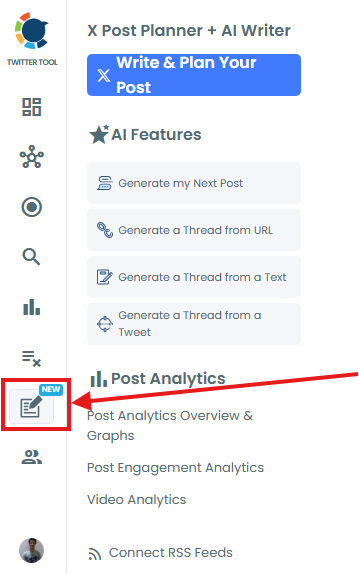
AI post generator with OpenAI integration
Circleboom’s AI writer runs on OpenAI and covers captions, post ideas, tweet threads, hashtag suggestions, and platform-specific content for LinkedIn, Instagram, Twitter, Pinterest, Facebook, and Google Business Profile. The Thread Generator is the standout drop in a URL or a block of text and it builds a draft thread from it.
I want to be straight with you: the AI output is a starting point, not a finished post. What comes out is fluent and grammatically fine, but it sounds generic and a bit corporate. You will edit it. What it actually does well is kill blank-screen paralysis. Getting a working draft in 30 seconds and spending 5 minutes fixing it beats staring at an empty text box for 20 minutes. That trade-off is worth it on days when you just need to get content out.
Verdict: Good for drafts. Always edit before publishing.RSS feed automation
Connect your blog’s RSS feed and every new post you publish automatically gets shared to LinkedIn, Facebook, X/Twitter, Pinterest, Google Business Profile, and Threads. Set it up once and walk away. That is the entire pitch for this feature and it is accurate.
I run CuriousBlogger and publish a few posts a month. Without RSS automation I was manually sharing each post across five platforms, which meant either doing it right away (distracting) or forgetting to do it at all. Now it just happens. If you are a blogger or run any kind of content site, this feature will save you a noticeable amount of time every single week.
Verdict: Excellent for bloggers. Set it up once and forget it.Multi-platform scheduling and content calendar
The scheduler covers X/Twitter, LinkedIn, Instagram, Facebook, Pinterest, Google Business Profile, Threads, YouTube Shorts, Bluesky, and TikTok. You can schedule individually, add posts to a queue that drips out at set intervals, or publish immediately. The calendar gives you a week or month view across all platforms.
One thing that actually irritates me: you cannot drag and drop posts to reschedule them on the calendar. To change a post’s time, you have to go back into the post itself. Buffer does this better and it is a daily friction point. Not a dealbreaker, but worth knowing if you reschedule content often.
Verdict: Good range of platforms. Calendar UX needs work.What Users Are Saying About Circleboom
I spent time going through verified reviews on G2, Capterra, Trustpilot, and AppSumo. The patterns are consistent. Here is what keeps coming up.
“Pulling designs right into Circleboom without downloading was a total gamechanger. Before I was downloading zips and re-uploading every single time.”
Positive AppSumo verified buyer
“Cleaned up five years of old tweets in under ten minutes. The filter by date feature is exactly what I needed to prepare my profile for a job search.”
Positive Capterra review
“I didn’t realise Twitter Management and Publish were two separate subscriptions until I checked my bank statement. Circleboom should make this clearer on the checkout page.”
Negative Trustpilot review
“Great for scheduling and the follower cleanup tools are genuinely unique at this price. Support response times could be faster, especially on billing issues.”
Negative G2 verified review
Circleboom vs Buffer vs Hootsuite vs TweetHunter
I have used or tested most of these tools at some point. Here is the honest side-by-side for the features that matter if you are a blogger or solo creator running your own accounts.
| Feature | Circleboom | Buffer | Hootsuite | TweetHunter | Later |
|---|---|---|---|---|---|
| Starting price | $12.99/mo | $6/mo | $99/mo | $49/mo | $25/mo |
| Platforms | 10+ platforms | 8 platforms | 10+ platforms | X only | 6 platforms |
| Twitter/X cleanup tools | Best in class | None | Basic | Moderate | None |
| Bulk tweet deletion | Yes, inc. archive | No | No | Yes | No |
| Native Canva integration | Yes, in-app | No | Via add-on | No | No |
| AI content writing | OpenAI powered | Basic | OwlyWriter | Strong | Basic captions |
| RSS auto-posting | Yes | Yes | Yes | No | No |
| TikTok posting | No | Yes | Yes | No | Yes |
| Free plan | Limited tier | Yes (3 channels) | No | No | Very limited |
| Best for | Twitter/X users + multi-platform creators Our pick | Budget scheduling | Enterprise teams | Twitter-only growth | Instagram-first brands |
Pricing as of March 2026. Verify current rates on each tool’s pricing page.
Feature depth vs. monthly cost entry-level paid plans
Hootsuite scores 88 vs Circleboom’s 84 on raw feature depth, but at $99/month it targets enterprise teams. Circleboom gives you 95% of what most individual creators need at 15% of the price.
Try Circleboom Free for 14 Days
No credit card required. Cancel anytime before day 14.
Circleboom Pricing in 2026
Two products, two separate invoices. I’ll break both down clearly because this is where most people get confused.
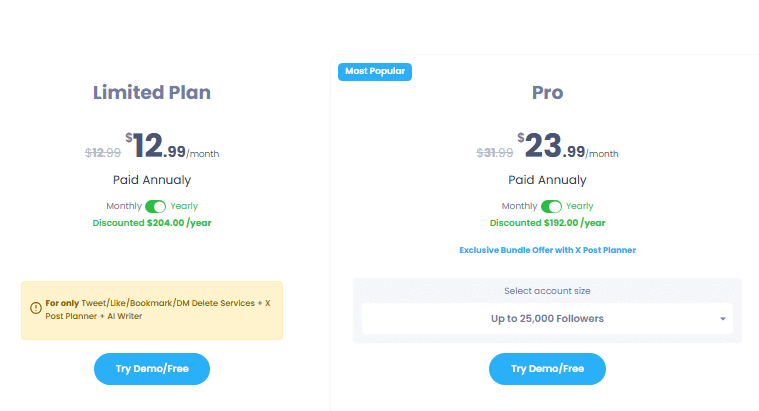
Twitter Management Tool Pricing
Circleboom Publish Pricing
The Publish plans are entirely separate from the Twitter Management tool. The most popular choice for bloggers and solo creators is Publish Premium at $34/month.
- Pro: $24/month (annual) 5 social accounts, 300 queued posts, basic AI features
- Premium: $34/month (annual) 10 accounts, unlimited queue, all AI generators
- Business: $79/month (annual) 30 accounts, built for small agencies
- Enterprise: $209/month (annual) 50+ accounts, custom support
The 14-day free trial is available on Publish plans only. No credit card required.
The Real Circleboom Problems You Need to Know About
Who Should Actually Use Circleboom in 2026
I want to be straight here because most reviews on this tool are written for hypothetical power users with massive followings. My X account is small and I still get real daily value from Circleboom. The cleanup tools work just as well at 500 followers as they do at 50,000.
How Circleboom is Rated on Review Platforms
Worth knowing what these scores actually reflect before you take them at face value.
G2’s 5.0 is from power users who went deep on the tool and got value from it. The Trustpilot and Capterra scores drag lower because they include a wider mix casual signups, people who discovered the dual subscription problem after the fact, and a few who had slow support experiences on billing. Both pictures are real. The G2 score tells you what you get if you use Circleboom properly. The Trustpilot score tells you what happens when onboarding fails.
My Verdict: is Circleboom Worth it in 2026?
For Twitter/X management specifically, yes it is the best tool at this price and it is not particularly close. The follower audit, bot detection, mass unfollow, and bulk tweet delete combination does not exist anywhere else under $25 a month with official X API certification. If keeping your account clean is something you care about and after a suspension, I care about it a lot this is the tool you want.
The Publish side is solid but not exceptional. It is a step above Buffer on features (Canva integration, AI writer, RSS automation) and a fraction of Hootsuite’s price. For a blogger scheduling content across four or five platforms without a team, it does the job without the enterprise price tag. The calendar UX needs work and TikTok is a real gap. But for everything else, it covers the bases.
The one thing I would genuinely change: make the dual subscription obvious at checkout. It is the single biggest source of frustration in the reviews and it is a completely avoidable problem. Go in knowing about it, budget for whichever combination makes sense for you, and it stops being an issue.
Start with the 14-day Publish trial. If you are an active X user, add the Twitter Management Pro plan once you have confirmed you will actually use the cleanup features regularly. That is the right order.
Try Circleboom Free for 14 Days
No credit card required. Cancel anytime before day 14 and pay nothing.
Start Your Free TrialPublish Premium plan. 14 days. No credit card.
Frequently Asked Questions About Circleboom
Is Circleboom safe to use with Twitter/X?
What is the difference between Circleboom Twitter and Circleboom Publish?
Does Circleboom have a free plan or free trial?
Can Circleboom delete all my old tweets including ones from years ago?
How much does Circleboom cost in 2026?
Who unfollowed me on Twitter? Can Circleboom track this?
Can Circleboom help prevent my Twitter account from getting suspended?
Does Circleboom work for small or new Twitter accounts?
Can I cancel my Circleboom subscription anytime?
You might also like: