I had my Twitter account suspended. That’s not something I’ve hidden. It’s actually the reason I started taking Twitter account health seriously in the first place.
It wasn’t a dramatic story. I didn’t spam anyone. I didn’t post illegal content. I didn’t run bots. What I did was spend a few years building a Twitter presence the wrong way: following accounts aggressively to grow my numbers, never cleaning up the people who didn’t follow back, letting bot accounts pile up in my follower list, and leaving old promotional tweets sitting there from years back that I’d completely forgotten about.
None of that felt like rule-breaking because I wasn’t actively doing anything wrong on any given day. But X’s automated systems don’t evaluate you based on what you did today. They build a picture over time. And the picture my account had built up. Poor follow ratio, bot-heavy followers, suspicious account patterns. Eventually it crossed a threshold I didn’t even know existed.
I rebuilt from scratch on a new account. This time I set it up differently from day one. This post covers exactly what I do now to keep my account clean, what signals X watches for that most people don’t realise, and the tool that makes the ongoing maintenance take about fifteen minutes a month instead of hours I don’t have.
The thing most suspension guides get wrong
Most “how to avoid Twitter suspension” articles tell you not to spam, not to use bots, and to follow the rules. That advice is correct but it misses the actual problem most real accounts face. Nobody reading this post is planning to run a spam bot. The real suspension risk for regular users is the slow accumulation of account health signals that look suspicious to X’s automated systems, even when no individual action is a policy violation.
That’s what happened to me. And that’s what this post is actually about.
Why Twitter Accounts Get Suspended: The Signals Most People Miss
X uses automated systems to enforce its rules. Those systems don’t read your tweets and make a judgment call. They measure patterns, ratios, and behaviour signals, and they compare them against what genuine, healthy accounts look like. When your account diverges too far from that model, flags go up.
Here are the signals that get real accounts suspended, not the obvious spam violations that every guide already covers.
Poor follower-to-following ratio
If you follow significantly more accounts than follow you back, your account looks like it’s using the follow-to-gain-followers strategy. X knows this tactic well and its systems watch for it. The recommended approach is a ratio close to 1:1, or better. Accounts following ten times more people than follow them back are a flag, especially when combined with other signals.
Over a few years of building CuriousBlogger’s Twitter presence, I had followed hundreds of accounts hoping they’d follow back, and most of them didn’t. I never cleaned it up. My ratio was drifting in the wrong direction year by year and I wasn’t paying attention.
Bot and fake accounts in your following list
This one surprised me when I understood it properly. It’s not about bot accounts following you. It’s about accounts in your following list that show bot-like patterns. If you follow a lot of accounts that have no bio, no photo, very high tweet frequency with zero engagement, or were clearly created to game follower counts, that says something about how your account grew. X’s systems can see the quality of who you’re following.
Rapid following and unfollowing patterns
X’s official limits allow following up to 400 accounts per day. Going above that triggers automatic restrictions. But even staying below the technical limit, patterns of following a large batch of accounts and then unfollowing them if they don’t follow back, done repeatedly over time, look exactly like the behaviour X is trying to eliminate. The pattern is more of a signal than any single day’s count.
Old content that no longer reflects platform rules
Rules change. What was acceptable three years ago may generate reports today. Old follow-for-follow solicitation tweets, content that has aged badly in terms of tone or subject matter, or posts from before a rebrand can all sit in your timeline gathering reports you don’t even know about. Accumulated reports trigger review. Review can trigger suspension.
Unauthorised third-party tools
Using tools that access the Twitter API outside official partnerships is one of the fastest routes to suspension. X monitors API access patterns closely. If a tool you’re using isn’t operating through official channels, your account can be flagged just for being connected to it. This is worth checking if you’ve ever used cheap or free Twitter automation tools. Some of them are not authorised and your account carries the risk even when the tool isn’t doing anything obviously wrong.
Inconsistent login patterns
Logging in from dramatically different locations in quick succession, switching devices constantly, or accessing your account through VPNs that cycle IP addresses can trigger security locks. X interprets this as potential account compromise. It usually resolves with a verification step, but repeated triggers can escalate.
The 7-Step Account Hygiene Routine that Would Keep Your New Account Clean
This is exactly what I do now. It’s not complicated. Most of it only takes fifteen minutes a month once you have the right tools set up.
Step 1: Run a follower audit every month
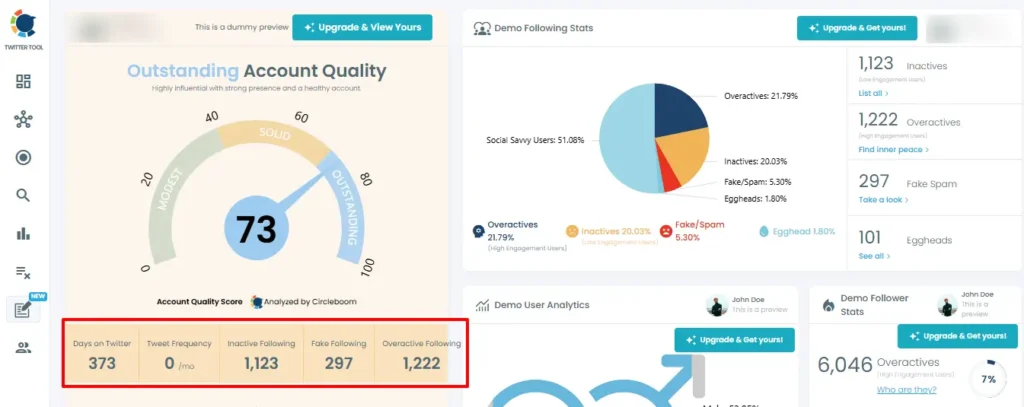
Once a month I log into Circleboom’s Twitter Management dashboard and look at the breakdown of my following list. It shows me four categories I actually care about: accounts not following me back, inactive accounts (no tweets in 30+ days), accounts with bot-like patterns, and overactive accounts posting 20+ times a day.
I go through each category and unfollow the obvious ones. I whitelist anyone I want to keep regardless of whether they follow back. The whole process takes about fifteen minutes and it keeps my ratio healthy and my following list full of accounts that are actually active.
Step 2: Clean up non-followers carefully, not aggressively
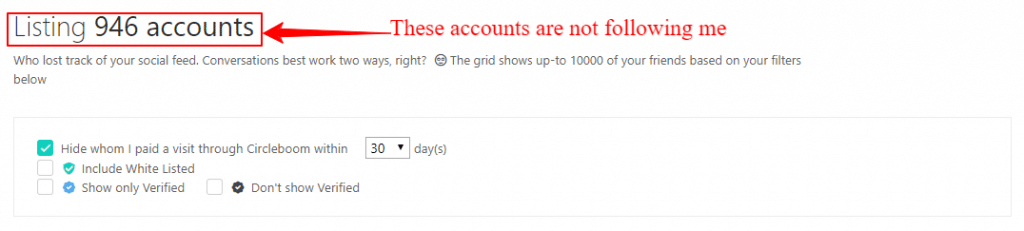
There’s a difference between unfollowing 300 non-followers in one sitting and doing it over a few days. The first looks like aggressive account manipulation. The second is normal account management. Circleboom handles this by respecting X’s rate limits on every action. It’s an Official X Enterprise Partner, so all the unfollowing happens inside the boundaries X has set. I never have to think about whether I’m doing too much at once.
Step 3: Remove bot and fake accounts from your following list
Circleboom’s bot checker scans your following list for accounts showing bot-like patterns: no bio, no profile photo, very high tweet volume with essentially zero engagement, or accounts that clearly exist to inflate follower counts. I review the flagged accounts and unfollow the obvious bots. It’s not perfect. Some borderline accounts get flagged and some bots slip through. But it catches the clear cases fast and I’d rather make the occasional mistake than leave obvious bot accounts sitting in my following list.
Step 4: Run the shadowban test quarterly
A shadowban is when X limits your account’s visibility without telling you. Your tweets still appear on your profile but they don’t show up in hashtag searches, reply threads, or recommendations for people who don’t already follow you. You can be shadowbanned and have no idea. The account still works, you just stop growing.
Circleboom has a built-in shadowban test that checks whether your account has visibility restrictions across different regions. I run it every three months. If something flags, I investigate what changed in my recent posting habits before it becomes a bigger problem.
Step 5: Clean up old tweets that could generate reports
Go back through your tweet history and look at it with fresh eyes. Any follow-for-follow solicitation content. Old promotional tweets for products you no longer recommend. Content that has aged badly in terms of tone. Tweets from a previous iteration of your brand or persona. These are not necessarily against current rules but they accumulate reports over time from accounts that stumble across them.
Circleboom’s bulk delete tool filters by date, engagement level, content type, or keyword. For tweets beyond X’s standard 3,200 tweet API limit, you upload your Twitter archive and Circleboom processes the full history. I used this to clear about 80 old tweets when I was rebuilding my presence, including some genuinely embarrassing promotional content from years back.

Step 6: Follow accounts at a human pace
When I find a new niche to engage with or want to build connections in a particular community, I don’t follow 100 accounts in one session. I follow a handful a day, genuinely chosen based on whether they’re active and posting content I’d actually read. This is slower but it looks like authentic behaviour because it is authentic behaviour. X’s systems can tell the difference between steady organic growth and a mass-following spree.
Step 7: Only use tools with official API access
Every tool connected to your Twitter account is a risk vector. If a tool is accessing the API outside official channels, your account carries the exposure. Before connecting any third-party tool, check whether it’s an Official X Partner or has official API access. Circleboom’s status as an Official X Enterprise Partner is the specific reason I use it for the account management tasks above rather than cheaper alternatives that claim to do the same things. The savings aren’t worth the risk.
Twitter’s Actual Rate Limits: The Numbers You Need to Know
X publishes its limits. Most people have never read them. Here’s what’s relevant for a regular user trying to stay in good standing.
| Action | Daily limit | What happens if you exceed it |
|---|---|---|
| Tweets | 2,400/day | Temporary posting restriction |
| New follows | 400/day | Following restricted, possible account flag |
| Direct messages | 500/day | DMs blocked for the remainder of the day |
| Following total (under 5k followers) | 5,000 max | Cannot follow more until ratio improves |
| API reads (free tier) | 1,500/month | API access blocked for the remainder of the period |
The following limit is the one that catches most regular users. If you follow fewer than 5,000 accounts total, X caps you at 5,000 following. Once you hit that ceiling, you can’t follow anyone new until the ratio of your followers to your following improves. This is the mechanism that forces account cleanup, and it’s also the mechanism that flags accounts that have been gaming the follow system.
What to Do Immediately if Your Account is Suspended Right Now
If you’re here because it’s already happened, here’s the process. Work through these steps in order.
The Tool I Use for Ongoing Account Maintenance
I want to be transparent here because the tool recommendation matters as much as the process.
When I was building my Twitter presence the first time, I used a mix of free tools and manual work. Some of those free tools were not operating through official API channels. I didn’t know that at the time and I’m not certain it contributed to my suspension, but it’s the kind of thing I think about now.
I use Circleboom’s Twitter Management tool specifically because it is an Official X Enterprise Partner. That designation means X itself has vetted and approved Circleboom’s API access. Every action I take through Circleboom (unfollowing non-followers, removing bot accounts, deleting tweets, testing for shadowbans) happens within the rate limits X has officially set. Using it does not create suspension risk. That matters to me in a way it probably didn’t before I actually went through a suspension.
Here’s what I use it for each month in practice:
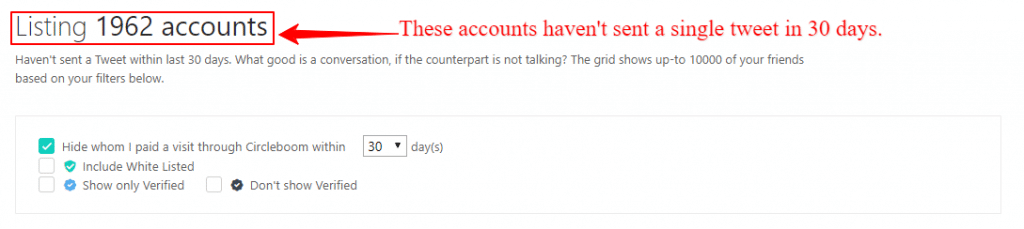
- Follower audit: see the breakdown of who I’m following by category (inactive, bot-like, non-followers, overactive)
- Non-follower cleanup: unfollow accounts that don’t follow back, done within X’s rate limits automatically
- Bot detection: identify accounts with bot-like patterns in my following list and remove them
- Shadowban check: quarterly test to verify my account has normal visibility
- Tweet cleanup: filter and remove old content that could generate reports
The Twitter Management Pro plan covers all of this at $23.99/month on annual billing. For anyone serious about their X account, that’s a reasonable cost for what it prevents.
14-day free trial on the Publish plan. Twitter Management has a free limited tier.
The Account Health Checklist I Run Every Month
Save this and run it once a month. The whole thing takes about twenty minutes once you have Circleboom set up.
Monthly Twitter account health checklist
Frequently Asked Questions
Why do Twitter accounts get suspended without warning?
What is a healthy Twitter follower to following ratio?
How many accounts can you follow per day on Twitter without getting suspended?
Can fake followers get your Twitter account suspended?
Is Circleboom safe to use with Twitter? Will it get my account suspended?
What should I do immediately if my Twitter account is suspended?
How can I check if my Twitter account is shadowbanned?
Does deleting old tweets help prevent Twitter suspension?
Run your first Twitter account audit
Circleboom shows you your follower quality, bot accounts, and non-followers in minutes. The free trial gives you full access to check what your account actually looks like right now.
Try Circleboom Free14-day free trial on Publish. Twitter Management has a free limited tier. No credit card required.
Related reading: