If you’re looking for Gemini AI photo prompts that produce clean, client-ready images (not random, experimental outputs), you’re in the right place.
Google’s Gemini image generation (powered by Imagen 3) can create impressive visuals, but results depend on one thing: prompt quality. Small changes in structure, detail, and constraints often separate “looks AI” from “looks professional.”
Over the last six weeks, I tested Gemini’s Nano Banana Pro on real deliverables with real expectations: LinkedIn-style headshots, e-commerce product visuals, startup marketing creatives, documentation diagrams, and more.
When you write prompts like a creative brief (not a casual request), Gemini’s output improves fast better lighting, more realistic textures, fewer weird artifacts, and more consistency across variations.
What Makes This Guide Different?
Most prompt lists give you generic templates and leave you guessing. This one is built for outcomes:
- 35+ production-tested Gemini AI prompts (refined based on real results)
- Works across Gemini modes, including Imagen 3
- Practical workflows for marketing, client work, and documentation
- Prompt techniques you can reuse so you can build your own prompts confidently
- Common mistakes + fixes (the problems you’ll hit, and how to solve them)
Whether you’re a freelancer, marketer, founder, or creator, these Nano Banana prompts will help you get better images in less time without endless trial and error.
Start Here (So the Prompts Don’t Let You Down)
Before you copy the first prompt, let me save you the headache I had in week one.
Gemini doesn’t “mess up” randomly. Most of the time, we’re just being vague. We ask for a “professional photo” and forget to define what professional means: lighting, lens look, background, framing, mood, and what to avoid.
So here’s the simple rule I used across client work:
Lock the subject first. Then change one thing at a time.
If you change the subject, the style, the lighting, and the background all at once, you’ll get a different image every time. If you keep the subject block the same and only swap the scene, the results suddenly start looking consistent and usable.
Which Gemini mode should you pick?
- Fast is my choice when I’m exploring options. I use it to generate 5–10 variations quickly and see what direction looks right.
- Thinking / Pro is what I switch to when I want the “final” look cleaner composition, fewer weird details, and better results when the image includes text (labels, posters, packaging, UI-style visuals).
The prompt format that gives you “client-ready”
Every prompt in this guide follows the same backbone:
Subject → Scene → Lighting → Camera look → Style → Constraints
In a second, I’ll give you a copy-paste template. Use it once, then reuse it like a mini creative brief.
Copy-Paste Prompt Template (Use This First)
Use this template as your “base prompt,” then swap only the Scene/Background line to create new variations without losing consistency.
- Subject: [what it is + key details]
- Scene/Background: [where it is + props]
- Lighting: [soft daylight / studio / golden hour / neon, etc.]
- Camera look: [35mm, 50mm, shallow depth of field, sharp focus, etc.]
- Style: [photoreal / cinematic / product photo / minimal]
- Constraints: [no extra text, no distorted hands, clean background, no watermark]
How to Use These Gemini AI Photo Prompts in Nano Banana
Here’s the exact flow I use so the prompts work the way they’re supposed to.
- Open Gemini (web or app).
- Click Create image from the tools menu.
- Pick your mode:
- Fast → Nano Banana (quick drafts and variations)
- Thinking → Nano Banana Pro
- Pro → Nano Banana Pro (best when you want a “final” look)
- Paste one of the prompts from this guide. (If you copied it from a code block, remove the backticks.)
- If the prompt says Upload, add your reference image(s) first, then run the prompt.
If the first result is close but not perfect, don’t restart from scratch. Keep the same prompt and tweak one line (lighting, background, framing). That’s how you dial it in fast.
Quick Copy-Paste Gemini AI Photo Prompts for Social Media
These Gemini AI photo prompts work beautifully with both models, though you’ll get more polish with the advanced option.
Professional Headshot Prompts for Men
1. Executive LinkedIn Headshot

Transform this photo into a professional corporate headshot of a man suitable for LinkedIn and company websites. Background: softly blurred contemporary office environment with large windows showing neutral cityscape, natural architectural elements. Style: clean, photorealistic, subtle professional retouching maintaining authentic appearance, no heavy filters or artificial smoothing. Lighting: soft natural window light from 45-degree angle creating gentle shadows that define facial structure. Expression: confident but approachable, slight natural smile. Camera: 85mm portrait lens equivalent, f/2.8 aperture for background separation. Constraints: preserve exact facial features and proportions, maintain natural skin texture with pores visible, keep authentic hairstyle and color, no text or watermarks. Output: vertical 4:5 ratio, 1080×1350 pixels for social media, professional business portrait quality.
2. Urban Street Style Portrait
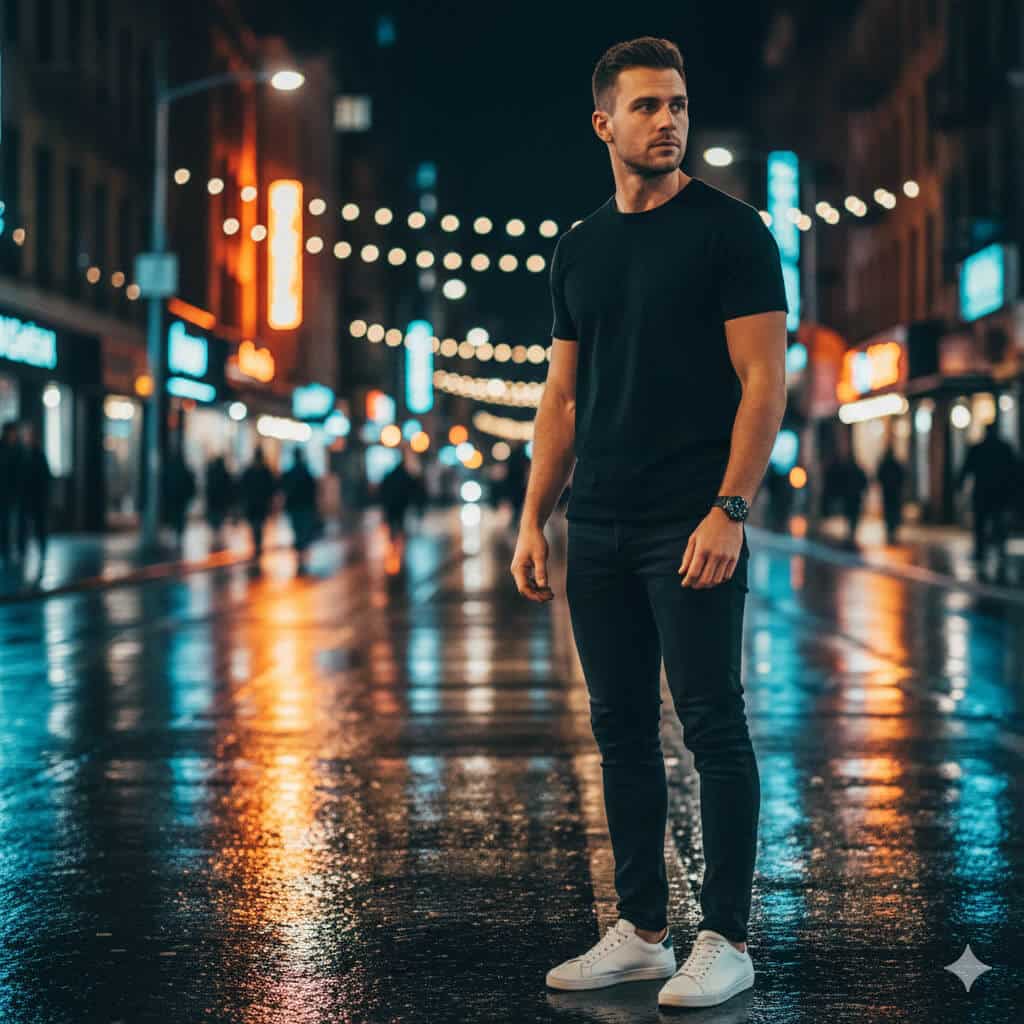
Create a cinematic street photography portrait of a man in an urban evening setting with editorial quality. Subject: man in late 20s to mid-30s. Outfit: minimalist black crew-neck T-shirt, dark slim-fit jeans, white leather sneakers. Background: wet city pavement reflecting colorful neon storefront signs, string lights, and urban evening atmosphere, pedestrians blurred in distance. Style: photorealistic with subtle film grain texture (Kodak Portra 400 aesthetic), shallow depth of field (f/2.8), beautiful bokeh background blur. Composition: medium shot from waist up, subject positioned in right third using rule of thirds, looking slightly away from camera showing side profile. Lighting: mix of warm neon light (2700K) and cool street lighting (4500K) creating color contrast. Mood: confident, urban, editorial fashion. Output: Instagram-ready, 4:5 vertical aspect ratio, 1080×1350 pixels, high detail.
3. Akshaye Khanna Dhurandhar Photo Style (Viral Trend)
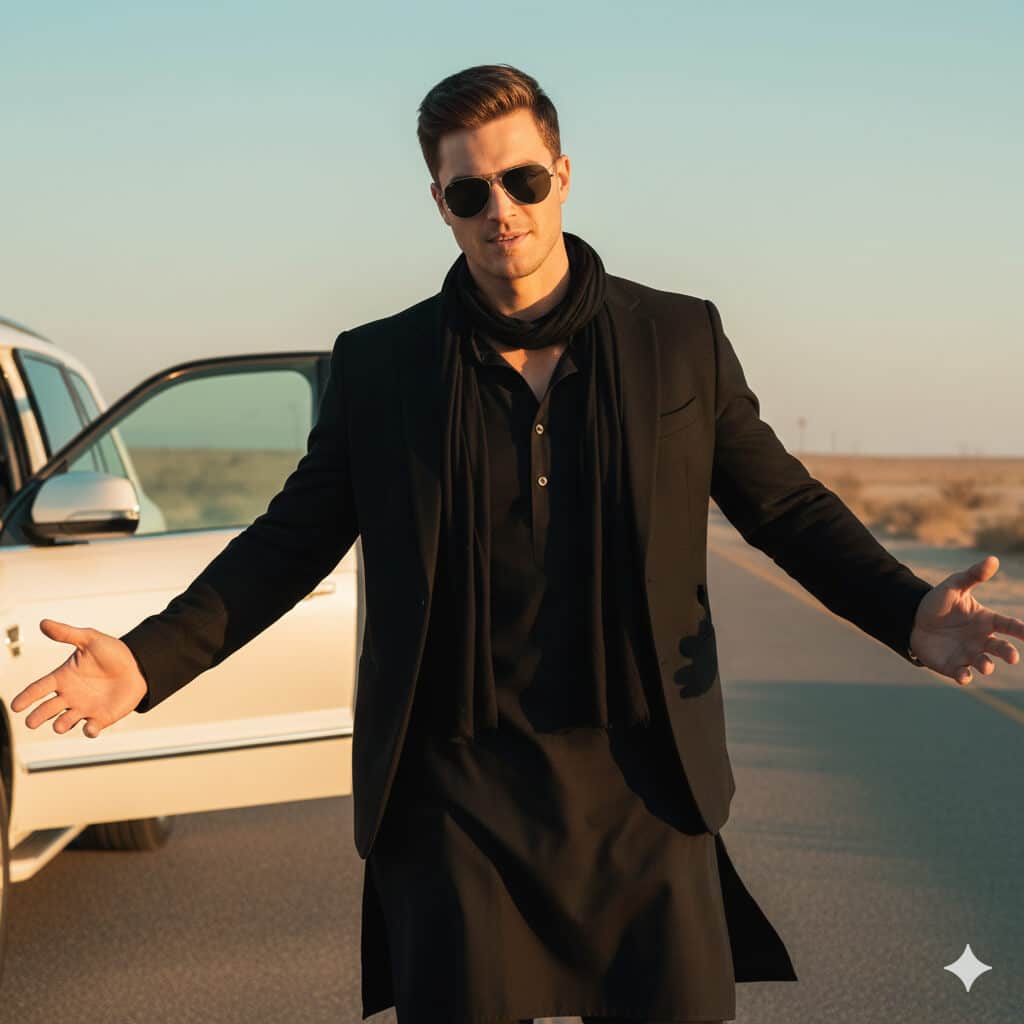
Transform my uploaded photo into an ultra-realistic Bollywood-style cinematic film still while preserving my exact identity and features (identical facial structure, age lines, skin texture, hairstyle, eye color; absolutely no face alteration; no beautification or smoothing).

Scene environment: Empty dusty desert highway during golden hour with soft beige atmospheric haze, abandoned feel, minimal traffic, white luxury SUV with driver's door open positioned on the left side of frame.

Wardrobe styling: Complete all-black sophisticated ensemble black cotton kurta with visible button details down front, structured black blazer with defined shoulders and lapels, black scarf or stole elegantly draped around neck falling to waist.

Accessories: Dark aviator sunglasses with symmetrical fit and realistic lens reflections showing desert environment and sky.

Pose and expression: Confident expression with subtle characteristic smirk, head tilted slightly downward and turned toward camera, both arms extended outward from body with palms facing upward in welcoming gesture, anatomically correct hands with proper five fingers each and natural gesture, no distortions.

Lighting setup: Warm golden hour sunlight from low sun position, gentle contrast, soft directional shadows falling naturally, subtle film grain for cinematic texture, professional color grading with slightly desaturated tones and warm orange-teal palette.

Camera specifications: Medium full-length shot showing subject from knees up, slightly low camera angle (approximately waist height) for dramatic heroic effect, shallow depth of field (f/2.0), face and outfit tack-sharp with background beautifully blurred, 35mm focal length equivalent.

Output specifications: Instagram portrait format, 4:5 aspect ratio, 1080×1350 pixels, high detail preservation in clothing texture and facial features.

Critical constraints: No text overlays or captions, no brand logos or visible trademarks, no watermarks, no extra fingers or missing fingers, no distorted or warped hands, no duplicate limbs, no plastic or overly smooth skin (maintain natural skin imperfections, pores, and texture), no face swapping or identity change.
4. Fitness Magazine Photography
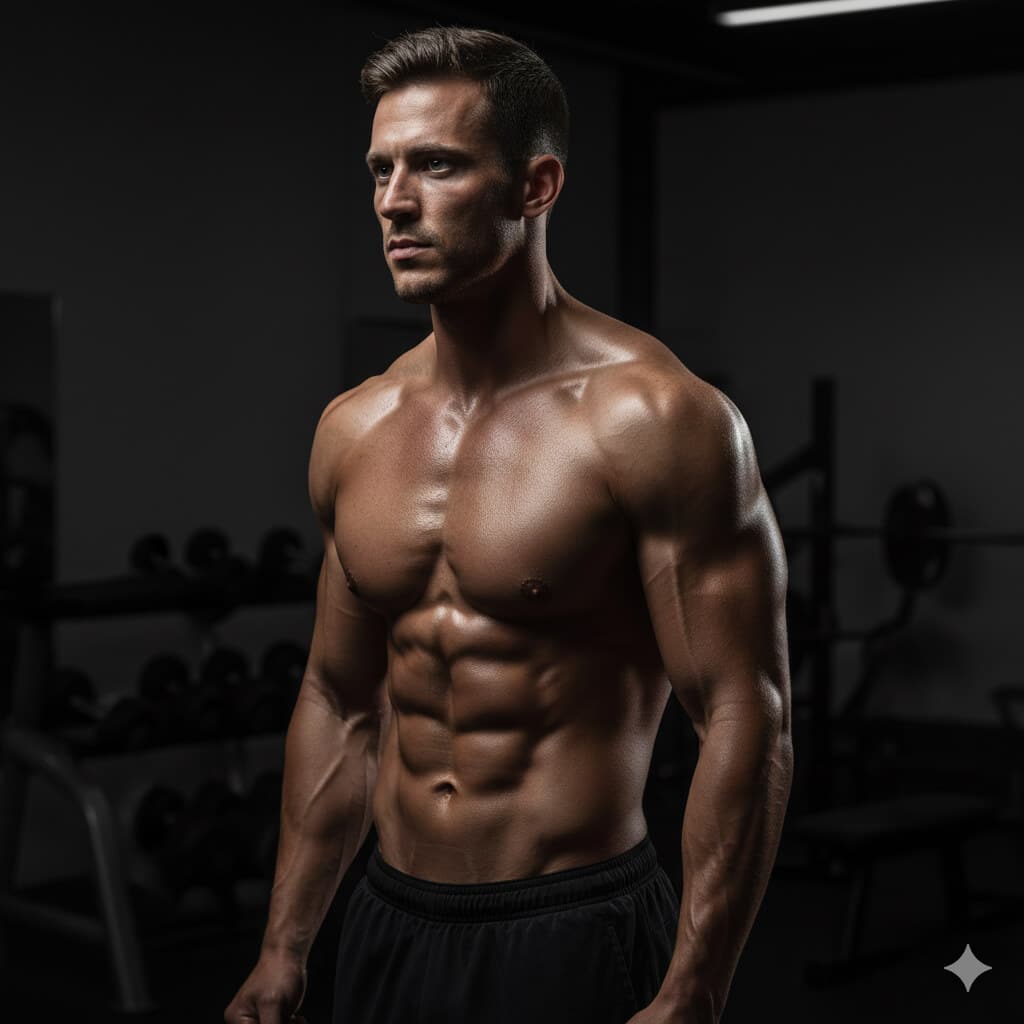
Transform this gym photo into a professional fitness magazine cover-style portrait of a man during workout with dramatic lighting. Subject: athletic male, visible muscle definition. Setting: dark gym environment. Lighting: dramatic single-source side lighting from left at 75-degree angle emphasizing muscle definition and creating strong shadows, dark gradient background transitioning from charcoal (#36454F) to pure black, subtle rim light from behind-right at 15% intensity outlining shoulder and arm. Style: photorealistic, high contrast ratio (80:20 shadow to highlight), sharp edge definition on muscles, natural body proportions, no excessive smoothing or plastic appearance. Camera: 85mm f/2.8, eye-level angle. Details: natural sweat texture on skin catching light, gym equipment softly blurred in deep background. Constraints: maintain authentic body shape and realistic muscle definition, no exaggerated size enhancement, keep natural skin texture. Output: vertical format 4:5 ratio for magazine cover or social media.
5. Corporate Business Professional

Create a corporate studio portrait of a man in smart business casual attire suitable for company website team pages. Outfit: dark navy blazer over clean plain white crew-neck T-shirt, no tie. Background: neutral medium grey gradient with subtle vignette darkening toward edges. Lighting: professional three-point studio lighting setup—key softbox positioned upper right at 45-degree angle, fill light from left at 40% of key light intensity, subtle rim light from behind creating edge definition on shoulders and head. Expression: professional and approachable, natural slight smile, direct eye contact with camera. Style: sharp professional photography, authentic retouching maintaining natural appearance. Camera: 85mm portrait lens, f/4.5 for extended sharpness. Output: square 2000×2000 pixels, headshot composition from mid-chest upward, suitable for corporate website and business materials.
6. Adventure Travel Mountain Summit
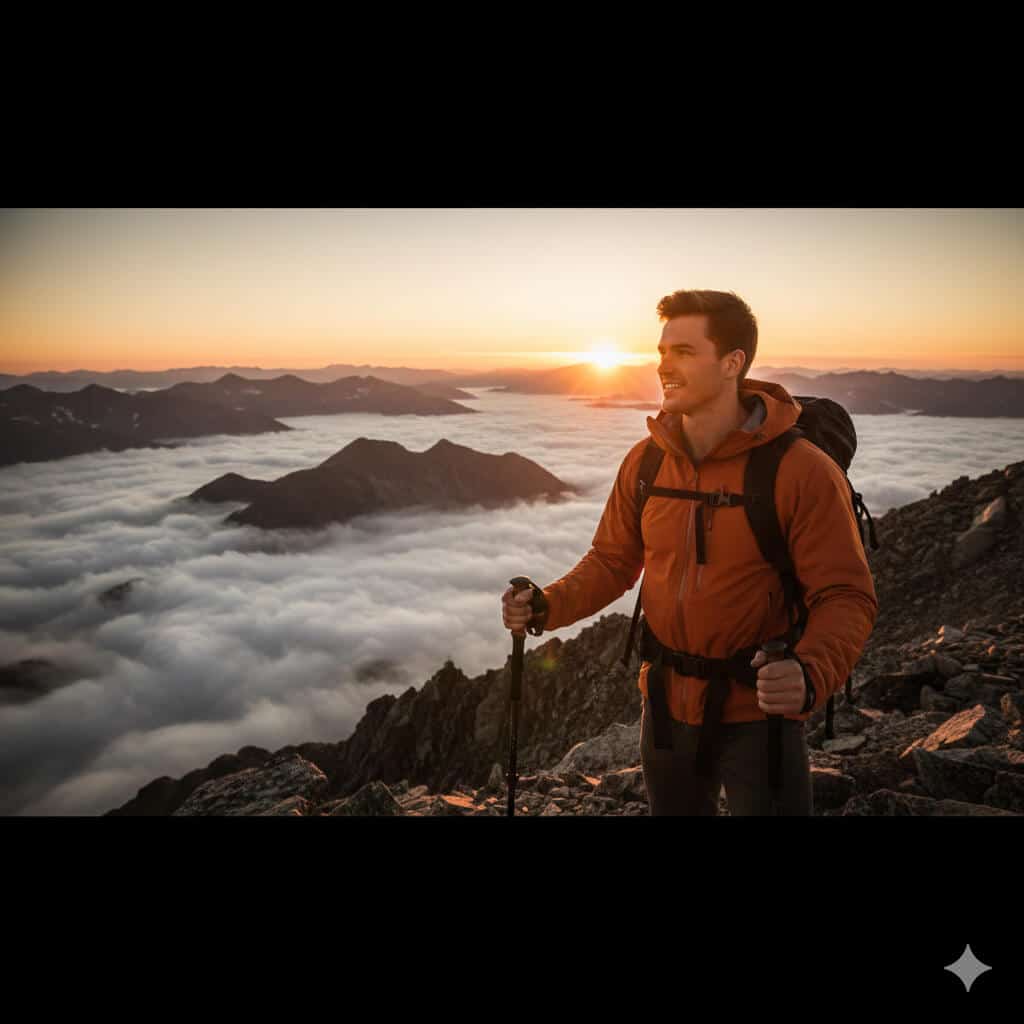
Create a corporate studio portrait of a man in smart business casual attire suitable for company website team pages. Outfit: dark navy blazer over clean plain white crew-neck T-shirt, no tie. Background: neutral medium grey gradient with subtle vignette darkening toward edges. Lighting: professional three-point studio lighting setup—key softbox positioned upper right at 45-degree angle, fill light from left at 40% of key light intensity, subtle rim light from behind creating edge definition on shoulders and head. Expression: professional and approachable, natural slight smile, direct eye contact with camera. Style: sharp professional photography, authentic retouching maintaining natural appearance. Camera: 85mm portrait lens, f/4.5 for extended sharpness. Output: square 2000×2000 pixels, headshot composition from mid-chest upward, suitable for corporate website and business materials.
Nano Banana Prompts for Women
7. Soft Pastel Aesthetic Portrait
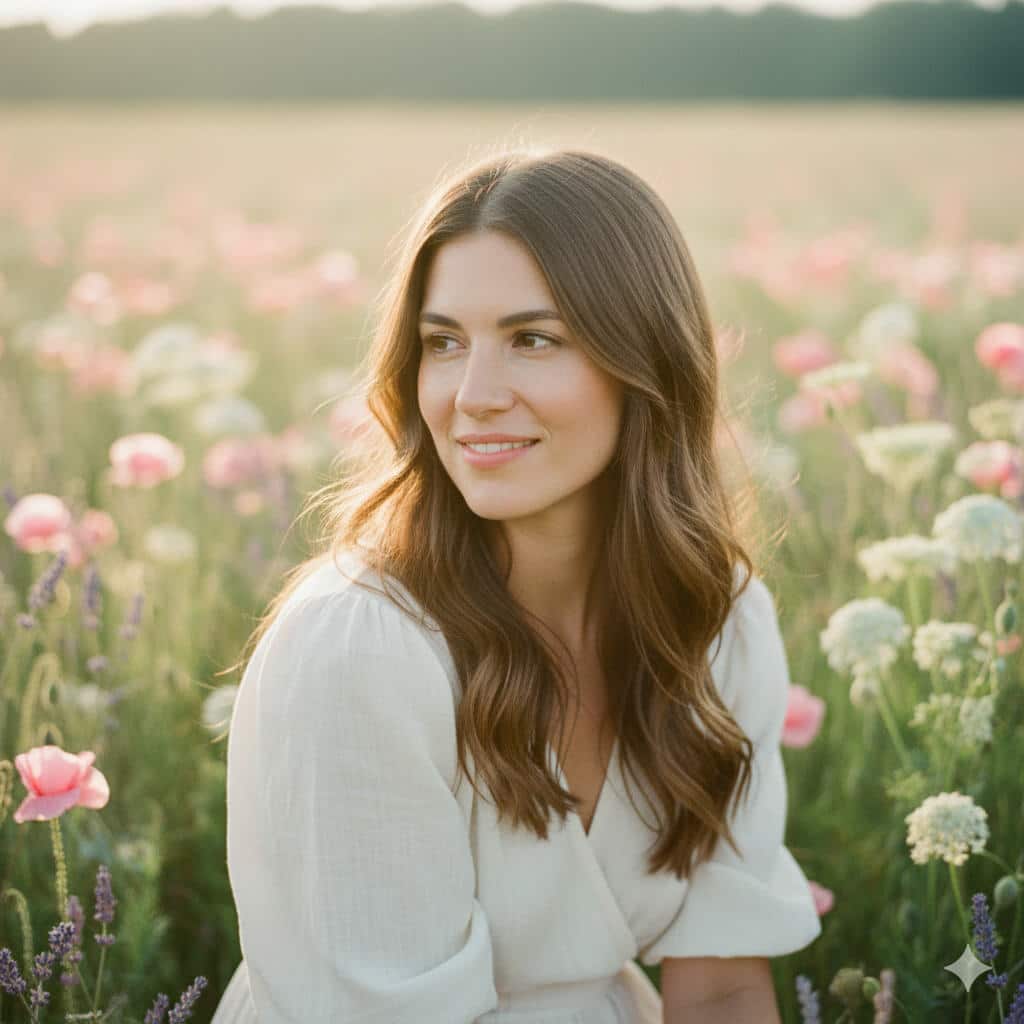
Transform this portrait into a soft pastel aesthetic photo of a woman with dreamy romantic quality perfect for lifestyle blogs and Instagram. Subject: woman in natural relaxed pose. Background: beautifully out-of-focus wildflower meadow in soft color palette—pink poppies, lavender stems, cream-colored Queen Anne's lace, all creating bokeh effect. Lighting: Warm golden hour backlight (one hour before sunset) creating natural rim lighting around hair and shoulders, gentle fill light on face from reflector or open sky. Skin: Subtle natural glow (not plastic), visible authentic texture, light freckles or natural features preserved. Style: Ethereal and romantic aesthetic, subtle film grain texture reminiscent of film photography, slight overexposure (+0.3 EV) for dreamy quality. Camera: 85mm f/1.8 portrait lens, shallow depth of field with creamy bokeh, subject tack-sharp with background melting away. Expression: Gentle, peaceful, authentic emotion. Output: Vertical 4:5 Instagram format, 1080×1350 pixels, lifestyle photography quality.
8. “Boss Mode” Founder Shot
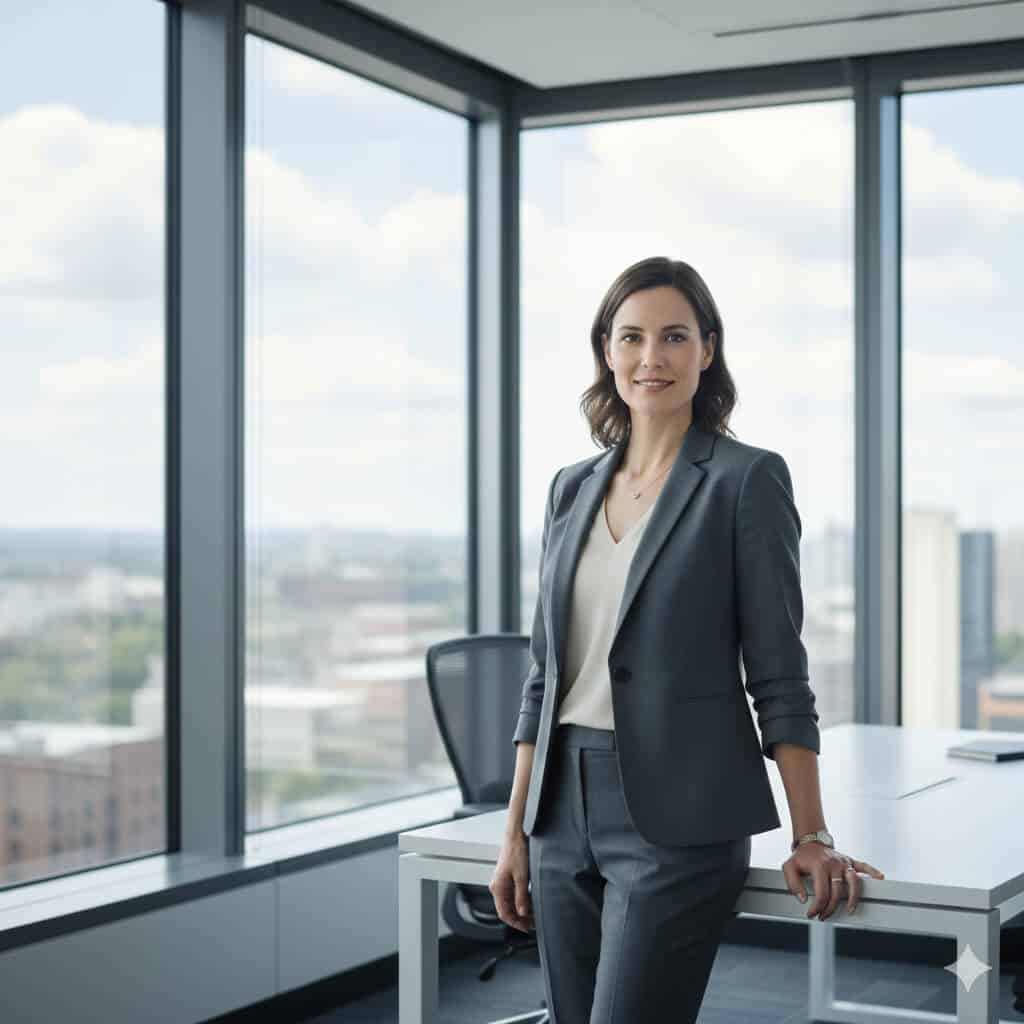
Create a confident corporate portrait of a woman technology executive or startup founder suitable for press releases, website hero sections, and LinkedIn banners. Subject: Professional woman in 30s-40s. Setting: Contemporary glass-walled corner office with floor-to-ceiling windows showing blurred city skyline visible through windows, modern minimalist furniture (white desk, ergonomic chair) subtly visible. Pose: Standing position with weight on back leg, arms relaxed at sides or one hand resting naturally on desk, body at slight angle to camera, direct eye contact conveying both authority and approachability. Outfit: Smart business casual—structured blazer in neutral tone (navy, charcoal, or camel) over simple top, minimal professional accessories. Style: Photorealistic, neutral professional color grading with slight blue-grey corporate tone, medium depth of field keeping subject sharp while background softly blurred showing context without distraction. Lighting: Natural window light as primary source supplemented with subtle fill light to prevent harsh shadows, even skin tones. Expression: Confident, competent, approachable—the "leader you'd want to work for" look. Output: Horizontal 16:9 format (1920×1080) for website hero sections and press materials, professional executive photography quality.
9. Festival Fashion with Artistic Makeup
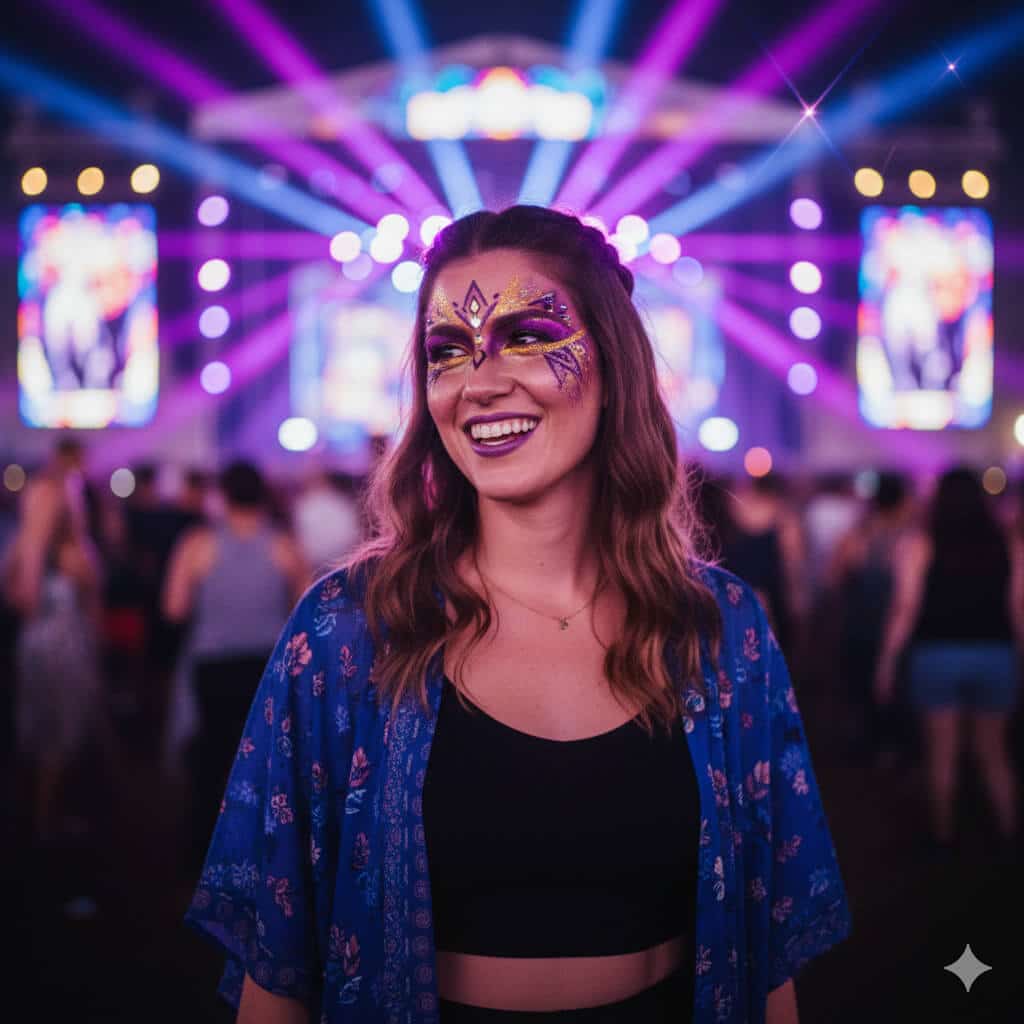
Transform this selfie into a vibrant festival photo of a woman with artistic makeup in energetic concert atmosphere. Subject: Woman with creative festival makeup. Details: Glitter or artistic face paint in bold complementary colors (purple and gold, blue and silver, or pink and teal), festival-appropriate styling with visible effort and artistry. Outfit: Festival fashion (crop top, flowing kimono, or unique festival wear). Background: Colorful stage lights in background creating bokeh effect—purple, blue, and magenta light rays crossing frame, blurred crowd creating energy and movement, string lights and festival atmosphere. Style: Energetic, high color saturation (vibrance +30), intentional lens flare from stage lights adding energy, natural bokeh circles from string lights and stage elements, slight motion blur in background suggesting movement and music. Composition: Close-up from shoulders up, subject slightly turned at 15-degree angle. Lighting: Multi-colored concert lighting on face, primary light from stage reflecting in eyes. Mood: Joy, freedom, celebration. Output: Square 1:1 format (2000×2000) for Instagram feed, festival photography aesthetic.
10. Editorial High-Fashion Beauty Portrait
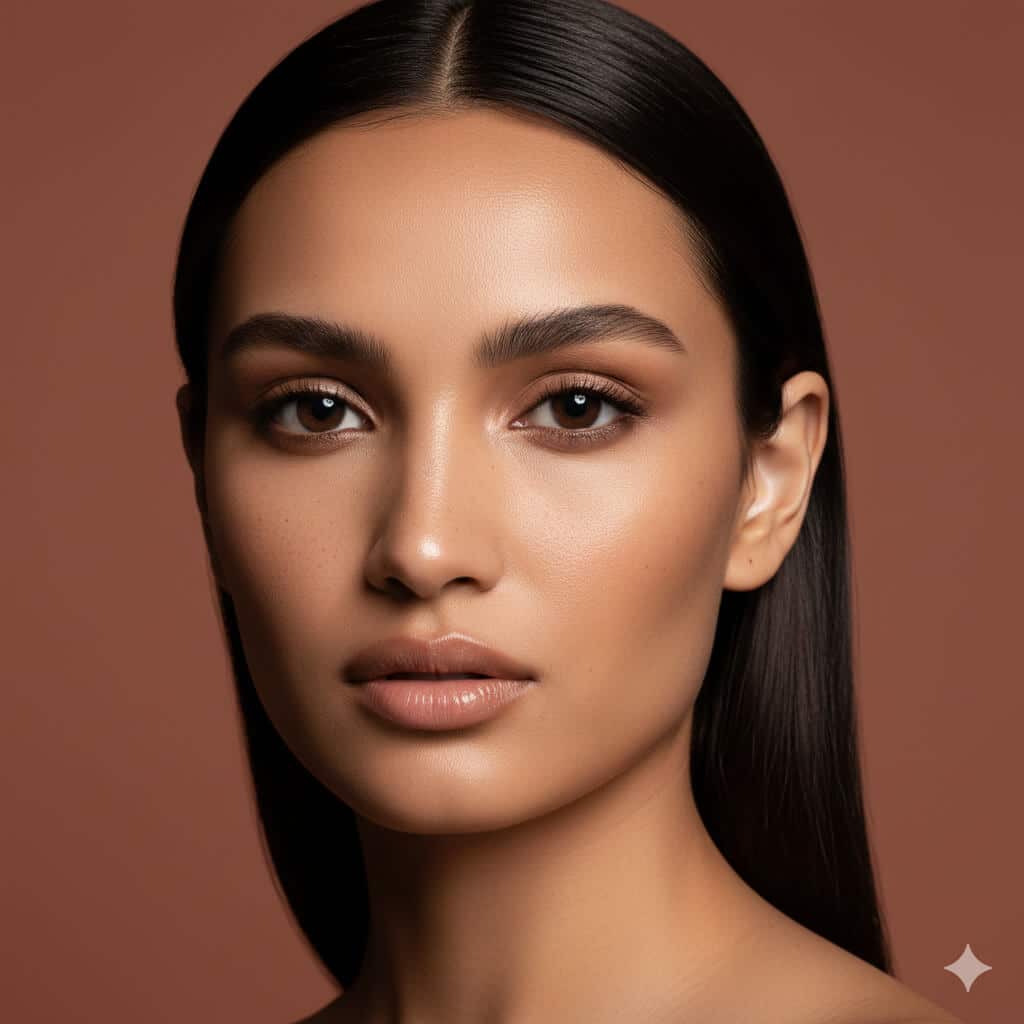
Create an editorial beauty portrait of a woman with high-end fashion photography aesthetic suitable for magazine beauty sections or cosmetics advertising. Subject: Woman with striking features. Background: Solid seamless backdrop in carefully chosen complementary tone to subject's skin—soft beige for warm skin tones, muted terracotta for olive skin, or cool grey for fair skin. Lighting: Beauty dish positioning (directly in front and slightly above, 15-degree downward angle) creating signature beauty lighting—soft but directional light highlighting cheekbone structure, creating defined but flattering shadows under cheekbones and jawline, catchlights positioned at 10 and 2 o'clock in eyes. Style: Clean high-fashion magazine beauty editorial, sharp precise detail, visible authentic catchlights in eyes creating dimension and life. Skin: Minimal retouching maintaining natural skin texture, subtle pores visible, freckles or beauty marks preserved. Makeup: Clean professional beauty look emphasizing features. Camera: 105mm macro equivalent lens, f/4.5 aperture balancing sharpness with subtle background softness, precise focus on eyes. Expression: Neutral or subtle, allowing features to be primary focus. Output: Vertical 4:5 format (1600×2000) for editorial use, fashion magazine beauty photography standard.
11. Cozy Hygge Lifestyle Portrait
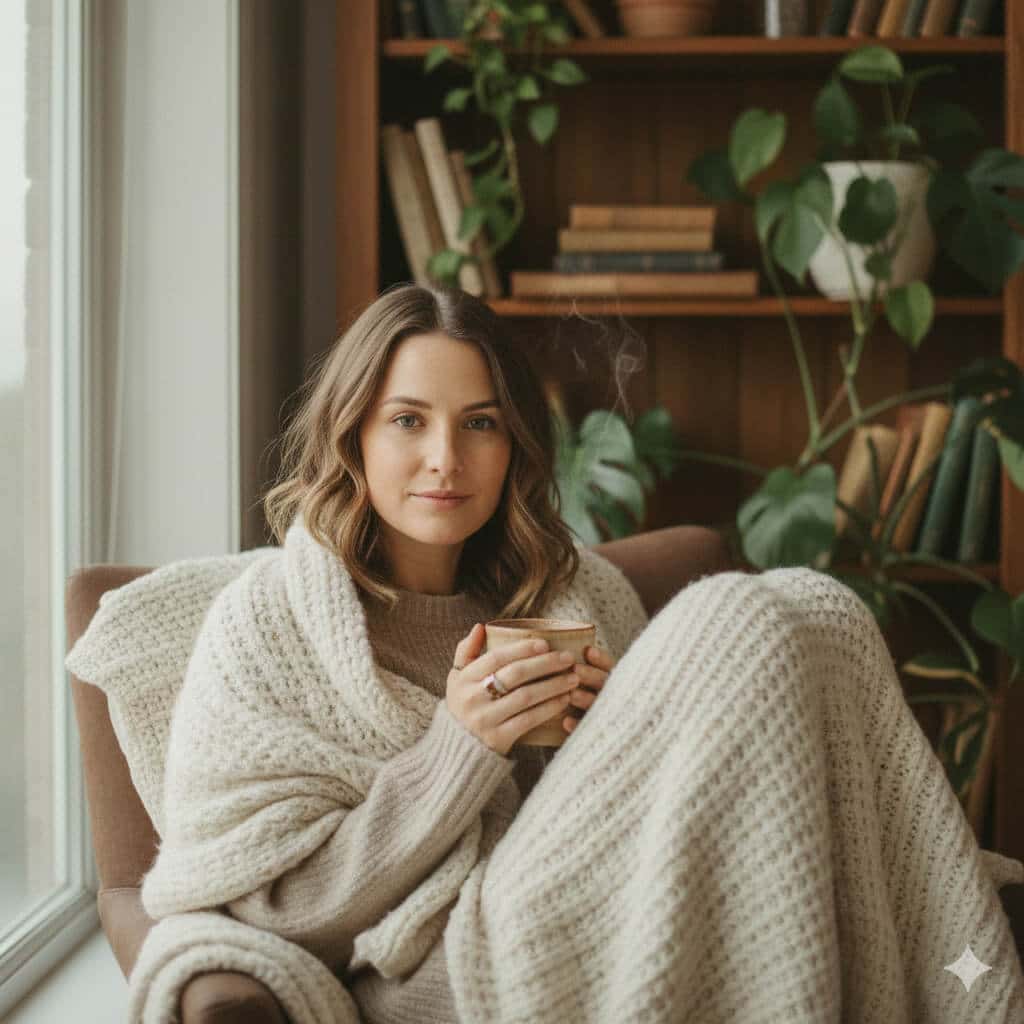
Transform this photo into a cozy lifestyle portrait of a woman in a peaceful indoor setting with Scandinavian hygge aesthetic for lifestyle blogs or wellness brands. Scene: Woman seated comfortably by large window with soft natural diffused light, holding handmade ceramic mug of coffee or tea (visible steam rising), soft chunky knit blanket in cream or grey tones draped over shoulders, wooden bookshelf with plants (pothos, monstera) and vintage books in soft focus background. Styling: Comfortable oversized sweater in neutral tone, hair naturally styled (loose waves or casual bun), minimal makeup, relaxed authentic expression. Style: Warm color palette with slight desaturation (-15% saturation) for muted Nordic tones, natural window lighting only (no artificial lights), shallow depth of field (f/2.2) with soft bokeh on background elements. Mood: Calm, contemplative, self-care, peaceful morning routine. Details: Visible texture in knit blanket, steam from mug catching light, soft shadows, authentic unposed feeling. Color temperature: Warm (4500K) creating cozy atmosphere. Output: Square 2000×2000 or 4:5 vertical (1080×1350) for lifestyle blog or Instagram, hygge lifestyle photography aesthetic.
Nano Banana Prompts for Girls & Boys (Kid-Safe, Cute & Creative)
12. Cartoon Princess Character for Girls
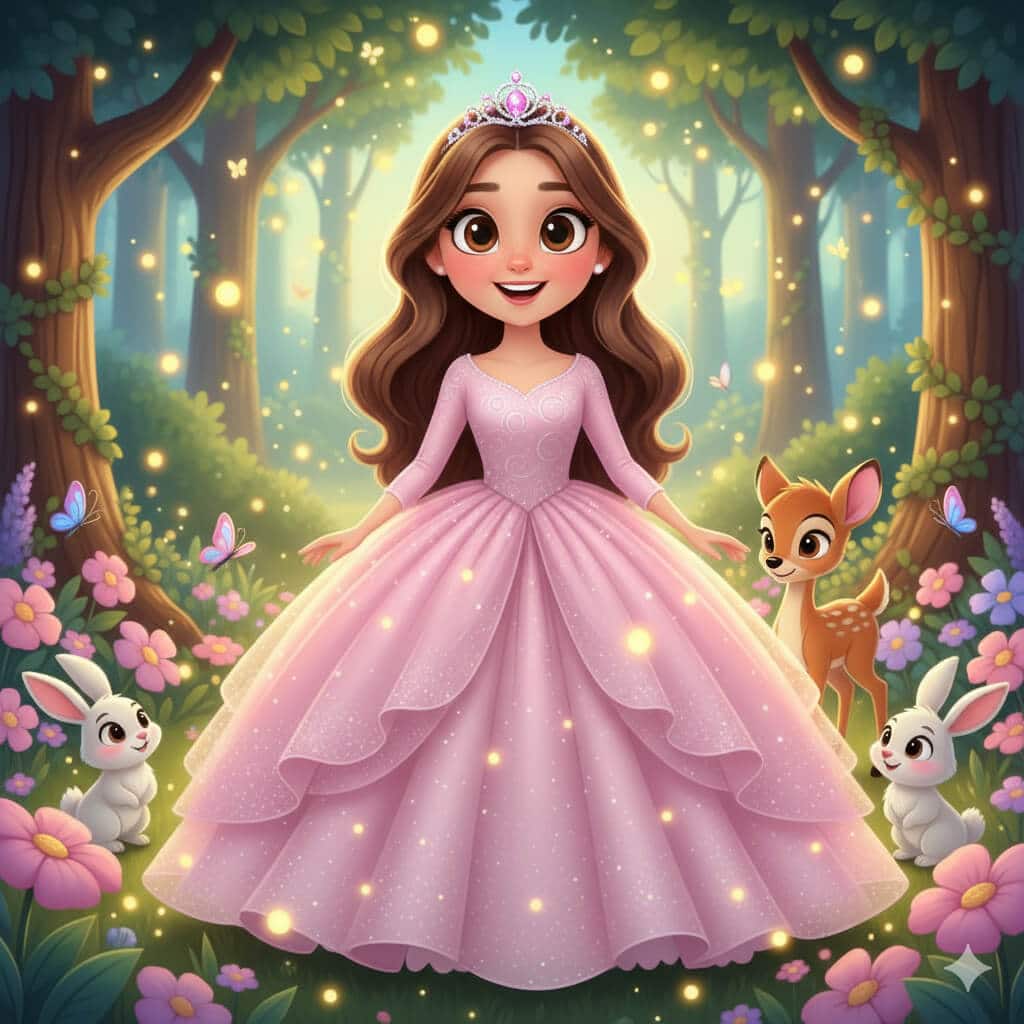
Transform this child's photo into an adorable cartoon princess character with completely age-appropriate and kid-safe styling. Subject: Young girl (preserve age appearance exactly). Character style: Cute cartoon princess with exaggerated features appropriate for children's animation. Outfit: Sparkly ball gown in pastel colors (soft pink, lavender, or sky blue) with layers of tulle, tiny jeweled crown or tiara. Background: Magical enchanted forest with soft glowing fireflies (warm yellow lights), friendly woodland creatures (rabbits, deer, butterflies), large friendly trees, flower gardens. Style: Vibrant saturated colors, large expressive eyes (anime/Disney-inspired but age-appropriate), simplified rounded shapes, kid-friendly aesthetic, colorful and joyful. Mood: Magical, innocent, empowering for young girls. Lighting: Soft magical glow, warm and inviting. Constraints: Absolutely no makeup on child, no adult styling elements, maintain child-appropriate proportions and innocent styling, no revealing clothing, maintain natural child body proportions. Output: Vertical format suitable for printing or digital sharing, children's entertainment aesthetic similar to Disney Jr. or Pixar shorts.
13. Fairytale Storybook Illustration for Girls
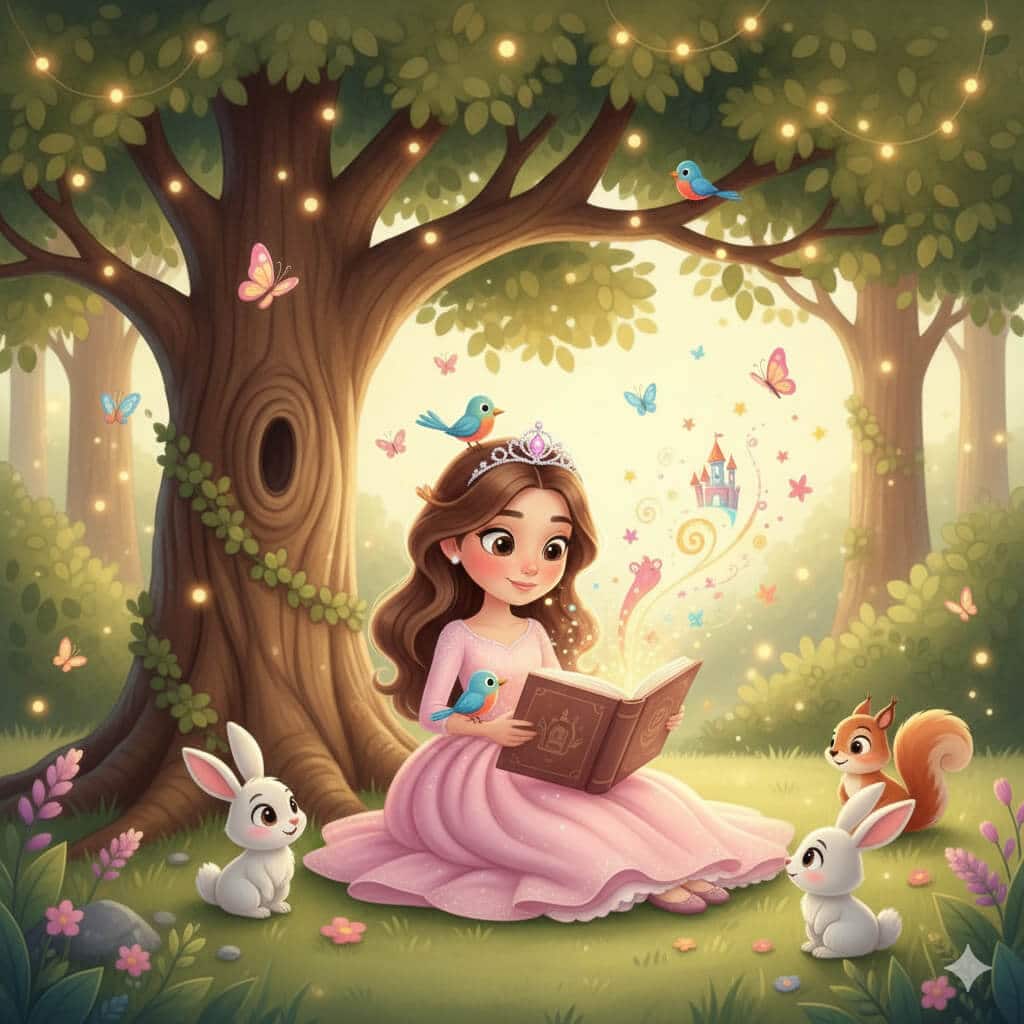
Create a children's storybook illustration of this girl reading a book under a large oak tree with whimsical educational aesthetic. Scene: Young girl sitting on grass beneath large friendly oak tree with spreading branches and detailed leaves, absorbed in reading a glowing storybook. Magical elements: Small friendly animals gathering around (fluffy rabbits, colorful songbirds, curious squirrel), magical stars and sparkles floating up from the book pages suggesting imagination coming to life, butterflies, gentle fairy lights in tree branches. Style: Watercolor children's book illustration art with soft blended edges, warm inviting colors (earth tones, soft greens, warm sunset oranges), painterly brushstroke texture, storybook aesthetic similar to classic children's literature. Mood: Whimsical, educational, encouraging reading and imagination. Lighting: Warm afternoon sunlight filtering through tree leaves creating dappled light. Clothing: Age-appropriate casual comfortable outfit. Constraints: Innocent, educational, no scary elements. Output: Landscape format (16:9 or 4:3) suitable for picture book layout or classroom display, professional children's book illustration quality.
14. Superhero Comic Poster for Boys
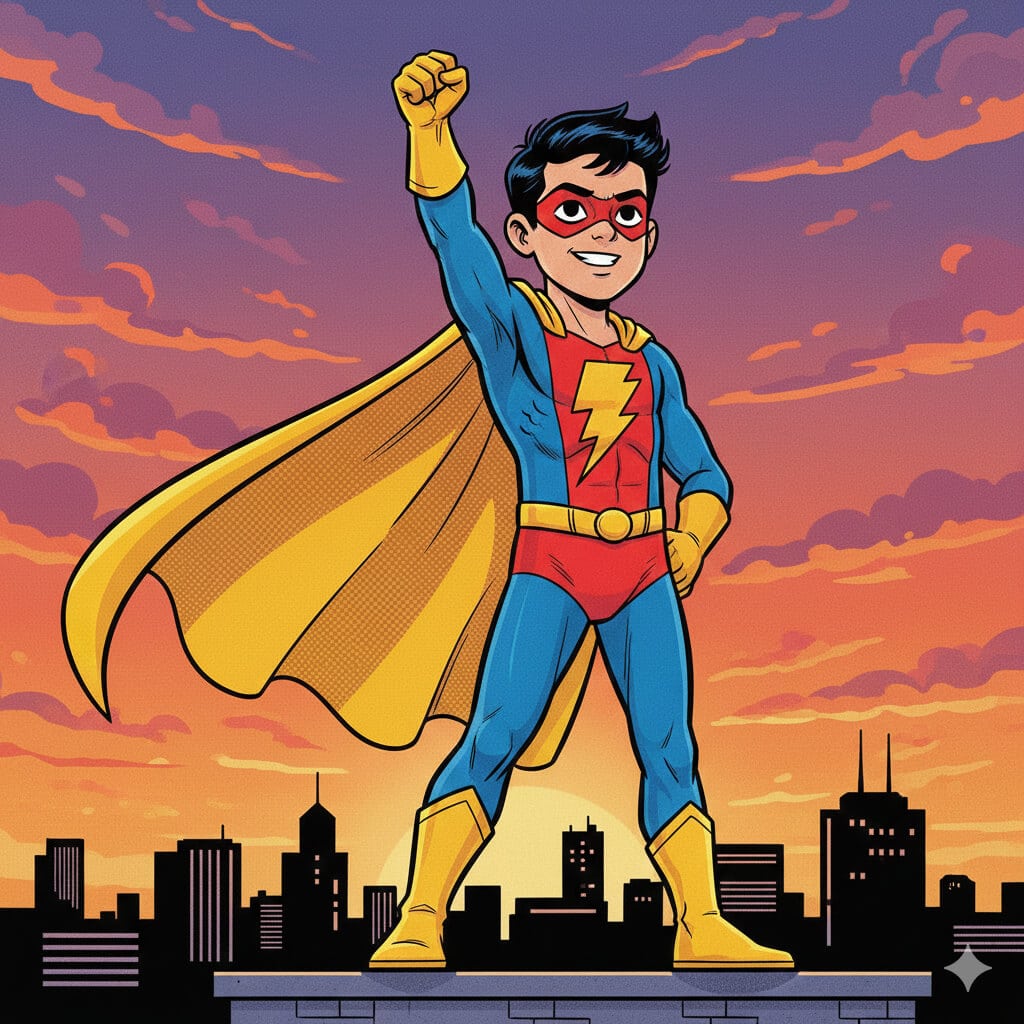
Transform this boy into a kid-friendly comic book superhero character with action-packed but safe aesthetic. Subject: Young boy (preserve age exactly). Superhero concept: Original superhero character (not copying existing trademarked characters). Outfit: Colorful superhero suit using primary colors (red and blue, or green and yellow), safe design with cape flowing dramatically, simple unique emblem on chest (star, lightning bolt, shield shape), mask covering eyes only. Pose: Heroic action pose showing confidence and courage—fist raised, standing tall, cape billowing behind—but no violent actions. Background: Stylized city skyline during dramatic sunset with purple and orange clouds, tall buildings in silhouette, safe urban environment. Style: Bold comic book aesthetic with cel-shading, visible halftone dot texture in shadows, vibrant saturated colors, dynamic composition showing movement without violence, black ink outlines. Mood: Empowering, brave, kid-appropriate heroism. Constraints: Absolutely no weapons, no violence or fighting, kid-safe superhero action only (flying, running, heroic poses), age-appropriate body proportions. Output: Vertical poster format (2:3 ratio, 2000×3000 pixels) suitable for child's room decoration or party materials.
15. Sports Champion Poster for Boys
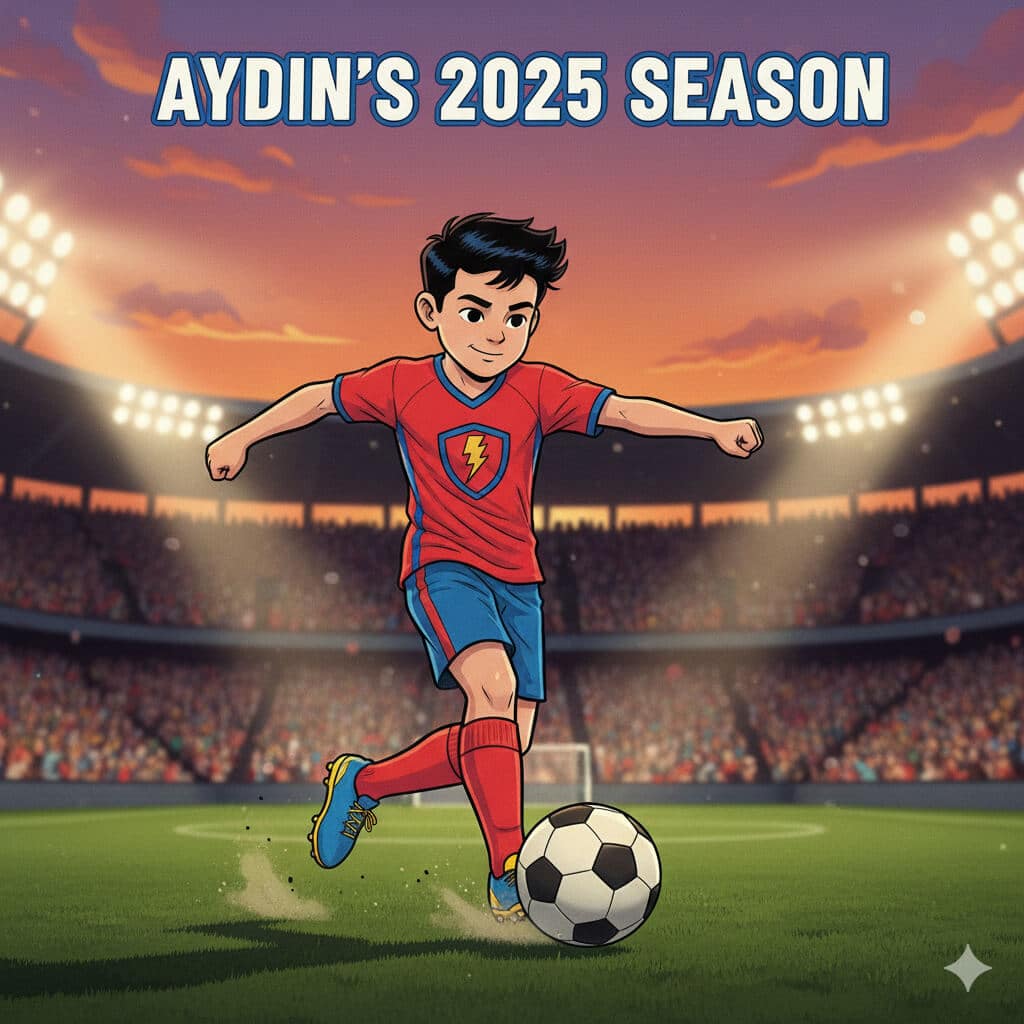
Create a sports hero poster from this child's photo with inspiring athletic aesthetic suitable for youth sports programs. Sport: [Cricket, football/soccer, basketball, baseball—specify preferred]. Subject: Young athlete (maintain exact age appearance). Scene: Illuminated sports stadium at evening with bright floodlights creating dramatic lighting, blurred cheering crowd in stands showing support and excitement, action captured mid-game moment. Player wearing: Appropriate sports uniform for specified sport, visible team colors, protective gear if applicable (helmet, pads, shin guards depending on sport). Pose: Dynamic action pose specific to sport—cricket: mid-bowl or batting stance; football: about to kick or dribbling; basketball: shooting or dribbling; baseball: pitching or batting. Style: Realistic sports photography with slightly enhanced dramatic lighting for poster effect, motion blur on background elements only (subject remains perfectly sharp), saturated team colors. Mood: Inspiring, athletic achievement, youth sports spirit. Lighting: Stadium floodlights from multiple angles, warm evening sky. Constraints: Age-appropriate proportions, realistic youth athletic ability (no professional adult athlete body), safe sports action only. Timeline text: "[Name]'s 2025 Season" Output: Vertical poster format (24×36 inches proportions, 2400×3600 pixels at 100 DPI), youth sports photography quality suitable for printing.
16. Back-to-School Celebration Illustration

Generate a cheerful back-to-school themed image from this child's photo with optimistic educational aesthetic perfect for classroom displays or family celebrations. Subject: Child with excited expression. Elements: Colorful new backpack (red, blue, or rainbow pattern) on shoulders, chalkboard in background with hand-drawn chalk doodles (books, stars, ABC letters, apples, math symbols, smiley faces), stack of bright new notebooks in primary colors, sharpened pencils in holder, possibly globe or learning materials. Scene setting: Classroom or study space feeling welcoming and exciting. Style: Bright optimistic colors, slightly cartoonish aesthetic with clean simple shapes and bold outlines (similar to educational material illustration), easy-to-read visual hierarchy, contemporary children's educational design. Mood: Excited and positive about learning, first day of school energy, educational enthusiasm. Lighting: Bright even lighting suggesting morning freshness. Constraints: Age-appropriate, educational focus, encouraging learning. Text (optional): "Ready to Learn!" or "Back to School 2025" in friendly rounded font. Output: Square format (2000×2000) suitable for social media, classroom display, or personalized back-to-school materials.
17. Fantasy Animal Adventure (Safe for All Kids)
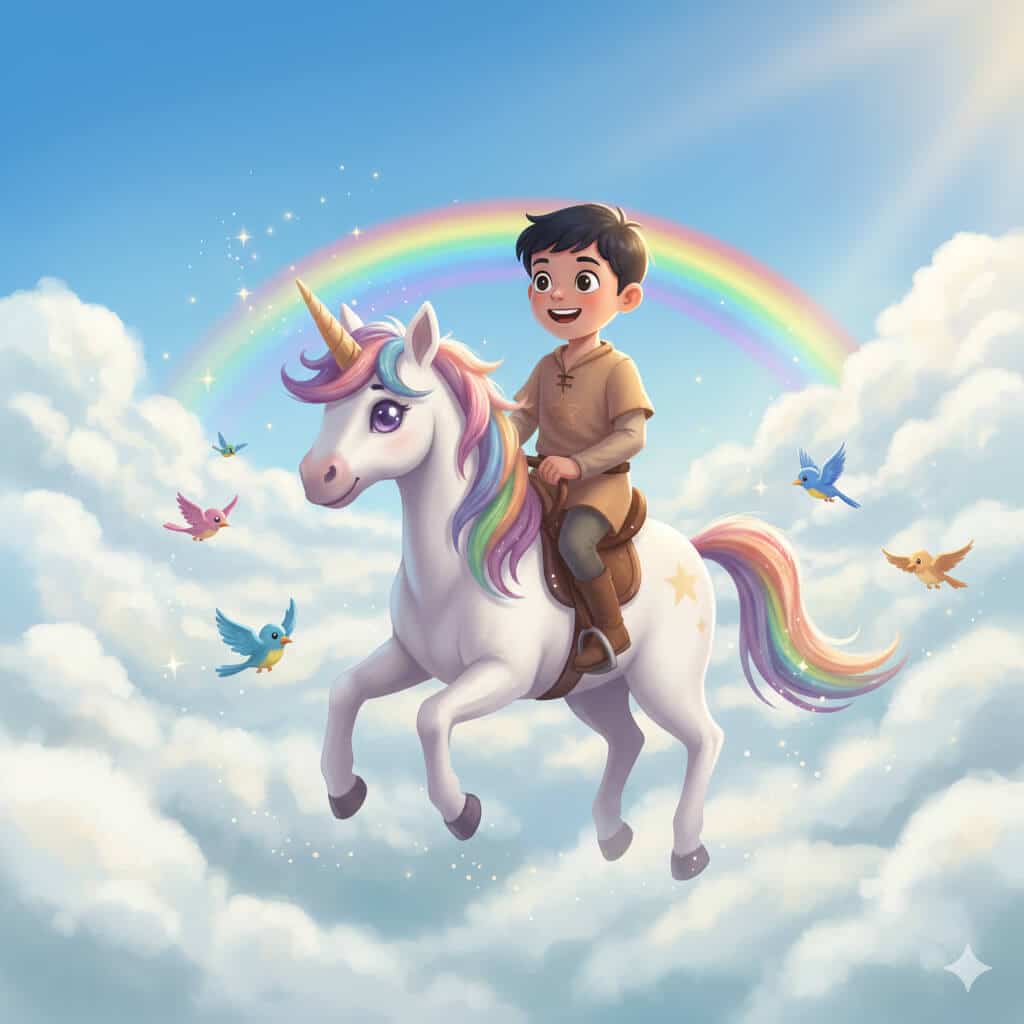
Transform this child into a character gently riding their favorite animal through a magical sky with whimsical safe fantasy aesthetic. Animal selection: [Horse, unicorn, friendly dragon, large bird, dolphin, or other animal—specify preference]. Animal appearance: Keep realistic proportions and anatomy but with friendly expressive face showing gentle, protective nature—large kind eyes, soft features, no scary elements. Subject: Child dressed in comfortable adventure outfit appropriate for the theme. Scene: Floating through big fluffy white cumulus clouds in bright blue sky, rainbow arc visible in distance adding magic, warm sun rays breaking through clouds creating magical atmosphere, birds flying alongside. Style: Whimsical fantasy art with painterly quality (digital painting), soft edges and dreamy blending, vibrant but not overwhelming colors. Mood: Safe magical adventure, wonder and imagination, empowering fantasy play. Lighting: Bright daylight from above-right creating warm cheerful atmosphere, soft shadows. Constraints: Absolutely no scary elements, no dangerous situations, no dark themes, completely kid-safe fantasy adventure, protective and nurturing relationship between child and animal. Output: Landscape format (16:9, 3000×1688) for framing or digital background, professional children's fantasy illustration quality suitable for children's books or room decoration.
Nano Banana Prompts for Couples
18. Golden Hour Beach Romance
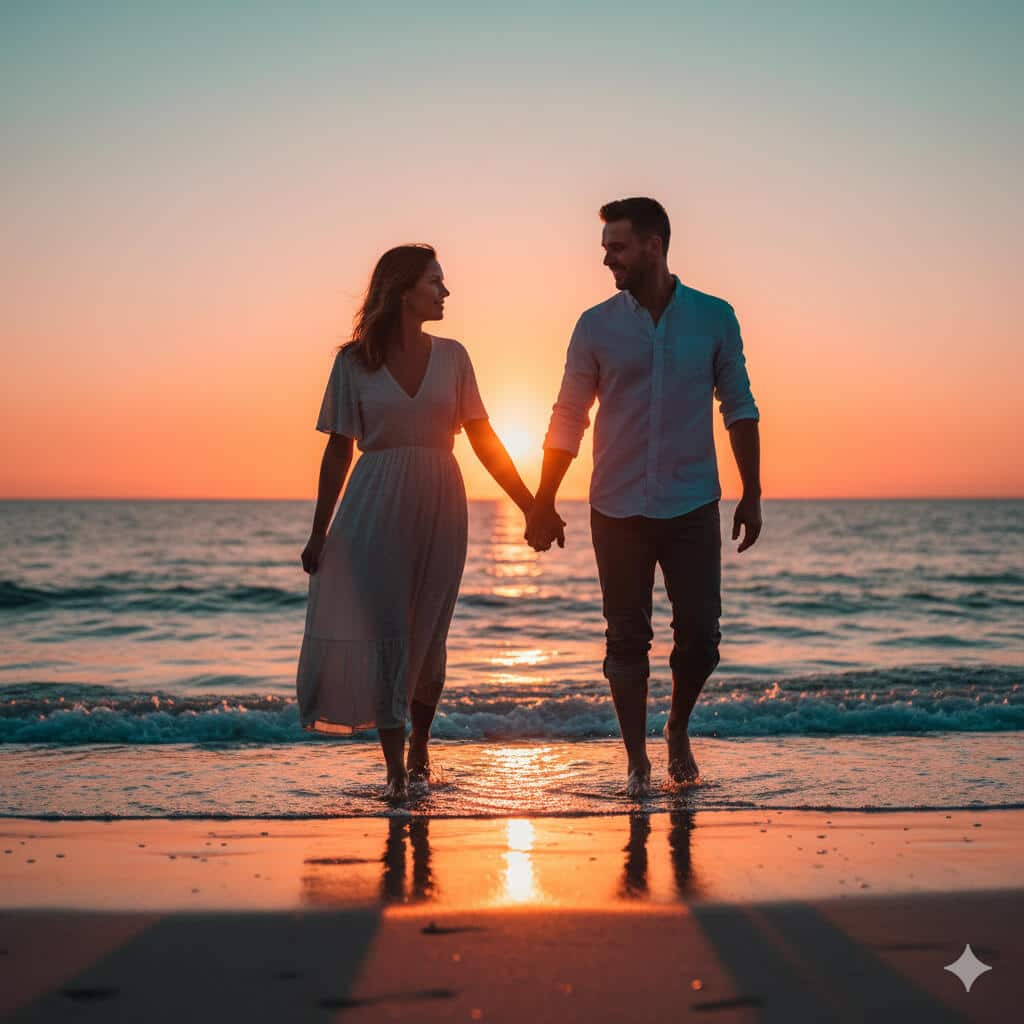
Transform this couples photo into a romantic sunset beach scene with cinematic quality perfect for anniversary celebrations or engagement announcements. Subjects: Couple showing authentic connection. Pose: Walking hand-in-hand along water's edge with small waves lapping at their feet, natural interaction and body language showing comfort and intimacy, not stiff or overly posed. Environment: Beach setting with wet sand reflecting warm colors, small waves creating texture, distant horizon line. Lighting: Warm golden sun positioned very low on horizon (15 minutes before sunset) creating dramatic backlight and rim lighting around couple's silhouettes, warm orange and pink tones throughout sky (color temperature 3000K), soft shadows. Style: Cinematic color grading with orange and teal palette, soft focus on distant background with couple remaining sharp, photorealistic skin tones, natural expressions showing genuine emotion. Details: Bare feet in wet sand, casual beach attire (flowing dress, rolled-up pants), wind gently moving clothing and hair. Constraints: No added text, no artificial props, maintain natural romance without staged appearance. Output: Horizontal 3:2 ratio (3000×2000) for printing or framing, romantic beach photography quality suitable for engagement or anniversary use.
19. Elegant Pre-Wedding Garden Portrait
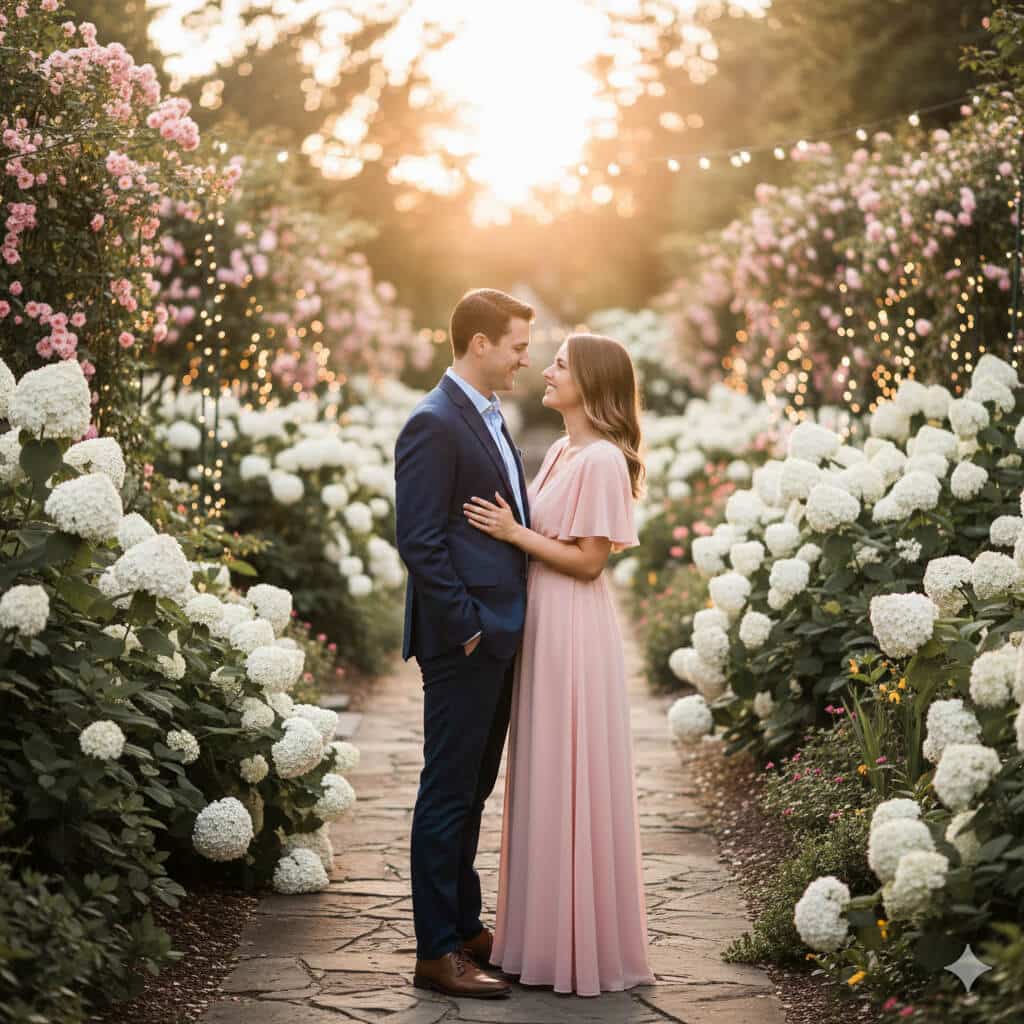
Create an elegant pre-wedding portrait in romantic garden setting suitable for engagement announcements, save-the-date cards, or wedding website hero images. Subjects: Engaged couple in semi-formal attire. Environment: Lush curated garden with blooming roses and hydrangeas, strung fairy lights creating bokeh in background (even though daytime), natural stone path or elegant garden architecture visible, perhaps gazebo or garden bench. Outfits: Semi-formal coordinated styling—flowing dress in soft color (blush, champagne, or soft blue) paired with tailored blazer or suit in complementary tone, cohesive but not overly matched. Pose: Natural intimate positioning showing connection—standing close, gentle touch, looking at each other or toward camera, authentic expressions of happiness. Style: Soft dreamy aesthetic with slight desaturation (-10% saturation) for romantic timeless feel, shallow depth of field (f/1.8) keeping couple sharp with beautifully blurred bokeh background, fairy lights creating circular bokeh. Lighting: Golden hour natural light (late afternoon) creating warm romantic glow, soft directional light on faces. Mood: Romantic, elegant, timeless, suitable for formal wedding materials. Output: Vertical 4:5 format (2000×2500) for save-the-date cards and social media, or horizontal 16:9 for website headers, professional engagement photography quality.
20. Minimalist Contemporary Couple Portrait
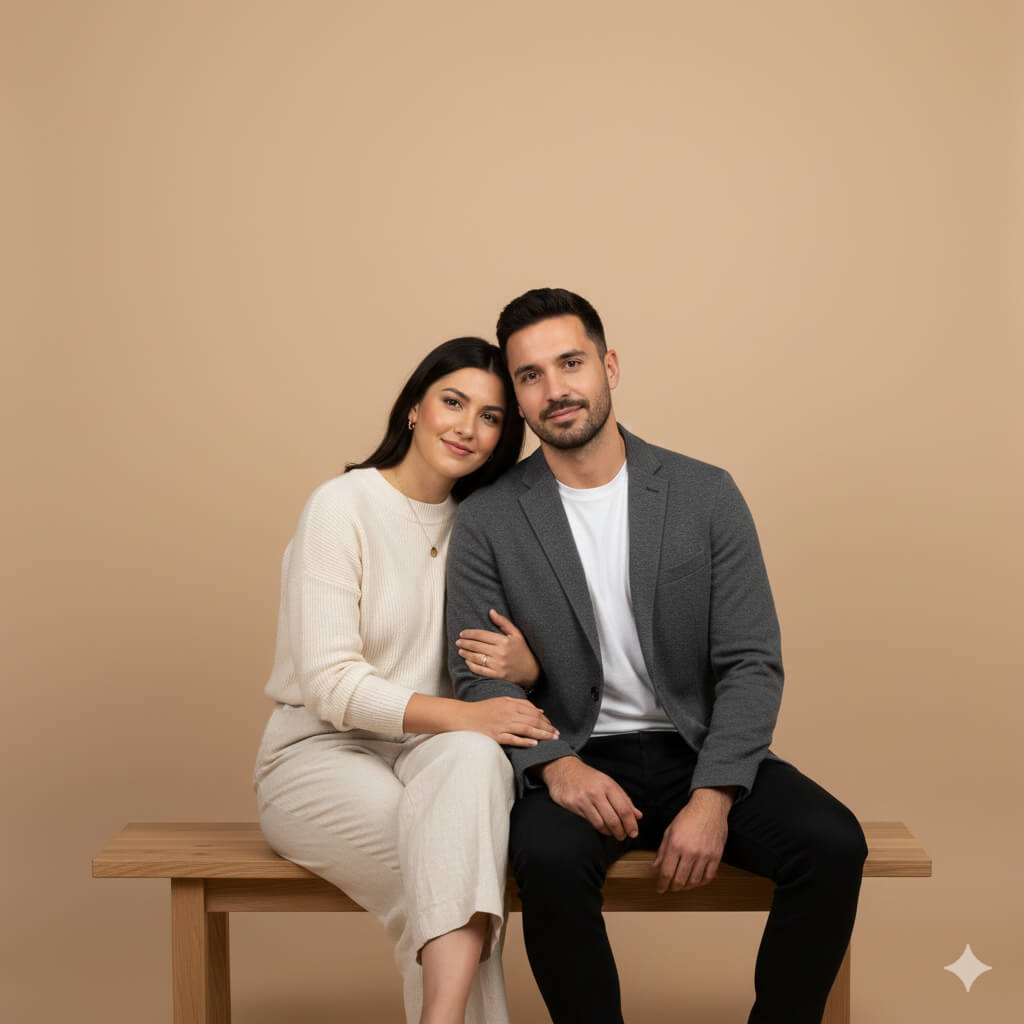
Generate a clean minimalist studio portrait of a couple with modern aesthetic perfect for contemporary home framing or modern wedding materials. Subjects: Couple showing comfortable authentic connection. Setting: Minimal studio environment with simple modern furniture (single chair or bench with clean lines), no distracting elements. Background: Solid neutral seamless backdrop in sophisticated tone (warm beige #E8DCC4, soft grey #C8C8C8, or charcoal #4A4A4A depending on couple's skin tones and styling). Pose: Seated together on simple furniture showing natural closeness—one seated, one standing behind with hand on shoulder; or both seated close together—authentic positioning not stiff. Styling: Contemporary clothing in neutral coordinated tones (blacks, whites, beiges, soft earth tones), minimal accessories, clean modern aesthetic. Lighting: Soft diffused studio lighting with no harsh shadows, even illumination across subjects, subtle modeling showing dimension without drama, professional portrait lighting. Style: Contemporary minimalist portrait, clean composition emphasizing subjects and their connection, timeless quality. Expression: Genuine subtle emotions, comfortable in each other's presence. Output: Square format (2000×2000) or 4:5 vertical suitable for modern home framing or clean website design, professional contemporary portrait photography matching current minimalist interior design trends.
21. Nostalgic Polaroid Memory Collage
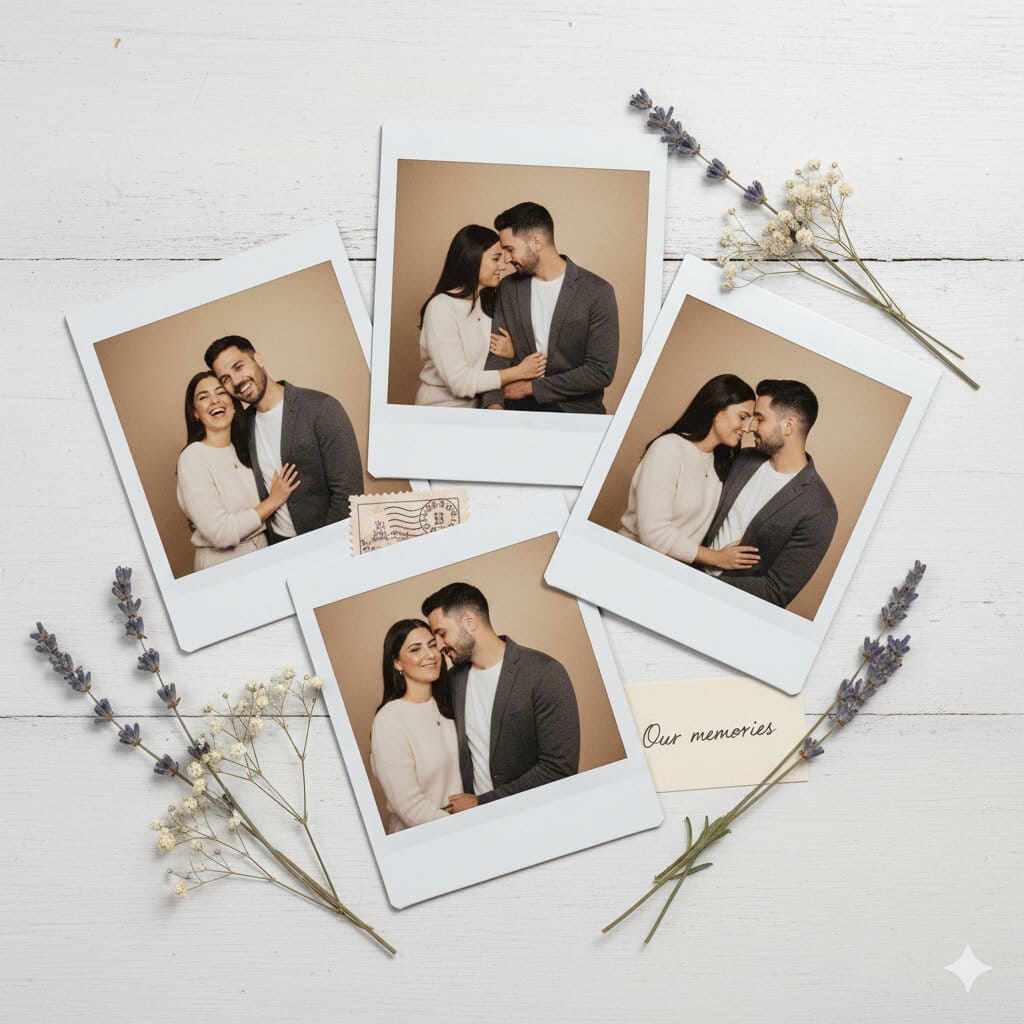
Transform these couple photos into a nostalgic collage of 4 Polaroid-style instant photos arranged naturally with vintage aesthetic perfect for anniversary posts or printed keepsakes. Photos: 4 different candid moments showing various expressions and genuine interactions (laughing together, quiet moment, playful interaction, romantic close-up). Polaroid styling: Each photo should have authentic instant film appearance with white borders (classic Polaroid white frame approximately 1cm thick on sides and bottom, 1.5cm on top), slight color shift and warm vintage tones characteristic of instant film (subtle yellow-orange cast), natural subtle grain texture. Arrangement: Photos overlapping slightly on neutral surface (white weathered table, cream linen backdrop, or soft grey surface), casual natural arrangement not perfectly aligned (slight rotation angles between 2-8 degrees), creating organic memory board feeling. Additional elements: Scattered thoughtfully—2-3 dried flowers (lavender, baby's breath), perhaps vintage postage stamp, small handwritten note partially visible saying "Our memories" in cursive. Style: Realistic instant film aesthetic matching Polaroid 600 or SX-70 film characteristics, warm vintage mood, slightly faded but preserved memories feeling. Lighting: Soft natural overhead lighting creating subtle shadows from overlapping photos. Output: Flat lay composition, square 2000×2000 format for social media or horizontal 3000×2000 for printing, vintage photography collage aesthetic perfect for anniversary celebrations or relationship milestones.
22. Travel Destination Couple Portrait
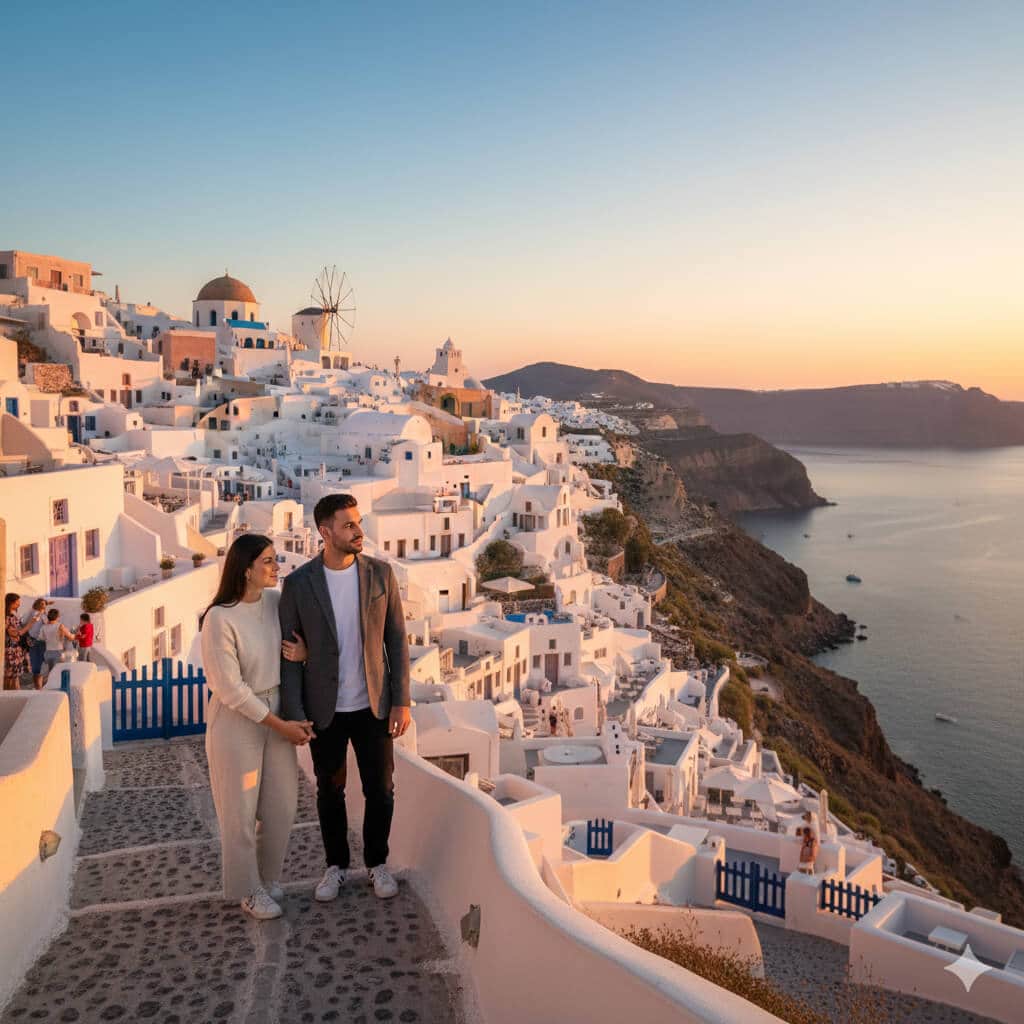
Create a travel photography image of this couple positioned at an iconic landmark showing both subjects and famous location with professional travel photography composition. Location: [Eiffel Tower Paris, Taj Mahal India, Santorini Greece, or user-specified destination]. Subjects: Couple in travel attire appropriate for location and weather. Composition: Wide-angle environmental portrait (35mm equivalent focal length) showing landmark prominently while keeping couple as human interest element—couple positioned in lower third or right/left third using rule of thirds, landmark rising behind them creating sense of place and scale, both clearly visible and in focus. Style: Vibrant travel postcard aesthetic with rich saturated colors matching destination character (romantic sunset tones for Paris, brilliant whites and blues for Santorini, warm golden tones for Taj Mahal), sharp detail throughout maintaining both subjects and landmark in focus (f/8-f/11 aperture equivalent). Pose: Natural travel moment—looking at landmark together, pointing, or turning back toward camera showing excitement, authentic travel interaction not overly posed. Lighting: Natural daylight appropriate for location—golden hour for maximum visual appeal when possible, showing landmark in best light. Details: Other tourists subtly visible in background adding authenticity, location-appropriate elements (tourists, local architecture, natural environment). Constraints: Preserve accurate facial features from reference photo, no text overlays, realistic integration with landmark setting maintaining architectural accuracy. Output: Horizontal format (16:9, 1920×1080 for digital sharing or 3:2, 3000×2000 for printing), professional travel photography quality suitable for travel blogs, social media, or printed photo books.
Nano Banana Saree Prompts (Traditional & Fashion)
23. Classic Silk Saree Traditional Portrait
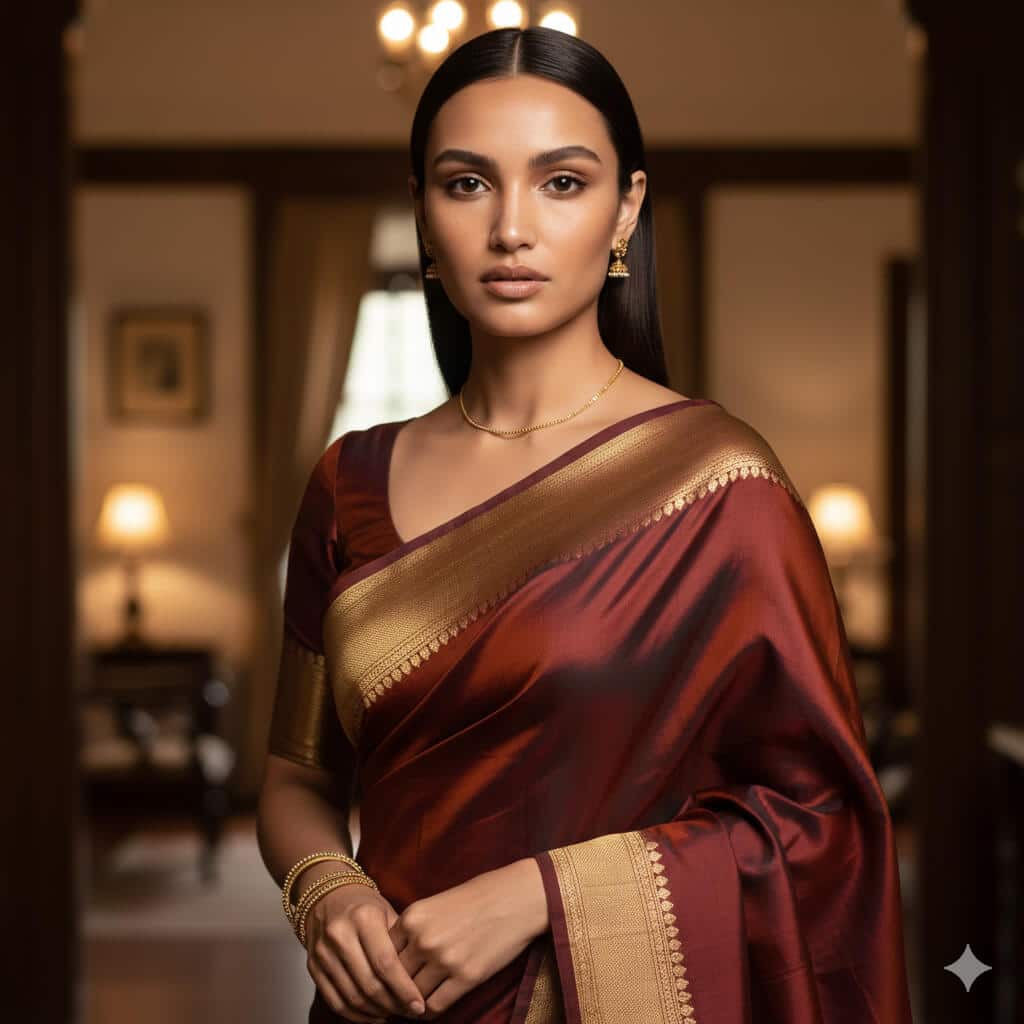
Transform this portrait into a traditional saree photoshoot of the same woman. Outfit: luxurious silk saree with an elegant woven border (Banarasi/Kanjeevaram-inspired), matching blouse with neat tailoring, pleats clean and symmetrical, pallu draped naturally over shoulder. Jewelry: subtle real gold jewelry (small jhumkas, thin chain, 6–8 bangles), minimal makeup, natural skin texture preserved. Background: softly blurred warm indoor setting (heritage home vibe), wooden tones and soft lamps in the distance. Lighting: soft window light from a 45-degree angle with gentle shadows, warm color temperature (4300K). Camera look: 85mm portrait lens, f/2.8 for creamy background blur, focus tack-sharp on eyes. Style: photorealistic, rich but natural colors, soft vignette. Constraints: preserve exact facial features, skin texture (pores visible), no face reshaping, no heavy smoothing, no extra jewelry, no text/watermarks. Output: vertical 4:5, 1080×1350.
24. Bridal Saree Look
Transform this image into a high-end bridal saree portrait while preserving the woman’s exact identity and facial features. Outfit: deep red or maroon bridal saree with intricate embroidery and zari work, crisp pleats, pallu detailed and neatly arranged. Jewelry: full bridal set (maang tikka, heavy necklace, earrings, bangles), realistic gold tone with gemstones; add visible mehendi on hands with clean patterns (no distorted fingers). Background: palace-style interior with warm ambient lights, softly blurred arches and chandeliers, elegant and cinematic. Lighting: warm key light from front-left, subtle rim light for separation, soft shadows, no harsh glare on jewelry. Camera: 85mm, f/2.2, focus on eyes and jewelry detail. Style: cinematic color grading (warm tones, slight desaturation), high detail suitable for print. Constraints: no face change, no plastic skin, no extra fingers, no logos/text/watermarks. Output: vertical 4:5, 1080×1350 (or 2000×2500 for print).
25. Contemporary Saree Fashion Editorial
Create a high-fashion editorial photo of the same woman wearing a modern minimalist saree. Outfit: monochrome saree (ivory/black/steel grey) with clean drape, structured blouse with sharp tailoring, minimal jewelry (one statement earring or cuff). Setting: modern studio with geometric set pieces (rectangles, arcs), clean background with subtle depth. Lighting: strong directional light from the side creating crisp shadows and editorial contrast; add a soft fill to keep skin tones realistic. Camera look: 50mm fashion portrait, f/4 for sharpness across face and outfit, magazine-style framing (3/4 body). Style: fashion magazine cover aesthetic, high contrast, premium texture detail in fabric, no AI gloss. Constraints: preserve facial features, realistic hands, no text/watermarks/logos. Output: vertical 4:5, 1080×1350, high detail.
26. Street Style Saree
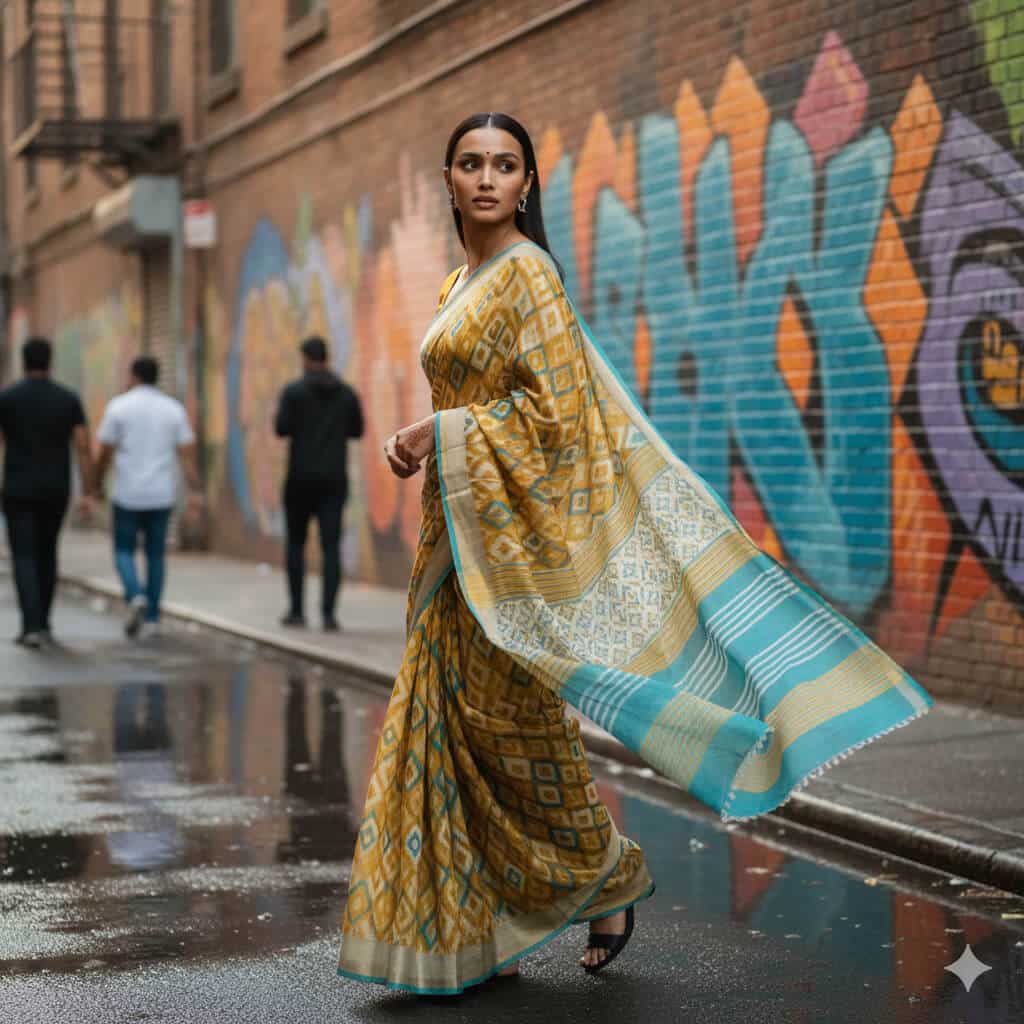
Transform this photo into a candid street-style portrait of the same woman wearing a saree in an urban city lane. Outfit: lightweight cotton/linen saree in modern color (mustard/teal/white) with casual blouse, comfortable styling, natural movement in fabric. Background: colorful wall art or graffiti mural, wet pavement or street texture, a few people blurred in the distance for realism. Lighting: natural daylight (late afternoon), soft shadows, realistic skin tones. Camera: 35mm street photography look, f/2.8, slight motion in background but subject sharp, documentary vibe. Pose: mid-walk or turning back slightly, candid expression. Constraints: keep identity exact, no beauty filter, no text/watermarks, no distorted fingers. Output: vertical 4:5, 1080×1350.
27. Festive Saree Celebration
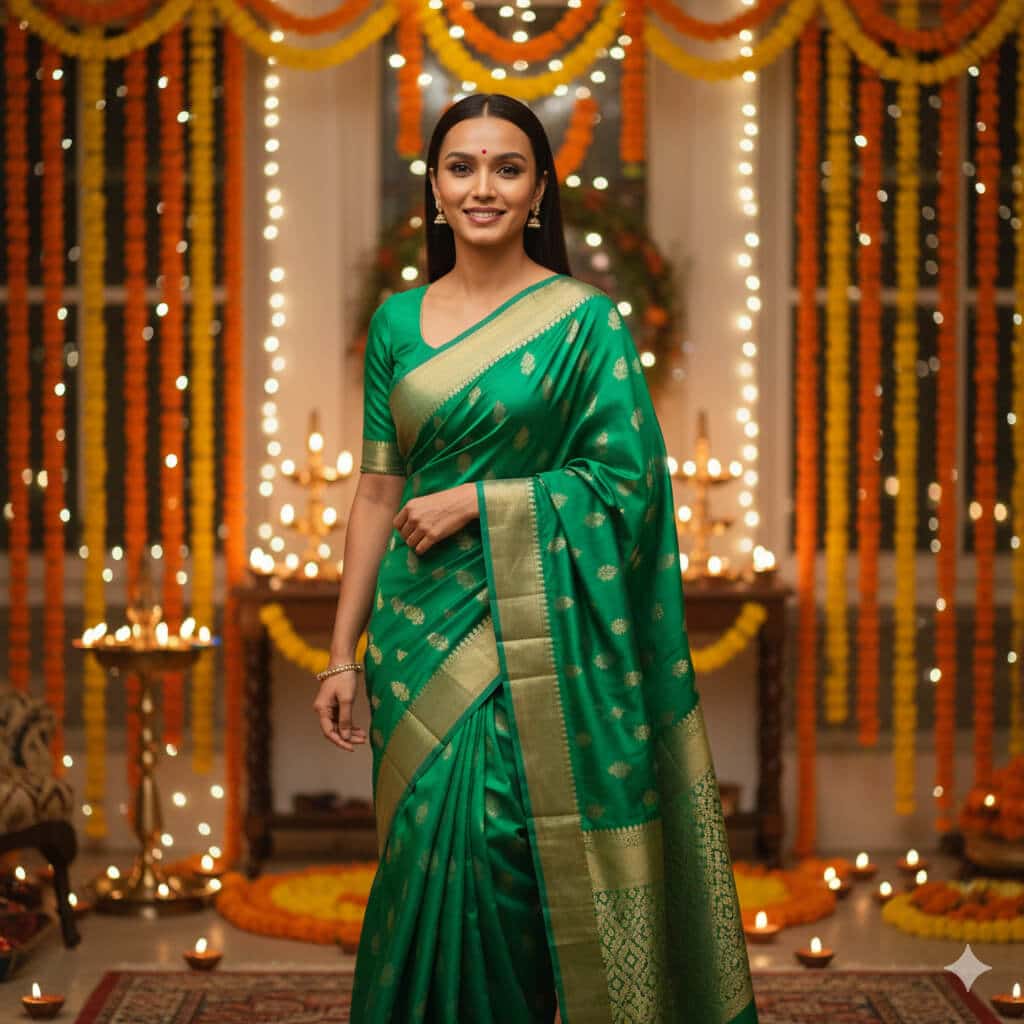
Create a festive celebration portrait of the same woman wearing a saree during a warm Indian festival evening. Outfit: bright festive saree (emerald green / royal blue / magenta) with subtle shimmer, neat pleats and pallu, blouse tailored. Setting: decorated home with diyas, marigold garlands, fairy lights, soft bokeh in the background, warm celebratory atmosphere. Lighting: warm indoor lighting (3000–3500K) with soft glow on face, gentle highlights on jewelry, no harsh shine. Camera: 85mm, f/2.0, close to mid-shot, eyes sharp. Style: vibrant but realistic color, soft film grain, joyful mood. Constraints: preserve face and skin texture, realistic hands, no extra fingers, no text/watermarks/logos. Output: vertical 4:5, 1080×1350.
Nano Banana “XYZ” Prompts: Trendy, Experimental & Just for Fun
28. 3D Action Figure Version of You
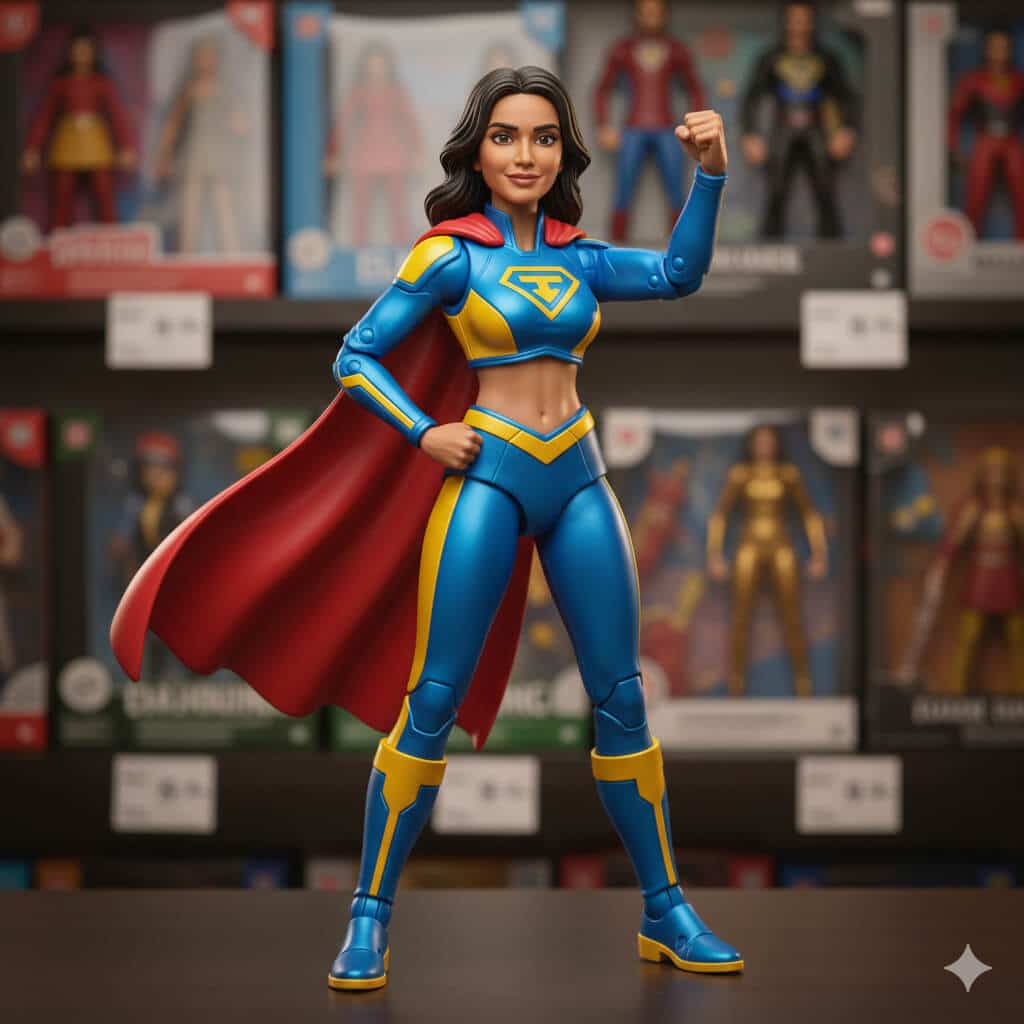
Turn this portrait into a stylized 3D action figure toy of the same person. Style: high-quality collectible toy (glossy plastic), simplified but recognizable facial features, slightly bigger eyes, clean edges, realistic toy proportions. Outfit: casual streetwear or superhero-inspired outfit (original design, no trademarks). Packaging scene: toy shelf background with blurred boxes and price tags, shallow depth of field. Lighting: soft studio light with gentle reflections on plastic. Constraints: keep key facial characteristics recognizable, no text or brand logos, no watermark. Output: square 2000×2000.
29. Retro Mall Studio Photo
Transform this selfie into a classic 1990s mall photo studio portrait. Background: neon gradient backdrop with starburst shapes and soft airbrushed patterns. Outfit: oversized denim jacket or windbreaker, vintage 90s styling. Lighting: cheesy studio flash with soft fill, slightly blown highlights, gentle blur/soft focus like old prints. Color: warm film scan look with mild grain and slight color shift. Constraints: keep identity and facial proportions intact, no text/watermarks. Output: 4:5 vertical, 1080×1350.
30. Anime Poster
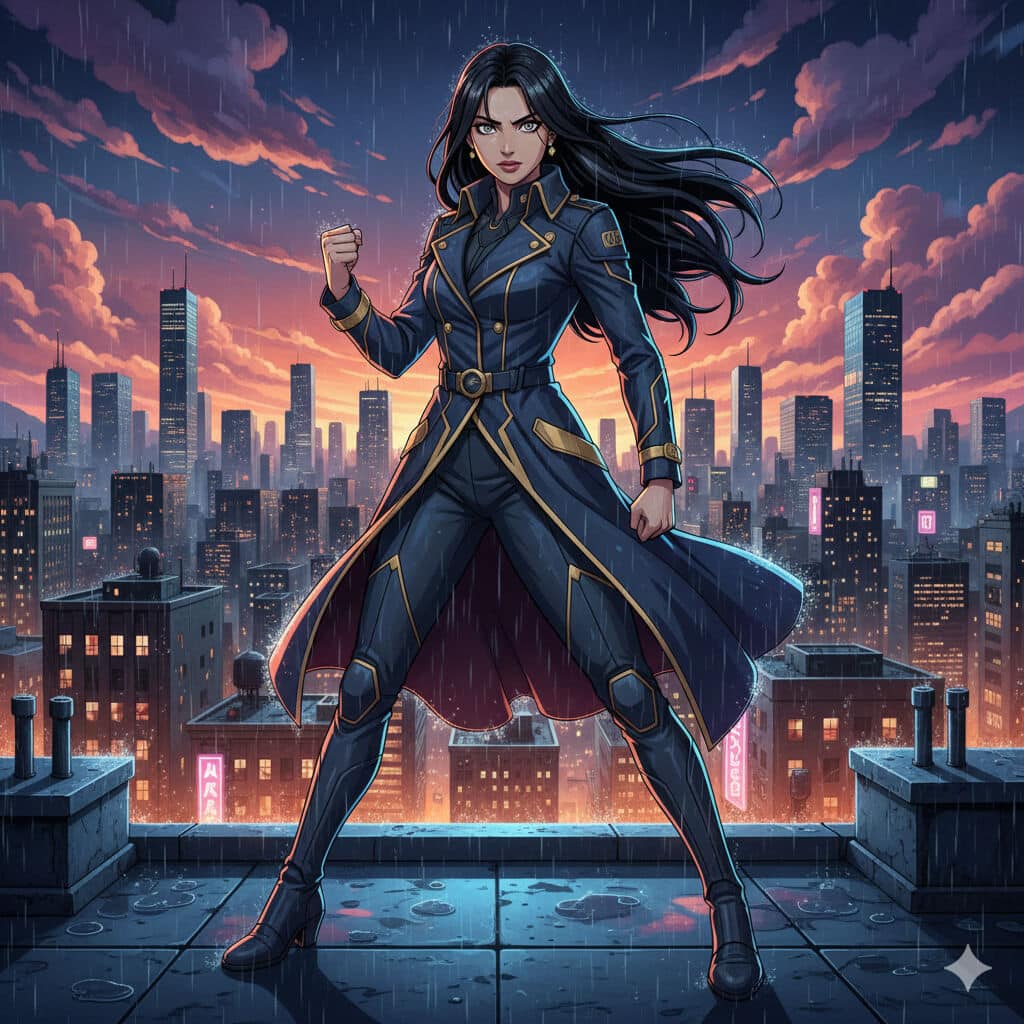
Turn this person into a Japanese anime-style key visual poster character (original design). Background: dramatic city skyline at night with glowing lights, rain reflections, cinematic clouds. Style: clean cel shading, crisp linework, bold color palette, detailed eyes, dynamic pose. Lighting: cool rim light + warm city glow, cinematic contrast. Constraints: preserve recognizable facial features, no text/logos/watermarks. Output: vertical poster 4:5, 1080×1350.
31. VHS Horror Cover
Create a 1980s VHS horror cover-style image starring this person as the main character (no gore). Pose: looking over their shoulder, tense expression. Background: dark forest with faint silhouettes, fog, and a single distant light source. Style: grainy VHS texture, faded colors, slight chromatic aberration, rough paper-print look. Add: subtle scratches and film noise. Constraints: no blood, no gore, no disturbing imagery, no text/watermarks. Output: vertical 2:3 poster, 2000×3000.
32. Chibi Sticker Sheet
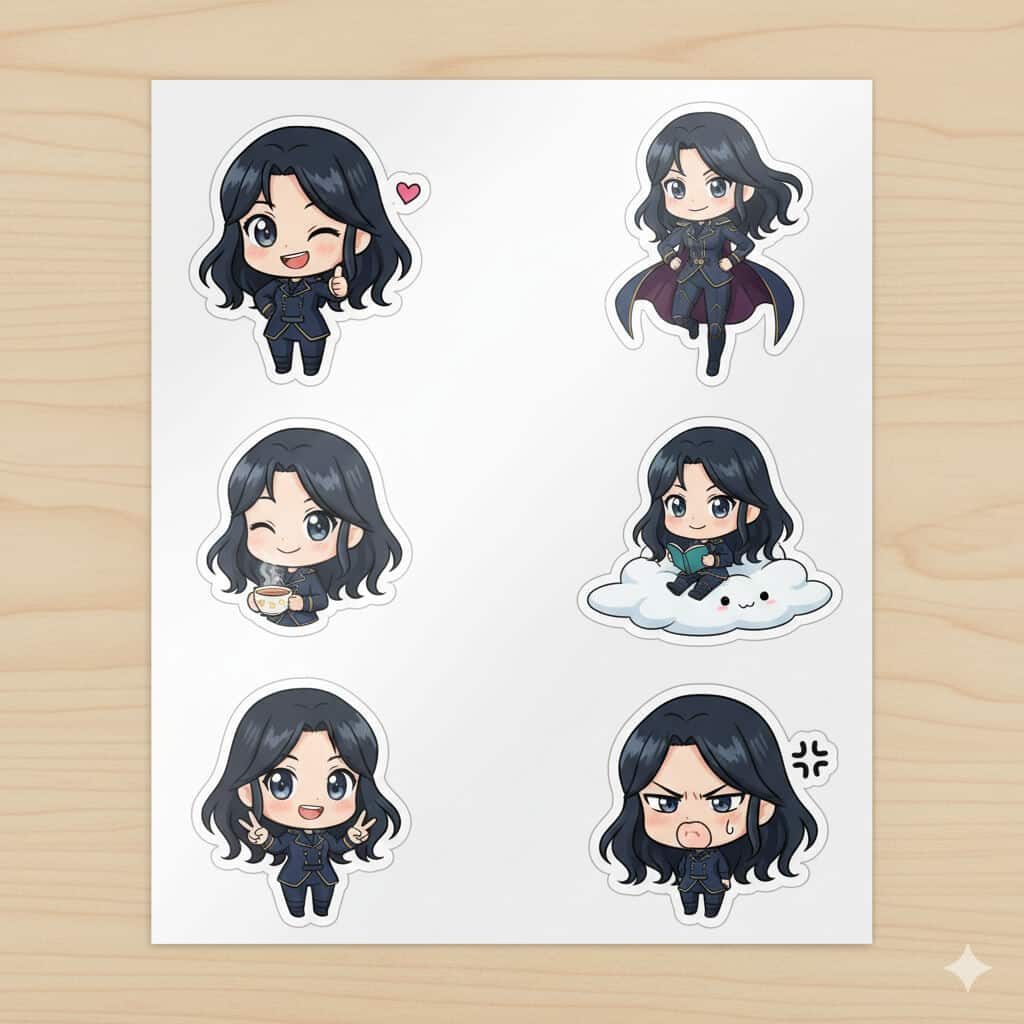
Production-Ready Nano Banana Pro Prompts (For Work & Clients)
1. Product Mockup with Lifestyle Context
Prompt:
Create a flat lay product photo of a minimalist black water bottle on a wooden desk, surrounded by a laptop showing a productivity dashboard, wireless earbuds, a notebook with handwritten notes, and a small succulent plant. Bright natural lighting from the left, Instagram-ready composition, shot from directly above, 1:1 aspect ratio.
2. Eye-Catching Ad Banner
Prompt:
Design a bold advertisement banner for a fitness app launch. Show the text "YOUR BEST SELF STARTS TODAY" in large, confident sans-serif typography against a gradient background shifting from deep purple to electric blue. Add subtle geometric patterns in the background. Size: 1200x628 pixels for Facebook ads.
3. Before and After Comparison
Prompt:
[Upload 2 images: current website homepage and competitor’s homepage]Create a side-by-side comparison image showing these two website designs with labels "Before" and "After" in clean, modern typography. Add subtle arrows highlighting three key improvements. Professional, business-friendly style with a light gray background
For Blogging & Content Creation
4. Blog Header with Text Overlay
Prompt:
Create a blog header image showing a cozy workspace with a laptop, coffee mug, and notebook. Overlay the text "10 Writing Tips That Actually Work" in elegant serif font, positioned in the upper third of the image. Warm, inviting color palette with soft focus background. 1200x630 pixels.
5. Tutorial Step-by-Step Graphic
Prompt:
Design a 4-panel tutorial infographic showing how to set up Google Analytics 4. Each panel should have a number (1-4), a simple icon representing the step, a brief title, and 2-3 bullet points of instructions. Clean, modern design with blue and white color scheme. Vertical layout.
6. Quote Card for Social Sharing
Prompt:
Create an inspirational quote card with the text "The best time to start was yesterday. The next best time is now." Display the quote in elegant script font against a soft watercolor background with pastel pink and mint green tones. Add attribution "Anonymous" in small text at bottom right. Square format, 1080x1080.
7. Data Visualization Infographic
Prompt:
Create an infographic showing "5 Blogging Statistics Every Blogger Should Know in 2025." Include realistic statistics presented as a vertical timeline. Use icons, percentage numbers in large bold fonts, and brief explanations. Color scheme: teal, orange, and white. Professional but approachable style.
For SEO & Tech Content
8. Technical Diagram
Prompt:
Create a simple flowchart diagram showing how a website's SEO process works, from keyword research through content creation to ranking on Google. Use boxes connected by arrows, with clear labels for each step. Include small icons for each stage. Clean, educational style with blue, green, and gray color palette.
9. Website Wireframe Concept
Prompt
Design a modern website homepage wireframe for a SaaS product. Show the hero section with headline placeholder text "Supercharge Your Workflow," navigation menu, call-to-action buttons, feature highlights section with icons, and footer. Use a grid layout with shades of gray and blue accent colors. Annotate key sections.
10. Browser Screenshot Mockup
Prompt:
Create a realistic Chrome browser window screenshot showing a Google Search results page for "best project management tools 2025." Include the search bar, featured snippet, three organic results with titles and meta descriptions, and "People also ask" section. Make it look authentic but generic.
11. Mobile App Interface Design
Prompt:
Design a mobile app login screen for a productivity app. Show a clean interface with app logo at top, email and password input fields, "Login" button in vibrant blue, "Forgot Password?" link, and social login options (Google, Apple). Modern, minimalist design with lots of white space. iPhone dimensions.
What I Got:
The interface was clean and followed iOS design guidelines. The buttons looked clickable, the input fields were properly sized, and the social login icons were recognizable. This would make a great mockup for pitching an app idea.
For Technology & Innovation Content
12. Tech Product Showcase
Prompt:
Create a professional product shot of a futuristic smartwatch with a black metal band, displaying a colorful health metrics dashboard on its screen. Studio lighting with dramatic shadows, placed on a reflective black surface with subtle reflections. Technology magazine quality.
13. Comparison Chart
Prompt:
Design a comparison table showing "ChatGPT vs Claude vs Gemini: Key Features" with three columns. Include rows for: Language Understanding, Image Generation, Code Writing, Price, and Context Window. Use checkmarks and X marks for yes/no features, and brief text for other details. Professional corporate style with brand colors.
14. Concept Illustration
Prompt:
Illustrate the concept of "cloud computing" in a way that's easy to understand. Show stylized clouds connected to various devices (laptop, phone, tablet) with data flowing between them as light streams or particle effects. Modern, slightly futuristic style with blue and purple gradient background. Suitable for a tech blog explainer article.
For Multi-Image Editing & Blending
15. Photo Collage with Brand Elements
Prompt:
[Upload 3 images: your headshot, your logo, and a screenshot of your work]Combine these three images into a cohesive personal branding banner. Place the headshot on the left with subtle circular frame, logo in the center with glow effect, and work screenshot on the right. Connect them with flowing lines or abstract shapes. Modern, professional color grading with blue tones.
16. Style Transfer Magic
Prompt:
[Upload 2 images: a photo of your product and a reference image with desired artistic style]Apply the artistic style and color palette from the reference image to my product photo, while keeping the product clearly recognizable. Blend the aesthetics seamlessly so it looks like the product naturally belongs in that artistic style.
17. Team Photo Enhancement
Prompt:
[Upload 2-3 images: individual photos of team members]Create a professional team composite image placing these three people side by side in a modern office environment. Ensure consistent lighting and color grading across all subjects. Add a subtle branded background with company colors. They should look naturally placed together.
For Creative & Design Projects
18. Vintage Poster Design
Prompt:
Create a retro 1960s travel poster for "Visit Tokyo" featuring Mount Fuji in the background, cherry blossoms in the foreground, and a bullet train crossing through the middle. Use vintage color palette (burnt orange, mustard yellow, teal), halftone dot patterns, and bold geometric shapes. Text should have classic travel poster typography. 24x36 inch poster proportions.
19. Icon Set Creation
Prompt:
Design a set of 6 minimalist line icons representing: Blog, Podcast, Video, Newsletter, Social Media, and Course. Each icon should be simple, recognizable, and work well at small sizes. Consistent stroke width, arranged in a 2x3 grid with labels underneath. Black icons on white background, modern and clean style.
20. Book Cover Concept
Prompt:
Create a book cover design for "The Digital Nomad's Guide to Success" by [Your Name]. Show a laptop on a beach background with palm trees and sunset colors. Title text should be large, bold, and modern in white or yellow. Subtitle and author name in smaller text. Professional self-help book aesthetic, 6x9 inch standard book size.
21. Localized Content Creation
Prompt:
[Upload an image with English text]Translate all the English text in this image into Spanish while keeping the exact same design, layout, colors, and visual elements. Make sure the translated text fits naturally and maintains the same professional appearance.
Nano Banana vs Nano Banana Pro in Gemini (Fast vs Thinking)
If you only remember one thing from this section, make it this:
Your prompt doesn’t magically “work better.” The model you pick changes what your prompt can do.
In Gemini’s image tool, you’ll usually see two lanes:
- Fast → Nano Banana
- Thinking → Nano Banana Pro
They can both generate great images, but they’re good at different jobs.
Nano Banana (Fast)
This is my “sketch mode.”
I use it when I’m exploring ideas, trying 6 variations quickly, or doing lightweight edits. It’s quick, forgiving, and great when I’m not ready to commit to one final look.
Use it for:
- fast iterations (try angles, outfits, backgrounds)
- casual social content
- quick photo mixing / small local edits
- anything where speed matters more than pixel perfection
Nano Banana Pro (Thinking)
This is my “deliverable mode.”
When the image needs to hold up in a deck, on a website, in print, or in front of a client, I switch to Pro. It’s more deliberate and it rewards detail. It also handles text inside images far better when you brief it properly.
Use it for:
- brand visuals and product-style shots
- diagrams, UI-like graphics, infographics
- anything with text that must be readable
- edits where accuracy matters (lighting, proportions, layout)
How to Write Nano Banana Pro Prompts That Actually Work
I learned this the hard way: Pro doesn’t want “cute prompts.”
It wants instructions that sound like a real creative brief.
1) Decide what matters most, then over-specify that
Don’t try to control everything. Control the 2–3 things that make or break the image.
Instead of:
Make it look professional.
Say:
Soft window light from 45 degrees, neutral color grade, no beauty smoothing, sharp focus on eyes.
2) Use a repeatable backbone (this stops random outputs)
Here’s the structure I default to:
Subject → Scene → Lighting → Camera look → Style → Constraints → Output
This is what keeps your results consistent. Especially when you’re generating a series.
3) Constraints are not optional (they’re the safety rails)
If you want a usable image, tell the model what it must not mess with:
- “preserve exact facial features and proportions”
- “maintain natural skin texture (pores visible)”
- “no extra fingers / no warped hands”
- “no logos / no watermarks / no text unless specified”
That one block alone fixes most “why did it ruin the face?” problems.
4) Reference images work best when each one has a role
A quick rule I follow:
- 1–2 images: identity + style direction
- 3–6 images: scene + wardrobe + lighting consistency
- more than that: only if you’re building a set (same person, multiple images, same look)
More images isn’t automatically better. Better images are better.
5) Lock your output, or you’ll regret it later
If you don’t specify format, you’ll get something that’s fine to preview… and annoying to use.
Good endings look like:
- “4:5 vertical, 1080×1350 for Instagram”
- “Square 2000×2000 for profile image”
- “2K output, clean layout, print-safe”
6) Text is Pro’s superpower (but only if you direct it like a designer)
If your image includes text, don’t say “add text.”
Say what a designer would say:
- where it goes (top third, left aligned, etc.)
- font style (bold sans serif headline)
- hierarchy (headline 2× body size)
- rules (no text over faces, readable at 100% zoom)
Common Nano Banana Pro Problems (and the fixes I actually use)
Problem: Skin turns plastic
Fix: natural skin texture, subtle pores visible, no beauty filter, no smoothing.
Problem: Text looks melted or fuzzy
Fix: text must be sharp and readable at 100% zoom, clean edges, proper spacing.
Problem: Lighting feels fake
Fix: one key light source only” (or define exactly two sources with direction and intensity).
Problem: The model gets confused
Fix: remove contradictions.
Instead of “minimal and super detailed,” write:
“minimal composition, one subject, high detail in fabric texture.”
Problem: The person changes across images
Fix: “keep the same face in every image; do not change facial structure, hairstyle, or proportions.”
Problem: You forget the goal
Fix: end every prompt with the use case:
“this is for LinkedIn / print / hero banner, so prioritize X.”
When to Use Fast vs Thinking (simple rule)
Use Fast (Nano Banana) when:
- you’re exploring ideas
- you need speed
- you’re iterating quickly
- perfection doesn’t matter yet
Use Thinking (Nano Banana Pro) when:
- it’s for a client or brand
- text must be correct
- layout/accuracy matters
- you need a consistent series
Why These Prompts Work
After testing these extensively, I’ve noticed a pattern. The prompts that work best are:
- Detailed but not restrictive – Give enough information to guide the AI, but don’t micromanage every pixel.
- Using the right language – Photography and design terms help the AI understand what you want. Terms like “bokeh,” “chiaroscuro,” “flat lay,” or “hero section” work better than vague descriptions.
- Structured progressively – Start with the main subject, then add style details, then specify technical requirements like size or resolution.
The prompts that disappointed me were usually too vague (“make a nice marketing image”) or tried to do too many unrelated things at once.
What Are Common Nano Banana Prompts Mistakes to Avoid?
After experimenting extensively, here are the pitfalls you should avoid:
- Don’t Be Vague: “Make a nice image about marketing” won’t get you far. The more specific you are, the better your results.
- Don’t Forget About Aspect Ratios: Always specify the dimensions or aspect ratio you need. Nothing’s worse than generating a perfect image that doesn’t fit your platform.
- Don’t Expect Perfect Text Every Time: While Nano Banana Pro is amazing with text, complex layouts or unusual fonts can still trip it up. Sometimes you’ll need a second attempt.
- Don’t Skip the Iterations: Your first prompt rarely gives you the perfect result. Refine, adjust, and iterate. The model learns from your feedback.
- Don’t Ignore Reference Images: When you have a specific vision, show don’t just tell. Upload examples of the style, color palette, or composition you want.
What Are The Tips for Getting Professional Nano Banana Results?
Here’s what separates amateur outputs from professional-looking results:
- Use Specific Color Values: Instead of “blue,” try “navy blue #1E3A8A” or “sky blue with slight desaturation.”
- Mention Brand Guidelines: If you’re creating marketing materials, include your brand colors, font preferences, and style guidelines directly in the prompt.
- Request Specific Resolutions: For web use, 2K is usually perfect. Save 4K for print materials or large displays where the extra cost is justified.
- Layer Your Requests: Start with the main subject, then add lighting instructions, then composition details, then text overlays. Structure your prompts like layers.
- Test Different Phrasings: The same idea expressed differently can yield dramatically different results. Experiment with how you describe things.
What’s Actually Worth Using This For?
Let me be honest about where Nano Banana Pro excels and where it struggles:
Absolutely Worth It:
- Blog graphics and social media content
- Marketing materials with text (posters, ads, banners)
- Infographics and educational diagrams
- Product mockups and concept visualizations
- Quick design iterations and A/B test variants
Still Needs Work:
- Photorealistic faces at small sizes
- Extremely complex scenes with many people
- Perfect brand color matching (always verify)
- Intricate hand-drawn details
Your Turn to Create Stunning Images!
I’ve given you 21 prompts to start with, but honestly, this is just scratching the surface. The real magic happens when you start experimenting with your own ideas.
Try these prompts, modify them for your specific needs, and see what works best for your content. Pay attention to which styles resonate with your audience and which prompts save you the most time.
And here’s a pro tip: keep a swipe file of prompts that work well for you. When you generate something amazing, save that prompt. Build your own library of go-to formulas that you can remix and reuse.
The barrier between having an idea and bringing it to life just got dramatically lower. So what are you waiting for? Fire up Gemini, switch to Thinking mode, and start creating.
What will you make first?
Quick Note: Remember that free users get limited generations with Nano Banana Pro before switching to the regular model. If you’re serious about using this tool regularly, the Google AI subscription is worth considering for higher limits and consistent access.