I spent a while paying for TweetHunter. Good tool. I still think it is one of the best things you can buy if growing and monetising a Twitter audience is your entire business.
But it was not my entire business. I was paying $49 a month for a tool that covered one platform when I needed five. I was downloading Canva graphics and re-uploading them manually. I was posting to LinkedIn and Facebook separately. And I was doing zero maintenance on my X account health. My follower ratio was quietly drifting in the wrong direction. I had no idea.
I moved to Circleboom. The price dropped by half. The workflow got faster. My account health became something I actually monitored instead of ignored.
That is the real context for this comparison. Not a feature checklist. An honest look at who each tool is actually built for.
The reason most comparisons get this wrong is the category framing. TweetHunter is a Twitter growth and monetisation tool. Circleboom is a Twitter account management tool AND a multi-platform scheduler. They overlap in the middle, on scheduling and content creation, but that overlap is the smallest part of what either tool actually does.
I’ve used both. Here’s the honest breakdown.
What TweetHunter Actually is
TweetHunter launched as a Twitter growth tool and has stayed laser-focused on that single platform ever since. The whole product is built around one promise: help you create content that performs on X, grow an audience, and turn that audience into customers.
The viral tweet library is the thing TweetHunter does that nothing else comes close to matching. Over three million high-performing tweets, searchable by keyword, handle, or niche topic. When you find a tweet in your space that got strong traction, you study it, rewrite it in your own voice, and schedule your version. If you stare at a blank post composer every morning wondering what to write, this library shortens that process from an hour to ten minutes. No other tool at this price has anything comparable.
The monetisation side is where TweetHunter really separates from everything else. The auto-plug fires a promotional reply on your own tweet the moment it crosses a likes threshold you set. Your tweet takes off, and without you touching anything, your product link is already sitting in the thread for everyone reading it. The auto-DM sends a personal message to every account that likes or retweets a specific tweet. The built-in CRM lets you build lists of leads, watch their activity, and engage with them from inside the dashboard without ever opening X.
For a creator selling a newsletter, a course, or consulting services entirely through Twitter, this stack is hard to replicate at any price.
What TweetHunter does not do is equally important to name. No Instagram. No LinkedIn. No Facebook. No follower audit. No way to see which accounts in your following list have gone dead. No bulk tweet deletion. No shadowban check. No Canva integration. One platform. One job. Done well.
What Circleboom Actually is
Circleboom is two separate products sharing one name, and most people only discover the second one after signing up for the first.
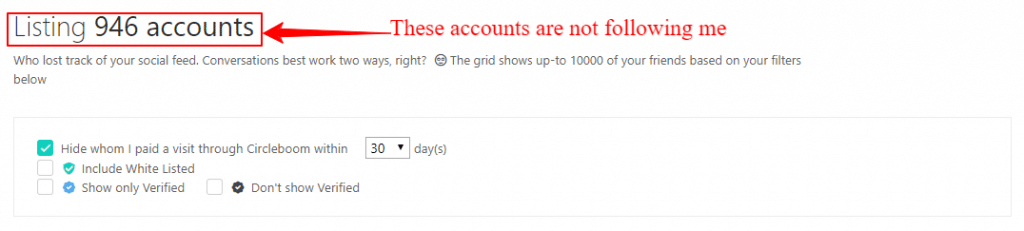
Circleboom Twitter Management is the account health product. Follower audits, fake follower detection, mass unfollow, bulk tweet deletion (including a full archive upload that goes beyond X’s 3,200 tweet limit), shadowban testing, and Twitter analytics. Nothing in TweetHunter touches any of this. It is a different category entirely.
Circleboom Publish is the multi-platform scheduler. X/Twitter, LinkedIn, Instagram, Facebook, Pinterest, Google Business Profile, Threads, YouTube Shorts, Bluesky, and TikTok, all from one post composer. Native Canva integration sits right inside the editor. RSS auto-posting for bloggers. Writing tools for captions and posts across every platform. A content calendar. This is the side that competes with TweetHunter on scheduling and content creation.
Both products are sold separately. You don’t need both. Most people only need one. But the Twitter Management side is why Circleboom users tend to stay long-term in a way TweetHunter users often don’t. Once you can see your account health clearly, you don’t want to go back to not knowing.
One thing worth saying plainly: Circleboom is an Official X Enterprise Partner. Every unfollow, every deletion, every action taken through the tool runs within the rate limits X has officially approved. For anyone who has ever had an account restricted because of a third-party tool running outside official channels, that designation is the specific reason to trust Circleboom over cheaper alternatives that claim to do the same things.
Pricing: Where the Real Difference Shows up
Both tools use flat monthly rates. Neither is hard to price out. But what you get for those rates is very different depending on what you actually need.
TweetHunter Pricing (Monthly Billing)
| Plan | Cost | What you get |
|---|---|---|
| Discover | $29/mo | Viral tweet library, scheduling, auto-DM, auto-plug, auto-retweet, analytics, unlimited Twitter accounts |
| Grow | $49/mo | Everything in Discover, plus writing tools, thread hooks, X CRM |
| Enterprise | $99/mo | Everything in Grow, plus custom writing model training |
The viral tweet library, auto-DM, and auto-plug are on the $29 Discover plan. Writing tools and the CRM only unlock at $49. Most people who use TweetHunter seriously end up on Grow, making the realistic entry price $49 a month.
Circleboom Pricing (Annual Billing)
| Plan | Flat rate | What you get |
|---|---|---|
| Twitter Mgmt Pro | $23.99/mo | Follower audit, fake follower detection, mass unfollow, bulk delete + archive, shadowban test |
| Publish Pro | $24/mo | 5 accounts, 300 queued posts, writing tools, Canva integration |
| Publish Premium | $34/mo | 10 accounts, unlimited posts, RSS auto-posting, all writing tools |
| Publish Business | $79/mo | 30 accounts, unlimited everything |
Side by Side: Who’s Actually Cheaper and When
| What you need | TweetHunter | Circleboom | Verdict |
|---|---|---|---|
| Twitter scheduling only | $29/mo | $24/mo | Circleboom cheaper + more platforms |
| Scheduling + writing tools | $49/mo | $24/mo | Circleboom saves $25/mo |
| Twitter account health tools | Not available | $23.99/mo | Circleboom only |
| Multi-platform (5+ accounts) | Not available | $24/mo | Circleboom only |
| Auto-DM and auto-plug | $29/mo | Not available | TweetHunter only |
| Twitter CRM / lead lists | $49/mo | Not available | TweetHunter only |
| 3M+ viral tweet library | $29/mo | Not available | TweetHunter only |
The pricing story is clear. Circleboom costs less and covers more platforms. TweetHunter costs more and goes deeper on Twitter monetisation specifically. The extra $25 a month is worth it only if you actively use the viral tweet library, auto-DM, and CRM. If those three things are not part of your daily workflow, that’s $300 a year sitting unused.
Feature Comparison: Where Each Tool Wins and Loses
| Feature | TweetHunter | Circleboom |
|---|---|---|
| Twitter/X scheduling | Yes | Yes (Publish) |
| Multi-platform posting | No (Twitter only) | Yes (10+ platforms) |
| Viral tweet library (3M+) | Yes | No |
| Content writing tools | Grow plan only | All plans |
| Thread creation and scheduling | Yes | Yes |
| Auto-DM on engagement | Yes | No |
| Auto-plug on viral tweets | Yes | No |
| Twitter CRM / lead lists | Grow plan only | No |
| Follower audit | No | Yes (Twitter Mgmt) |
| Fake follower detection | No | Yes (Twitter Mgmt) |
| Bulk tweet deletion + archive | No | Yes (Twitter Mgmt) |
| Shadowban test | No | Yes (Twitter Mgmt) |
| Native Canva integration | No | Yes, in-app |
| RSS auto-posting for blogs | No | Yes (Premium) |
| Official X Enterprise Partner | No | Yes |
Twitter Management: Where They Don’t Even Play in the Same League
Every comparison glosses over this by saying “Circleboom is better for Twitter management.” That undersells it by a significant margin.
TweetHunter posts to Twitter and helps you grow there. That is its job. It does it well.
Circleboom has a dedicated Twitter Management product that does things TweetHunter has never attempted. Here is what it actually covers:
- Follower audit: shows every account you follow broken down by category. Inactive (no tweets in 30+ days), overactive (20+ tweets per day), accounts that don’t follow you back, and accounts with suspicious patterns.
- Mass unfollow: remove non-followers, inactive accounts, and suspicious profiles in bulk. All done within X’s official API rate limits. Because Circleboom is an Official X Enterprise Partner, none of this creates account risk.
- Bulk tweet deletion: delete tweets, retweets, likes, and bookmarks in bulk. The archive upload feature bypasses the 3,200 tweet standard limit, so you can go back years.
- Fake follower detection: scans your following list for accounts showing suspicious patterns and surfaces them for review.
- Shadowban test: checks whether your account has visibility restrictions across different regions. Most people find out they were shadowbanned only after running this test for the first time.
- Twitter account analytics: follower growth tracking, audience breakdown, account quality score.
If you have been on Twitter for more than a year without auditing your account, the follower audit alone is worth the $23.99/month for at least one month. Most people are surprised by what they find.
Scheduling and Content Creation: Where TweetHunter Holds its Own
On pure Twitter scheduling and content creation, TweetHunter is excellent. Let me be specific about where it genuinely wins.
Where TweetHunter is Genuinely Better
The viral tweet library. Three million plus high-performing tweets you can search, study, and rewrite in your own voice. No other tool at this price has anything like it. For a creator building their Twitter presence who needs daily content inspiration, this library alone justifies the Discover plan price. Circleboom has writing tools. They are not the same thing.
Auto-DM and auto-plug for monetisation. Auto-plug fires a promotional reply on your tweet the moment it hits a likes threshold you set. Auto-DM sends a personal message to everyone who engages with a specific post. These two features convert Twitter engagement directly into leads and sales, hands-free. Circleboom has nothing equivalent. If this is how you earn from your audience, TweetHunter is the right tool and no amount of other advantages in Circleboom changes that for you.
Twitter CRM for relationship-driven outreach. The Grow plan CRM lets you build curated lists of specific people, watch their recent tweets, and engage with them from the dashboard. For consultants and creators who manage real business relationships on X, this is a genuine time-saver. Circleboom has no CRM. That gap matters if outreach is part of how you work.
Where Circleboom is Genuinely Better
Native Canva integration. When writing a post inside Circleboom Publish, there is a Canva button sitting right in the composer. Click it, pull from your existing library or design something new, and it drops straight into the post. No downloading. No uploading. No tab switching. The whole round trip is thirty seconds. TweetHunter has no Canva integration at all. You design in Canva, download the file, go back to TweetHunter, and upload it. It works, but once you have used the integrated version for a week, the old process feels like an extra job.
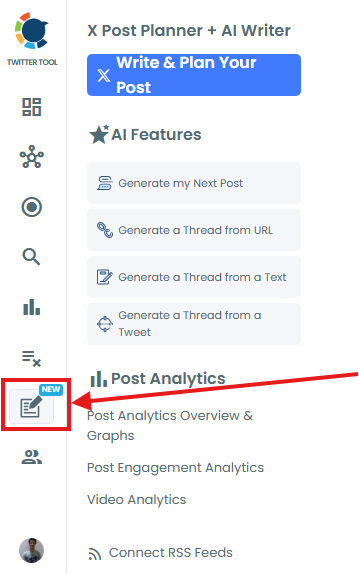
Multi-platform posting from one composer. Circleboom Publish covers X/Twitter, LinkedIn, Instagram, Facebook, Pinterest, Google Business Profile, Threads, YouTube Shorts, Bluesky, and TikTok. Write once, post everywhere. If you run a content site alongside your X presence, this saves a meaningful amount of time every single week. TweetHunter is Twitter only, by design.
RSS auto-posting for bloggers. Circleboom Publish Premium connects to your blog’s RSS feed and pushes each new post automatically across all your connected social accounts the moment it goes live. LinkedIn, Facebook, X/Twitter, Pinterest, Threads, all updated without you touching anything. TweetHunter has no RSS auto-posting capability.
Price at equivalent features. To access TweetHunter’s writing tools and CRM, you are on the $49 Grow plan. Circleboom Publish Pro with writing tools, Canva integration, and multi-platform scheduling is $24/month. Whether the viral tweet library, auto-DM, auto-plug, and CRM are worth the extra $25 each month is the only real question in this comparison.
When to Switch from TweetHunter to Circleboom
A lot of people searching this comparison are current TweetHunter users. If any of these situations sound familiar, it is probably time to make the move.
Try Circleboom Free for 14 Days
No credit card. Cancel anytime before day 14.
My Honest Recommendation by User Type
Neither tool is right for everyone and I’m not going to pretend otherwise.
One more thing worth saying
These tools are not really competing for the same person. TweetHunter is built for the Twitter-first creator. Circleboom is built for the content creator or blogger who runs Twitter alongside everything else and wants the whole thing managed in one place. Most people searching this comparison are in the second camp. The answer was probably clear before you got here. You just needed the pricing confirmed.
Try Circleboom free for 14 days
Full access to the Publish platform. No credit card. Cancel before day 14 and pay nothing.
Start Free Trial14 days. No card. Cancel anytime.
Frequently Asked Questions
Is Circleboom or TweetHunter cheaper?
Which is better for Twitter management, Circleboom or TweetHunter?
Does TweetHunter work with platforms other than Twitter?
Can Circleboom replace TweetHunter’s viral tweet library?
Is Circleboom safe to connect to your Twitter account?
Does TweetHunter have Twitter account cleanup tools?
Is Circleboom better than TweetHunter for bloggers?
Can I use both Circleboom and TweetHunter at the same time?
Related reading:
- Circleboom Review 2026: Is It Worth Your Time?
- Circleboom Pricing 2026: Which Plan Do You Actually Need?
- Circleboom vs Buffer 2026: Which One Should You Buy?
- TweetHunter Review: Automated Growth App For Twitter
- How to Prevent Twitter Account Suspension (I Learned This the Hard Way)
- The 3 Safe Twitter Unfollow Tools That Won’t Get You Banned