I’ll give you the short answer first, then prove it.
Buffer wins if you want something free, simple, and you manage three or fewer social accounts. Circleboom wins the moment you hit five accounts, care about your Twitter health, or use Canva regularly for content. For bloggers running an X account alongside a content site, it’s not really a contest.
The reason most comparison posts get this wrong is the pricing math. Every article says “Buffer is cheaper” and stops there. The truth is more specific: Buffer is cheaper at one to three channels because of the free plan. At five accounts, Circleboom Pro at $24/month matches Buffer Essentials at $25/month and gives you far more. At ten accounts, Circleboom Premium at $34/month beats Buffer Essentials at $50/month by $16 every single month.
I’ve used both. Here’s the honest breakdown.
What Buffer actually is
Buffer launched in 2010 as a simple tweet scheduler. It has grown into a multi-platform social media tool covering Facebook, Instagram, X/Twitter, LinkedIn, Pinterest, TikTok, YouTube, Threads, Bluesky, and Mastodon. The product is known for one thing above everything else: it’s easy to use. The queue-based scheduling is straightforward, the interface is clean, and most people figure it out in under an hour.
Buffer’s free plan covers up to three social channels with up to ten posts queued per channel. After that, you’re on a paid plan charged per channel. This per-channel pricing model is what most comparison posts misrepresent, so we’ll go through the actual numbers in a moment.
What Buffer does not do: follower audits, bot detection, mass unfollow, bulk tweet deletion, or any form of Twitter account management beyond scheduling. No Canva integration either. If you need those things, Buffer is the wrong tool and no amount of loyalty to it will change that.
What Circleboom actually is
Circleboom is two separate products that share a name. This matters because most people discover Circleboom as a Twitter management tool and are surprised to find a full multi-platform scheduler living alongside it.
Circleboom Twitter Management is a dedicated X/Twitter account tool covering follower audits, fake follower and bot detection, mass unfollow, bulk tweet deletion (including a full archive upload that bypasses the 3,200 tweet API limit), shadowban testing, and Twitter account analytics. Nothing in Buffer’s product line competes with this. It’s a different category entirely.
Circleboom Publish is the multi-platform scheduler covering X/Twitter, LinkedIn, Instagram, Facebook, Pinterest, Google Business Profile, Threads, YouTube Shorts, Bluesky, and TikTok. It includes native Canva integration inside the post composer, an AI post generator running on OpenAI, RSS auto-posting for bloggers, and a content calendar. This is the side of Circleboom that competes with Buffer directly.
Both products are sold separately. You do not need both. Most people only need one.
Pricing: the real numbers most comparisons get wrong
Buffer’s pricing is per social channel. Circleboom’s pricing is a flat rate per plan tier. These are fundamentally different models, and the “who’s cheaper” answer changes completely depending on how many accounts you manage.
Buffer pricing (annual billing)
| Plan | Cost | What you get |
|---|---|---|
| Free | $0 | 3 channels max, 10 posts queued per channel, 1 user |
| Essentials | $5 per channel/mo | Unlimited channels, 1 user, analytics, AI assistant |
| Team | $10 per channel/mo | Unlimited channels, unlimited users, draft collaboration |
Circleboom Publish pricing (annual billing)
| Plan | Flat rate | What you get |
|---|---|---|
| Pro | $24/mo | 5 accounts, 300 queued posts, AI generator, Canva |
| Premium | $34/mo | 10 accounts, unlimited posts, RSS auto-posting, all AI tools |
| Business | $79/mo | 30 accounts, unlimited everything |
The crossover: who’s actually cheaper at each account count
This is the table no one else has run correctly. Buffer’s per-channel model changes the math at every step.
| Accounts you manage | Buffer cost/mo | Circleboom cost/mo | Verdict |
|---|---|---|---|
| 1 to 3 accounts | $0 (free plan) | $24 (Pro) | Buffer wins (free) |
| 4 accounts | $20 (Essentials) | $24 (Pro) | Buffer slightly cheaper, fewer features |
| 5 accounts | $25 (Essentials) | $24 (Pro) | Circleboom wins + more features |
| 10 accounts | $50 (Essentials) | $34 (Premium) | Circleboom saves $16/mo |
| 10 accounts (multi-user team) | $100 (Team plan) | $34 (Premium) | Circleboom saves $66/mo |
The “Buffer is cheaper” argument is only true when you stay on the free plan. The moment you need paid features, the comparison shifts. At five accounts they’re essentially the same price, and Circleboom has Canva integration, stronger AI, and Twitter management that Buffer doesn’t touch. At ten accounts you’re spending $50/month on Buffer Essentials while Circleboom Premium costs $34.
Feature comparison: where each tool wins and loses
| Feature | Buffer | Circleboom |
|---|---|---|
| Free plan | Yes (3 channels) | 14-day trial only |
| TikTok posting | Yes | No |
| Browser extension | Yes | No |
| Drag and drop calendar | Yes | Clunky |
| Ease of use | Very easy | Moderate learning curve |
| Mastodon support | Yes | No |
| Native Canva integration | No | Yes, in-app |
| AI content generator | Basic assistant | OpenAI powered |
| RSS auto-posting | Yes | Yes (Premium+) |
| Twitter follower audit | No | Yes (Twitter tool) |
| Fake follower and bot detection | No | Yes (Twitter tool) |
| Bulk tweet deletion | No | Yes, incl. archive |
| Twitter shadowban test | No | Yes (Twitter tool) |
Twitter management: where they don’t even play in the same league
This is the part every comparison glosses over by saying “Circleboom is better for Twitter.” That undersells it by a significant margin.
Buffer posts to Twitter. That’s it. You write something, pick a time, Buffer posts it. There’s thread support and basic analytics. Good. Clean. Done.
Circleboom has a dedicated Twitter Management product that does things Buffer has never attempted. Here’s what it covers:
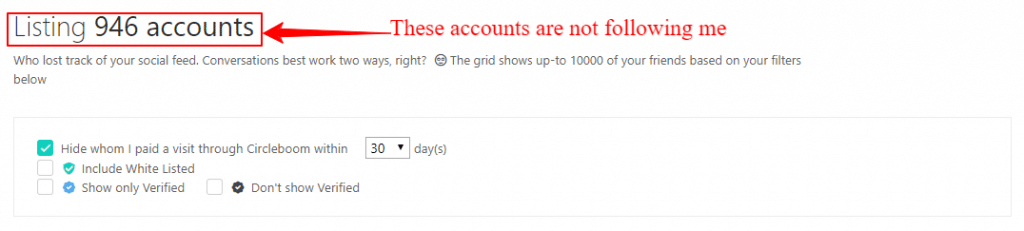
- Follower audit: shows you every account you follow categorised by type. Inactive (no tweets in 30 days), overactive (20+ tweets per day), fake and spam profiles, accounts that don’t follow you back, bot-like accounts.
- Mass unfollow: remove non-followers, inactive accounts, or bots in bulk without clicking account by account. All done within X’s official API rate limits because Circleboom is an Official X Enterprise Partner.
- Bulk tweet deletion: delete tweets, retweets, likes, and bookmarks in bulk. The archive upload feature bypasses the standard 3,200 tweet API limit, so you can go back years.
- Twitter bot checker: scans your followers for bot-like patterns and surfaces them for review.
- Shadowban test: checks whether your account has visibility restrictions across different countries.
- Twitter account analytics: follower growth tracking, audience characteristics breakdown, language stats, interest cloud, account quality score.
If you have ever had an account suspended, or you are actively building an X presence and want to keep your follower ratio healthy, this is not a nice-to-have. It is the only tool at this price doing all of this inside one dashboard.
Scheduling and content creation: where Buffer holds its own
On pure scheduling, Buffer is excellent and Circleboom is good. Let me be specific about both.
Where Buffer is genuinely better
TikTok posting. Buffer supports native TikTok publishing. Circleboom does not. If TikTok is a significant part of your content strategy, this is a real gap and no workaround inside Circleboom fills it.
Drag and drop calendar. You can reschedule posts by dragging them to a new time slot on Buffer’s calendar. Circleboom’s calendar exists but to change a post’s time you have to open the post itself. That friction adds up over a week of active scheduling.
Browser extension. Buffer’s Chrome extension lets you schedule content directly from any webpage without opening the app. Circleboom has no equivalent. If you share a lot of curated content from around the web, this matters.
Simpler onboarding. Buffer takes about twenty minutes to learn. Circleboom takes a few hours, partly because it’s two separate products that share a login. For someone who just wants to post content and doesn’t care about deep Twitter features, Buffer’s simplicity is a genuine advantage.
More social platforms. Buffer supports Mastodon. Circleboom doesn’t. If Mastodon is on your list, Buffer is the only option here.
Where Circleboom is genuinely better
Native Canva integration. This is the most consistently praised feature in Circleboom’s G2 and AppSumo reviews. When you’re composing a post in Circleboom Publish, you click the Canva button, pick from your existing library or design something new, and it drops straight into the post. No downloading, no uploading, no file management. Buffer has no Canva integration at all. For anyone who creates visual content in Canva regularly, this changes the workflow significantly.

Stronger AI. Circleboom’s AI writer uses OpenAI and covers captions, full post drafts, tweet threads, hashtag suggestions, and platform-specific content for every network it supports. Buffer has a basic AI assistant that generates post suggestions. The difference in output quality is noticeable.
RSS auto-posting. Both tools support RSS feeds, but Circleboom’s implementation (on Premium) distributes to more platforms and works alongside the Canva workflow seamlessly. For bloggers who publish regularly and want their posts auto-shared, this is a meaningful advantage.
Flat-rate pricing at scale. As the crossover table showed, Circleboom becomes cheaper than Buffer at five or more accounts and the gap grows at ten. For anyone managing multiple client accounts or their own accounts across multiple businesses, the flat rate is better economics.
When to switch from Buffer to Circleboom
A lot of people searching for this comparison are current Buffer users. If any of these moments sound familiar, it’s probably time to make the move.
Try Circleboom Free for 14 Days
No credit card. Cancel anytime before day 14.
My honest recommendation by user type
I’m going to be direct here. Neither tool is right for everyone and I’m not going to pretend otherwise.
One more thing worth saying
These tools are not really in the same category. Buffer is a social media scheduler. Circleboom is a social media scheduler AND a dedicated Twitter account management tool. If you only need scheduling, compare them head to head. If you need Twitter management, the comparison is over before it starts.
Try Circleboom free for 14 days
Full access to the Publish platform. No credit card. Cancel before day 14 and pay nothing.
Start Free Trial14 days. No card. Cancel anytime.
Circleboom vs Buffer: frequently asked questions
Is Buffer or Circleboom cheaper?
Which is better for Twitter management, Buffer or Circleboom?
Does Buffer have Twitter cleanup tools?
Can Circleboom post to TikTok?
Does Circleboom have a free plan like Buffer?
Which has better AI content generation?
Is Circleboom better than Buffer for bloggers?
Can I use Buffer and Circleboom at the same time?
Related reading: