Searching for Circleboom pricing is more confusing than it should be. Unlike most social media management tools that show one pricing table, Circleboom sells two completely separate products, and the cost structure for each looks nothing like the other. Most people land on the wrong page, subscribe to the wrong plan, and only figure out the problem when a second charge hits their card.
I’ve been paying for both Circleboom plans since the tool launched. This post covers exactly how much Circleboom costs in 2026, what each plan actually includes, which combination makes sense for your situation, and whether there is any way to reduce the subscription cost. No padding. Just the numbers and the honest take.
Most bloggers and solo creators only need one of these. The decision framework later in this post will tell you exactly which one, and whether you should bother with both.
Why Circleboom Has Two Separate Pricing Structures
Circleboom started as a Twitter follower management tool. It was built to audit your X account, unfollow non-followers, detect fake accounts, and bulk delete tweets. When they later built a multi-platform social media scheduler, they launched it as an entirely separate product rather than merging it. Two products, two dashboards, two subscriptions.
This split is the most complained-about thing in Circleboom’s Trustpilot and AppSumo reviews. The complaint is almost always the same: “I didn’t realise I was paying for two products.” Circleboom does disclose it on the pricing page, but only if you know to look. Most people don’t.
So before looking at numbers: figure out which product you actually need. Here’s what each one covers.
Circleboom Twitter Management Pricing
The Twitter Management tool covers follower audits, fake follower removal, bulk tweet deletion, and X account analytics. It has five tiers. The pricing scales with your account size and the number of accounts you manage.
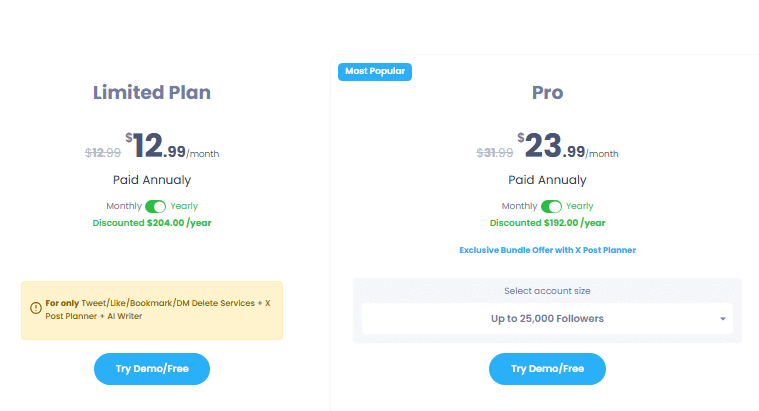
| Plan | Monthly billing | Annual billing | Account size |
|---|---|---|---|
| Free | $0 | $0 | Basic overview only |
| Limited | ~$21/mo | $12.99/mo | Tweet/like deletion only |
| Pro Sweet spot | ~$35/mo | $23.99/mo | Up to 25,000 followers |
| Plus | ~$55/mo | ~$35/mo | 2 accounts, up to 100k followers |
| Premium | ~$85/mo | ~$55/mo | 2 accounts, up to 1M followers |
Prices shown are approximate. Verify exact current rates at circleboom.com/twitter-management-tool/plans-and-pricing. Annual billing saves up to 50% vs monthly.
What the Limited Plan Actually Gives You
The Limited plan at $12.99/month (annual) covers bulk tweet deletion, retweet removal, like cleanup, bookmark deletion, and DM removal. It includes the X Post Planner and AI Writer. What it does not include is follower analytics, the fake follower checker, the non-follower filter, unfollower tracking, or smart search. If your only goal is cleaning your tweet history, Limited is enough and you should not pay for Pro.
Why the Pro plan is The Right Call for Most People
At $23.99/month on annual billing, Pro unlocks the full Twitter account management toolkit: follower audit, “not following me back” filter, Twitter bot checker, unfollower tracker, live smart search, shadowban test, and complete account analytics. It handles accounts up to 25,000 followers, which covers the overwhelming majority of bloggers and individual creators. This is the plan that makes Circleboom genuinely worth paying for.
Circleboom Publish Pricing
Circleboom Publish is the social media scheduling and content management platform. It is a separate product from the Twitter Management tool with its own pricing tiers. Platforms supported include X/Twitter, LinkedIn, Instagram, Facebook, Pinterest, Google Business Profile, Threads, YouTube Shorts, Bluesky, and TikTok.
Verify current rates at circleboom.com/social-media-scheduler/plans-and-pricing. Prices reflect annual billing.
The 300-post Queue Cap on Pro: Why it Matters
The Publish Pro plan limits your scheduled post queue to 300 posts at a time. The cap resets as posts publish, so it’s not a monthly limit. It’s a ceiling on how much you can have queued up simultaneously. For a single account posting once a day that’s months of runway. For someone managing four or five platforms who batches content in advance, 300 fills up surprisingly fast. The fix is Premium at $34/month, which removes the cap entirely.
RSS Auto-posting is only on Premium (important for bloggers)
If you run a blog and want your new posts automatically shared to LinkedIn, Facebook, X/Twitter, Pinterest, and Threads the moment they go live, you need Premium. RSS auto-posting is not included in the Pro plan. It’s a single feature, but for a content publisher it’s genuinely the most time-saving thing in the entire product. It’s the main reason I’m on Premium rather than Pro.
What’s Included in Circleboom Publish Plan?
The pricing cards above show the headline numbers. Here is the full feature breakdown across all four Publish plans so you can see exactly what you lose by going with the cheaper option.
| Feature | Pro $24/mo |
Premium $34/mo |
Business $79/mo |
Enterprise $209/mo |
|---|---|---|---|---|
| Social accounts | 5 | 10 | 30 | 50+ |
| Scheduled post queue | 300 posts | Unlimited | Unlimited | Unlimited |
| RSS auto-posting | No | Yes | Yes | Yes |
| Canva integration | Yes | Yes | Yes | Yes |
| AI post generator | Basic | All generators | All generators | All generators |
| AI thread generator | Limited | Full access | Full access | Full access |
| LinkedIn carousel maker | No | Yes | Yes | Yes |
| Content calendar | Yes | Yes | Yes | Yes |
| Analytics and reporting | Basic | Full | Full | Full |
| Customer support | Priority email | Priority + chat | Dedicated |
The upgrade from Pro to Premium costs $10/month and unlocks: unlimited post queue, RSS auto-posting, full AI generator suite including the LinkedIn carousel maker, and full analytics. For most active bloggers and content creators, that $10 difference pays for itself immediately.
Annual vs Monthly: What You Actually Save
Circleboom’s annual plans cut the monthly rate by roughly 40-50%. Here’s the savings on the plans most people use.
Annual vs monthly billing: savings per year
If you plan to use Circleboom for more than 8 months, annual billing pays for itself. Use the 14-day Publish free trial first to confirm the product fits your workflow before committing to annual.
When Monthly Billing Actually Makes Sense
Monthly billing costs more but gives you flexibility. It makes sense if you are testing whether Circleboom fits your workflow after the trial period, if you only need the tool for a specific season or campaign, or if you want to cancel cleanly without worrying about annual refund policy. Once you are confident you will use it long-term, switch to annual and recoup the savings immediately.
Is there a Circleboom Coupon or Discount Code?
This is one of the most searched questions about Circleboom pricing, and the honest answer is: there is no permanent public coupon code that consistently works.
The biggest legitimate discount Circleboom offers is annual billing. Switching from monthly to annual saves between $130 and $190 per year depending on which plan you’re on. That is a real, guaranteed discount that requires no code and no luck.
Beyond that, Circleboom has run time-limited promotional offers through its affiliate partners. These are not available year-round, but they do appear occasionally around product launches and end-of-year periods. Checking through affiliate sites like CuriousBlogger is the most reliable way to find them when they’re active.
The 14-day free trial on Circleboom Publish is also effectively a discount. Two full weeks of access at no cost before any charge. If you only need the tool for a short-term project, the trial alone may cover what you need.
Circleboom nonprofit pricing
Circleboom has a dedicated nonprofit program offering discounted access to qualifying organisations. If you run a registered nonprofit, check circleboom.com/nonprofits for current eligibility and application details. This is one of the less-known discounts that many nonprofit social media managers miss entirely.
Circleboom Pricing for Agencies and Teams
The Business plan at $79/month (annual) is Circleboom’s primary offering for agencies: 30 social accounts, unlimited posting, all features unlocked. For a small agency managing five to ten clients across two or three platforms each, this is a reasonable cost compared to Hootsuite’s equivalent ($249/month) or Sprout Social ($299/month).
A few things worth knowing before committing as an agency:
- No white-label reporting. Circleboom does not offer branded client reports. If your clients expect a dashboard with your agency’s name on it, Circleboom is not built for that. Tools like AgencyAnalytics are purpose-built for this use case.
- No client sub-accounts. There is no client-facing login or permission system. All account management sits in your single Circleboom dashboard. For small agencies this is manageable; for larger teams it becomes friction.
- Twitter Management is separate. If your clients need follower audits, bot detection, or tweet deletion, that requires a separate Twitter Management subscription on top of the Publish Business plan.
For agencies primarily focused on scheduling content across multiple client social accounts, and less concerned with white-label reporting or client portal access, Circleboom Business is genuinely competitive on price. For agencies where client-facing dashboards are a hard requirement, look elsewhere.
Which Circleboom Plan Should You Actually Get?
Here’s the framework I’d use based on your situation. Pick the one that matches you.
Circleboom Publish. No credit card. Cancel before day 14 and pay nothing.
How Circleboom Pricing Compares to the Alternatives
The right comparison depends entirely on which Circleboom product you’re evaluating. Here’s the honest breakdown across the tools you’re most likely also considering.
| Tool | Circleboom | Buffer | Hootsuite | TweetHunter | Later |
|---|---|---|---|---|---|
| Starting price | $12.99/mo | $6/mo (or free) | $99/mo | $49/mo | $25/mo |
| Free plan | Limited tier only | Yes (3 channels) | No | No | Very limited |
| Free trial | 14 days (Publish) | Free plan only | No | No | 14 days |
| Twitter cleanup tools | Best in class | None | Basic | Moderate | None |
| Canva integration | Native in-app | No | Via add-on | No | No |
| RSS auto-posting | Yes (Premium+) | Yes | Yes | No | No |
| Social listening | No | No | Yes | No | No |
| TikTok posting | No | Yes | Yes | No | Yes |
Buffer wins on price if you only need basic scheduling and have no Twitter management needs. Hootsuite wins if social listening and enterprise reporting are priorities, but at $99/month you’re paying nearly 3x more for features most solo creators never use. TweetHunter is stronger on Twitter growth analytics but covers Twitter only and costs $49/month for that single-platform focus. For the combination of Twitter account management depth and multi-platform scheduling, Circleboom has no real competitor at this price point.
Read the full Circleboom review for the detailed feature-by-feature comparison.
Is Circleboom Worth the Price?
For the Twitter Management tool: yes, if you take your X account health seriously. The follower audit, bot detection, fake follower removal, and mass unfollow features genuinely don’t exist anywhere else at $23.99/month with an Official X Enterprise Partner certification. That certification matters. Tools doing the same things outside official partnerships put your account at suspension risk.
For Circleboom Publish: yes, at Premium for bloggers managing three or more platforms. The Canva integration, RSS auto-posting, and AI content generation replace what would otherwise require separate tools at a higher combined cost. For basic scheduling on one or two platforms, Buffer’s free plan or $6/month option is probably sufficient.
Where it gets expensive is both together. At $57.99/month combined, that’s $696/year for a solo blogger. Here’s the real value question: what does it replace? A Twitter cleanup tool (~$20/month elsewhere), a social media scheduler (~$30-50/month elsewhere), and hours of manual work every week. Most people who run the full comparison find Circleboom’s combination works out cheaper, not more expensive.
Start with the free trial. Use it properly: set up your RSS feed, schedule a week of content, test the Canva workflow. If it saves you two hours a week, it’s already paid for itself.
Try Circleboom Publish Free for 14 Days
No credit card. Cancel anytime before day 14.
Circleboom Pricing: Frequently Asked Questions
Does Circleboom offer a free plan?
How much does Circleboom cost per year?
Is there a Circleboom coupon or discount code?
Can I upgrade or downgrade my Circleboom plan?
Does Circleboom offer a money-back guarantee?
Is Circleboom pricing per user or per social account?
What happens to my scheduled posts if I cancel Circleboom?
How much does Circleboom cost per month if I cancel annual billing early?
Is Circleboom cheaper than Hootsuite?
Do I need to pay for both Circleboom Twitter and Circleboom Publish?
Start with the free trial. Decide after 14 days.
Full access to Circleboom Publish. No credit card required. No commitment.
Start Free Trial14 days. No card required. Cancel anytime before day 14.
Related reading: